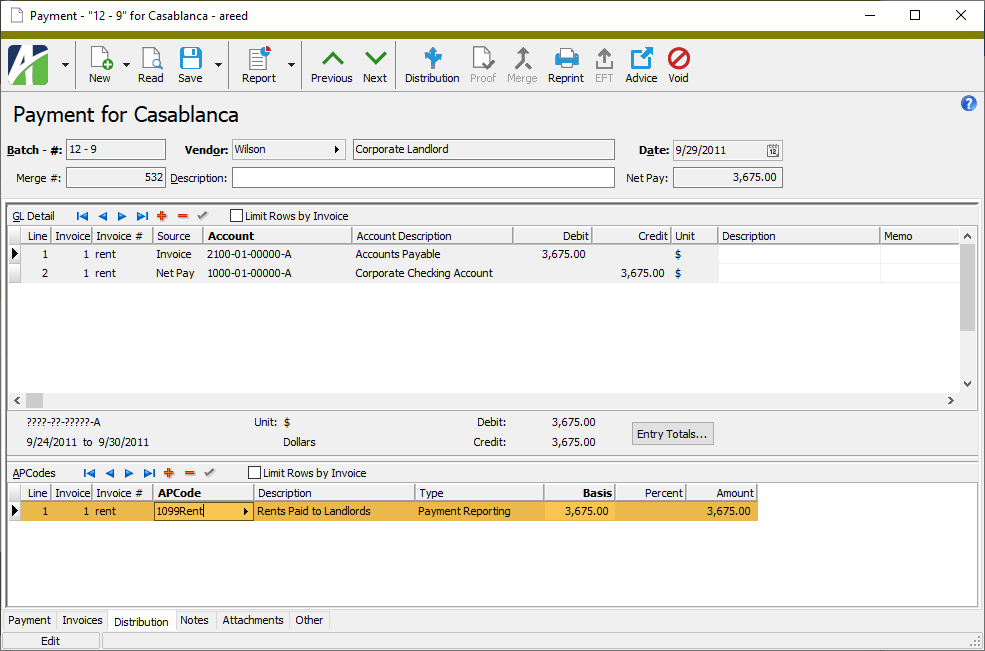
The Payment APCodes folder contains the payment APCode detail lines for payments which reference an APCode.
When you double-click a detail line in the HD view, the Payment window opens with the Distribution tab selected and with focus in the APCode detail line you clicked.
This view can be particularly helpful in researching and preparing 1099s.
Payment APCodes Listing
Payment APCodes Listing
Purpose
The Payment APCodes Listing shows APCode detail for selected payment APCodes.
Content
When printed to include details, for each payment APCode detail line, the report shows:
APCode
vendor
payment date
batch-entry-line number
invoice number
basis amount
percent (if applicable)
APCode amount.
The following totals appear on the report:
grand totals.
Print the report
In the Navigation pane, highlight the Accounts Payable > Payments > Payment APCodes folder.
Start the report set-up wizard.
To report on all or a filtered subset of payment APCodes:
Right-click the Payment APCodes folder and select Select and Report > Payment APCodes Listing from the shortcut menu.
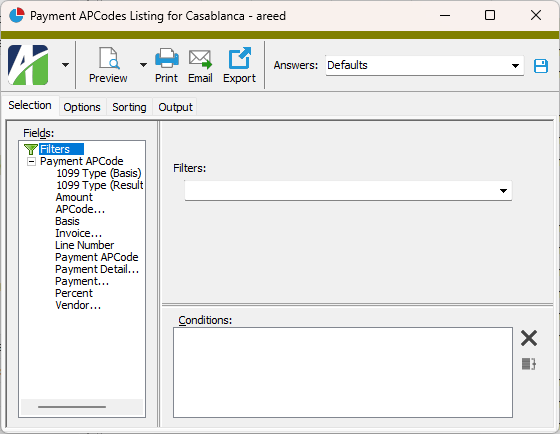
On the Selection tab, define any filters to apply to the data.
To report on specifically selected payment APCodes:
In the HD view, select the payment APCodes to include on the report. You can use Ctrl and/or Shift selection to select multiple records.
Click .
Select the Options tab.
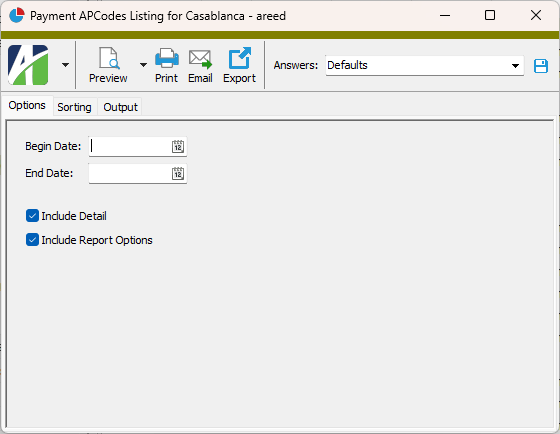
In the Begin Date and End Date fields, enter the range of dates for which to include payment APCode detail on the report.
Ensure the Include Detail checkbox is marked if you want to include APCode detail on the report. If you clear the checkbox, the report shows grand totals only.
To include a section at the end of the report with the report settings used to produce the report, leave the Include Report Options checkbox marked. To produce the report without this information, clear the checkbox.
Select the Sorting tab.
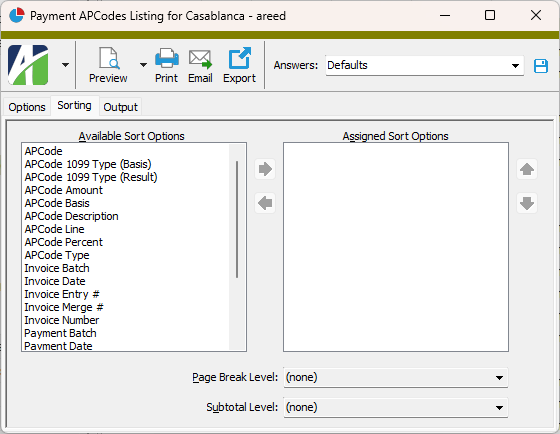
In the Available Sort Options list box, highlight the field(s) to sort the report by, then click to move your selection(s) to the Assigned Sort Options list box.
If you selected multiple sort fields, use and to arrange the sort fields in the order you want them applied.
If you want the report to start a new page for each change in one of the sorting options you specified, select the sorting option to break on from the Page Break Level drop-down list. If you do not want to insert page breaks, accept "(none)".
If you want the report to subtotal based on one of the sorting options you specified, select the sorting option to subtotal on from the Subtotal Level drop-down list. If you do not want to show subtotals, accept "(none)".
Select the Output tab.
In the Design field, look up and select the report design to use.
In the toolbar, click the icon for the type of output you want:
- Provides access to two preview options.
Preview - Click the icon or click the drop-down arrow and select Preview from the drop-down menu to view the report in the Crystal Reports viewer.
Preview to PDF - Click the drop-down arrow next to the icon and select Preview to PDF to view the report in the PDF reader.
- Opens the Print dialog so that you can select and configure a printer and then print a paper copy of the report.
- Opens the Report Email dialog so that you can address and compose an email that the report will be attached to. For best results, ensure your email client is running before you attempt to send a report via email.
- Opens a drop-down menu with two export options:
Export Report - Opens a dialog so that you can save the report to a file. File types include Crystal Reports (.rpt), PDF (.pdf), Microsoft Excel (.xls), Microsoft Word (.doc), rich text (.rtf), and XML (.xml).
Export Data - Opens a dialog so that you can export report data to XML or JSON file format.
From
The email account from which to send the email. Valid options are:
Windows user default account. Sends email using the user's Windows default email account. For most users, this is the account configured in Outlook or another email client application.
Server personal. Sends email using the email configuration for the system or company server and the email address on the current user's authorized user record. The authorized user record must have a confirmed email address.
Server generic. Sends email using the email configuration and "from" address for the system or company server. This option requires "Send generic" access to the Server Email resource.
To
The email address(es) to which to send the email. Separate email addresses with semi-colons.
CC
The email addresses to copy on the email. Separate email addresses with semi-colons.
BCC
The email addresses to blind copy on the email. Separate email addresses with semi-colons.
Subject
The subject line.
Text box
The body of the email.
Data extensions
The following data extension is available for the report:
Payment APCodes
Payment APCodes security
Common accesses available on payment APCode detail
Access
A user with this access can...
Change
Use the mass change action on payment APCode detail.
Data
Have read-only access to payment APCode detail from anywhere in the software (e.g., field validations, filters, date expressions).
Delete
Delete payment APCode detail.
Edit
Edit payment APCode detail records.
Read
Have read-only access to payment APCode detail records.
Report
Run reports with payment APCode detail information.
Report Designs
Create and edit report designs with payment APCode detail information. This access enables the Report Designs button on the Output tab of report dialogs.
Shared Answers
Create and edit saved answers related to payment APCode detail.
Shared Filters
Create and edit shared filters on payment APCode detail.
Visible
View the Payment APCodes folder in the Navigation pane.
Payment APCode filters
The following built-in filters are available for payment APCodes:
Filter Name
Effect
? APCode
Prompts for an APCode and lists the payment APCode detail lines that reference the APCode.
? Payment Date Range
Prompts for a range of dates and lists the payment APCode detail lines in the date range.
? Vendor
Prompts for a vendor name and lists the payment APCode detail lines for the specified vendor.
 .
.
 to move your selection(s) to the Assigned Sort Options list box.
 and
and  to arrange the sort fields in the order you want them applied.
 - Provides access to two preview options.
 - Opens the Print dialog so that you can select and configure a printer and then print a paper copy of the report.
 - Opens the
  - Opens a drop-down menu with two export options: