APCodes determine how Accounts Payable processes invoices and payments. There are three types of APCodes: use tax, payment reporting, and payment withholding. You can assign default APCodes on vendor records.
Tips
- In the Invoices HD view, you can add columns to show the basis, amount, and difference by invoice for each APCode.
- In the Payments HD view, you can add columns to show the payment basis, payment amount, the difference between reportable pay and the APCode basis, and reportable pay for each APCode.
Form 1099-NEC
Starting in reporting year 2020, non-employee compensation is reported on Form 1099-NEC instead of Form 1099-MISC. As a result, some boxes on the 1099-MISC form have been renumbered.
 Create an APCode for use tax
When an APCode for use tax is used on an invoice, ActivityHD automatically generates the GL entries for use tax. It multiplies the basis amount entered in the APCodes table on the invoice by the rate and credits the specified account. You can optionally specify an account for the offsetting debit.
Create an APCode for use tax
- In the Navigation pane, highlight the Accounts Payable > Setup > APCodes folder.
- Click
 . The New APCode window opens.
 - Enter a unique Name for the APCode.
- Enter a Description of the APCode to help operators pick the right code during invoice entry.
- In the Type field, select "Use Tax".
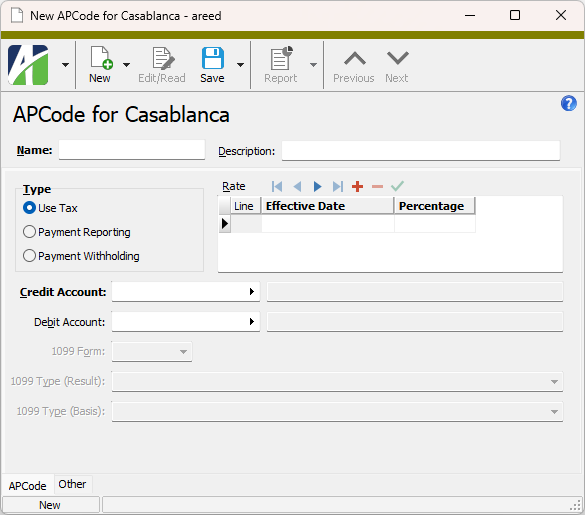
- In the Rate table in the Effective Date column, enter the date the rate takes effect. This date is compared with the invoice date to determine if the rate is in effect.
- In the Percentage column, enter the use tax rate as a percent.
- In the Memo column, enter any additional information you want to record about the rate on this row.
- In the Credit Account field, select the GL account to credit with the use tax amount. This is typically the tax liability account.
- In the Debit Account field, enter the GL account to debit with the use tax amount. This is typically the sales tax expense account. If you need to allocate the use tax to multiple distribution lines at invoice entry time, leave this field blank.
- Save the new APCode.
Create an APCode for payment reporting
An APCode for payment reporting tracks amounts paid to a vendor by "type", usually federal and state 1099 reporting. Each payment reporting APCode is associated with a certain 1099 type, e.g., 1099 - NEC Nonemployee Compensation, 1099 - MISC Other Income, 1099 - MISC Rents, etc. ActivityHD uses these types to display the number correctly in the electronic file layout and to correctly print on 1099 forms. You should create an APCode for each 1099 type you are required to report and then include the appropriate APCodes on each vendor's APCode default list. During invoice entry, the default APCodes will automatically be loaded and you can adjust the 1099 amounts as needed.
Note
Both "basis" and "result" 1099 types can be included on a payment reporting APCode so that you can use one APCode for reporting taxable income and for reporting tax withheld.
Example
Suppose you are reporting Pennsylvania state income and state income tax withheld on Form 1099-NEC. You could create a single APCode (e.g., Tax-PA) that specifies the taxable income (basis) and the tax withheld (result):
- 1099 Type (Result): 1099-NEC Box 5 - State income tax withheld
- 1099 Type (Basis): 1099-NEC Box 7 - State income
Create an APCode for payment reporting
- In the Navigation pane, highlight the Accounts Payable > Setup > APCodes folder.
- Click . The New APCode window opens.
- Enter a unique Name for the APCode.
- Enter a Description of the APCode to help operators pick the right code during invoice entry.
- In the Type field, select "Payment Reporting".
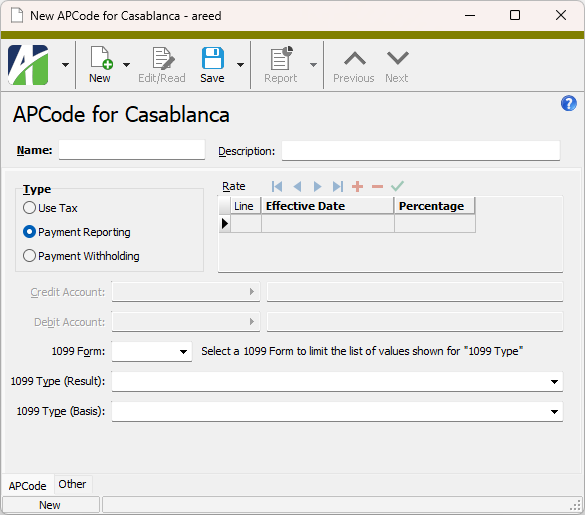
- From the 1099 Form drop-down list, select the 1099 form for payment reporting. Valid options are:
- 1099-DIV
- 1099-INT
- 1099-MISC
- 1099-NEC
- 1099-R
- From the 1099 Type (Result) drop-down list, select the 1099 type that corresponds to the item on the 1099 form that should display the result amount (amount withheld) for the APCode. Your options are:
Note
Because the IRS alters forms from time-to-time, box numbers may change. The dropdown lists box numbers for the current filing year only.
If you selected "1099-DIV" in the 1099 Form field, the following options are available:
- 1099-DIV Box 1a - Total ordinary dividends
- 1099-DIV Box 1b - Qualified dividends
- 1099-DIV Box 2a - Total capital gain distribution
- 1099-DIV Box 2b - Unrecaptured Section 1250 gain
- 1099-DIV Box 2c - Section 1202 gain
- 1099-DIV Box 2d - Collectibles (28%) gain
- 1099-DIV Box 2e - Section 897 ordinary dividends
- 1099-DIV Box 2f - Section 897 capital gains
- 1099-DIV Box 3 - Nondividend distributions
- 1099-DIV Box 4 - Federal income tax withheld
- 1099-DIV Box 5 - Section 199A dividends
- 1099-DIV Box 6 - Investment expenses
- 1099-DIV Box 7 - Foreign tax paid
- 1099-DIV box 9 - Cash liquidation distributions
- 1099-DIV Box 10 - Non-cash liquidation distributions
- 1099-DIV Box 11 - Exempt interest dividends
- 1099-DIV Box 12 - Specified private activity bond interest dividend
- 1099-DIV Box 15 - State income tax withheld
- 1099-DIV N/A - Local income tax withheld
If you selected "1099-INT" in the 1099 Form field, the following options are available:
- 1099-INT Box 1 - Interest income not included in Box 3
- 1099-INT Box 2 - Early withdrawal penalty
- 1099-INT Box 3 - Interest on U.S. Savings Bonds and Treasury obligations
- 1099-INT Box 4 - Federal income tax withheld (backup withholding)
- 1099-INT Box 5 - Investment expenses
- 1099-INT box 6 - Foreign tax paid
- 1099-INT Box 8 - Tax-exempt interest
- 1099-INT Box 9 - Specified private activity bond interest
- 1099-INT Box 10 - Market discount
- 1099-INT Box 11 - Bond premium
- 1099-INT Box 12 - Bond premium on Treasury obligations
- 1099-INT Box 13 - Bond premium on tax-exempt bond
- 1099-INT Box 17 - State income tax withheld
- 1099-INT N/A - Local income tax withheld
If you selected "1099-MISC" in the 1099 Form field, the following options are available:
- 1099-MISC Box 1 - Rents
- 1099-MISC Box 2 - Royalties
- 1099-MISC Box 3 - Other income
- 1099-MISC Box 4 - Federal income tax withheld (backup withholding or withholding on Indian gaming)
- 1099-MISC Box 5 - Fishing boat proceeds
- 1099-MISC Box 6 - Medical and health care payments
- 1099-MISC Box 8 - Substitute payments in lieu of dividends and interest
- 1099-MISC Box 9 - Crop insurance proceeds
- 1099-MISC Box 10 - Gross proceeds paid to an attorney in connection with legal services
- 1099-MISC Box 11 - Fish purchased for resale
- 1099-MISC Box 12 - Section 409A deferrals
- 1099-MISC Box 14 - Excess golden parachute payments
- 1099-MISC Box 15 - Nonqualified deferred compensation
- 1099-MISC Box 16 - State income tax withheld
- 1099-MISC Box 18 - State income
- 1099-MISC N/A - Local income tax withheld
If you selected "1099-NEC" in the 1099 Form field, the following options are available:
- 1099-NEC Box 1 - Nonemployee compensation
- 1099-NEC Box 4 - Federal income tax withheld
- 1099-NEC Box 5 - State income tax withheld
- 1099-NEC Box 7 - State income
- 1099-NEC N/A - Local income tax withheld
If you selected "1099-R" in the 1099 Form field, the following options are available:
- 1099-R Box 1 - Gross distribution
- 1099-R Box 2a - Taxable amount
- 1099-R Box 3 - Capital gain (included in taxable amount)
- 1099-R Box 4 - Federal income tax withheld
- 1099-R Box 7b - Traditional IRA/SEP/SIMPLE distribution or Roth conversion
- 1099-R Box 14 - State tax withheld
- 1099-R Box 16 - State distribution
- 1099-R Box 17 - Local tax withheld
- 1099-R Box 19 - Local distribution
If you did not make a selection in the 1099 Form field, all options above are available.
- From the 1099 Type (Basis) drop-down list, select the 1099 type that corresponds to the item on the 1099 form that should display the basis amount for the APCode. (See the previous step for valid options.)
- Save the new APCode.
Create an APCode for payment withholding
When a payment withholding APCode is used, ActivityHD automatically withholds from amounts paid to a vendor and updates the corresponding liability account during payment processing. Payment withholding is typically used for federal and state 1099 backup withholding and for other types of state or union garnishments. During payment processing, the rate is multiplied by the adjusted payment basis, and the result is subtracted from the check amount and credited to the specified liability account.
Create an APCode for payment withholding
- In the Navigation pane, highlight the Accounts Payable > Setup > APCodes folder.
- Click . The New APCode window opens.
- Enter a unique Name for the APCode.
- Enter a Description of the APCode to help operators pick the right code during invoice entry.
- In the Type field, select "Payment Withholding".
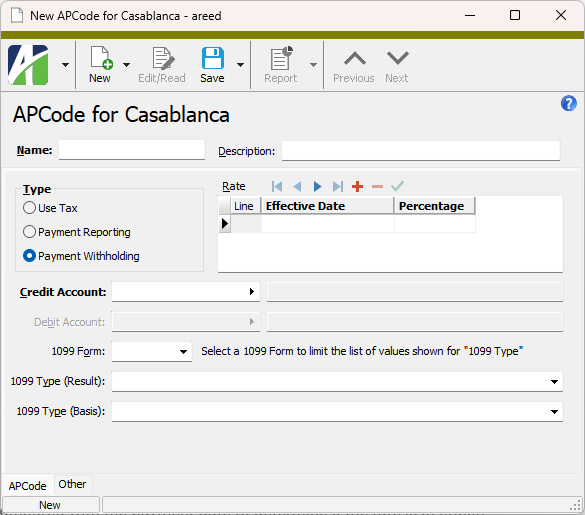
- In the Rate table in the Effective Date column, enter the date that the rate takes effect. The date is compared with the payment date to determine if the rate is in effect.
- In the Percentage column, enter the rate to apply, as a percent, to the adjusted payment to calculate the withholding amount during payment processing. This amount is deducted from the payment amount and credited to the account you specify.
- In the Memo column, enter any additional information you want to record about the rate on this row.
- In the Credit Account field, select the GL account to credit with the calculated withholding amount during payment processing. This is typically the withholding payable account.
- From the 1099 Form drop-down list, select the 1099 form for payment withholding. Valid options are:
- 1099-DIV
- 1099-INT
- 1099-MISC
- 1099-NEC
- 1099-R
- From the 1099 Type (Result) drop-down list, select the 1099 type that corresponds to the item on the 1099 form that should display the result amount (amount withheld) for the APCode. Your options are:
Note
Because the IRS alters forms from time-to-time, box numbers may change. The dropdown lists box numbers for the current filing year only.
If you selected "1099-DIV" in the 1099 Form field, the following options are available:
- 1099-DIV Box 1a - Total ordinary dividends
- 1099-DIV Box 1b - Qualified dividends
- 1099-DIV Box 2a - Total capital gain distribution
- 1099-DIV Box 2b - Unrecaptured Section 1250 gain
- 1099-DIV Box 2c - Section 1202 gain
- 1099-DIV Box 2d - Collectibles (28%) gain
- 1099-DIV Box 2e - Section 897 ordinary dividends
- 1099-DIV Box 2f - Section 897 capital gains
- 1099-DIV Box 3 - Nondividend distributions
- 1099-DIV Box 4 - Federal income tax withheld
- 1099-DIV Box 5 - Section 199A dividends
- 1099-DIV Box 6 - Investment expenses
- 1099-DIV Box 7 - Foreign tax paid
- 1099-DIV box 9 - Cash liquidation distributions
- 1099-DIV Box 10 - Non-cash liquidation distributions
- 1099-DIV Box 11 - Exempt interest dividends
- 1099-DIV Box 12 - Specified private activity bond interest dividend
- 1099-DIV Box 15 - State income tax withheld
- 1099-DIV N/A - Local income tax withheld
If you selected "1099-INT" in the 1099 Form field, the following options are available:
- 1099-INT Box 1 - Interest income not included in Box 3
- 1099-INT Box 2 - Early withdrawal penalty
- 1099-INT Box 3 - Interest on U.S. Savings Bonds and Treasury obligations
- 1099-INT Box 4 - Federal income tax withheld (backup withholding)
- 1099-INT Box 5 - Investment expenses
- 1099-INT box 6 - Foreign tax paid
- 1099-INT Box 8 - Tax-exempt interest
- 1099-INT Box 9 - Specified private activity bond interest
- 1099-INT Box 10 - Market discount
- 1099-INT Box 11 - Bond premium
- 1099-INT Box 12 - Bond premium on Treasury obligations
- 1099-INT Box 13 - Bond premium on tax-exempt bond
- 1099-INT Box 17 - State income tax withheld
- 1099-INT N/A - Local income tax withheld
If you selected "1099-MISC" in the 1099 Form field, the following options are available:
- 1099-MISC Box 1 - Rents
- 1099-MISC Box 2 - Royalties
- 1099-MISC Box 3 - Other income
- 1099-MISC Box 4 - Federal income tax withheld (backup withholding or withholding on Indian gaming)
- 1099-MISC Box 5 - Fishing boat proceeds
- 1099-MISC Box 6 - Medical and health care payments
- 1099-MISC Box 8 - Substitute payments in lieu of dividends and interest
- 1099-MISC Box 9 - Crop insurance proceeds
- 1099-MISC Box 10 - Gross proceeds paid to an attorney in connection with legal services
- 1099-MISC Box 11 - Fish purchased for resale
- 1099-MISC Box 12 - Section 409A deferrals
- 1099-MISC Box 14 - Excess golden parachute payments
- 1099-MISC Box 15 - Nonqualified deferred compensation
- 1099-MISC Box 16 - State income tax withheld
- 1099-MISC Box 18 - State income
- 1099-MISC N/A - Local income tax withheld
If you selected "1099-NEC" in the 1099 Form field, the following options are available:
- 1099-NEC Box 1 - Nonemployee compensation
- 1099-NEC Box 4 - Federal income tax withheld
- 1099-NEC Box 5 - State income tax withheld
- 1099-NEC Box 7 - State income
- 1099-NEC N/A - Local income tax withheld
If you selected "1099-R" in the 1099 Form field, the following options are available:
- 1099-R Box 1 - Gross distribution
- 1099-R Box 2a - Taxable amount
- 1099-R Box 3 - Capital gain (included in taxable amount)
- 1099-R Box 4 - Federal income tax withheld
- 1099-R Box 7b - Traditional IRA/SEP/SIMPLE distribution or Roth conversion
- 1099-R Box 14 - State tax withheld
- 1099-R Box 16 - State distribution
- 1099-R Box 17 - Local tax withheld
- 1099-R Box 19 - Local distribution
If you did not make a selection in the 1099 Form field, all options above are available.
- From the 1099 Type (Basis) drop-down list, select the 1099 type that corresponds to the item on the 1099 form that should display the basis amount for the APCode. (See the previous step for valid options.)
- Save the new APCode.
An APCode record cannot be deleted if it is used on an invoice, recurring invoice, payment, or vendor.
To delete an APCode, highlight the APCode record in the HD view and click  , or open the APCode and select
  > Edit > Delete. In either case, ActivityHD prompts you to confirm your action. Click Delete to delete the APCode.
APCodes Listing
Purpose
The APCodes Listing provides a list of the APCodes defined in Accounts Payable.
Content
For each APCode included on the report, the listing shows:
- description
- code type
- 1099 type
- credit and/or debit accounts
- rate detail.
For each rate detail line, the listing shows:
- line number
- effective date
- percentage.
In addition, you can include one or more of the following:
- timestamps
- memos
- custom fields.
The following total appears on the report:
- record count.
Print the report
- In the Navigation pane, highlight the Accounts Payable > Setup > APCodes folder.
- Start the report set-up wizard.
- To report on all or a filtered subset of APCodes:
- Right-click the APCodes folder and select Select and Report > APCodes Listing from the shortcut menu.
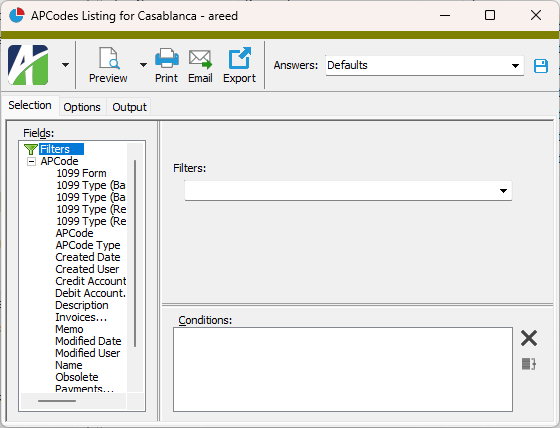
- On the Selection tab, define any filters to apply to the data.
- To report on specifically selected APCodes:
- In the HD view, select the APCodes to include on the report. You can use Ctrl and/or Shift selection to select multiple records.
- Click
 .
.
- To run the report for a particular APCode from the APCode window:
- In the HD view, locate and double-click the APCode to report on. The APCode window opens with the APCode loaded.
- Click .
- To report on all or a filtered subset of APCodes:
- Select the Options tab.
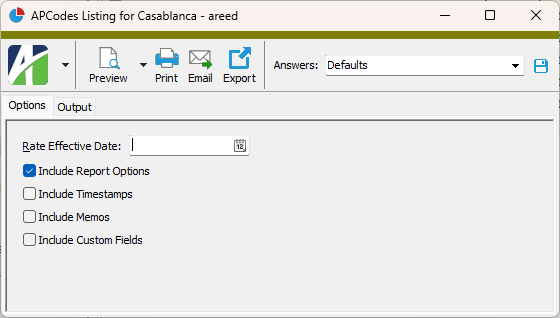
- In the Rate Effective Date field, enter the date to test to determine which rates appear on the report.
- To include a section at the end of the report with the report settings used to produce the report, leave the Include Report Options checkbox marked. To produce the report without this information, clear the checkbox.
- Mark the checkbox(es) for the additional information to include:
- Timestamps
- Memos
- Custom Fields (only visible if custom fields are set up)
- Select the Output tab.
- In the Design field, look up and select the report design to use.
- In the toolbar, click the icon for the type of output you want:
 - Provides access to two preview options.
- Preview - Click the icon or click the drop-down arrow and select Preview from the drop-down menu to view the report in the Crystal Reports viewer.
- Preview to PDF - Click the drop-down arrow next to the icon and select Preview to PDF to view the report in the PDF reader.
 - Opens the Print dialog so that you can select and configure a printer and then print a paper copy of the report.
 - Opens the Report Email dialog so that you can address and compose an email that the report will be attached to. For best results, ensure your email client is running before you attempt to send a report via email.
 - Opens a drop-down menu with two export options:
 - Export Report - Opens a dialog so that you can save the report to a file. File types include Crystal Reports (.rpt), PDF (.pdf), Microsoft Excel (.xls), Microsoft Word (.doc), rich text (.rtf), and XML (.xml).
- Export Data - Opens a dialog so that you can export report data to XML or JSON file format.
- From
- The email account from which to send the email. Valid options are:
- Windows user default account. Sends email using the user's Windows default email account. For most users, this is the account configured in Outlook or another email client application.
- Server personal. Sends email using the email configuration for the system or company server and the email address on the current user's authorized user record. The authorized user record must have a confirmed email address.
- Server generic. Sends email using the email configuration and "from" address for the system or company server. This option requires "Send generic" access to the Server Email resource.
- To
- The email address(es) to which to send the email. Separate email addresses with semi-colons.
- CC
- The email addresses to copy on the email. Separate email addresses with semi-colons.
- BCC
- The email addresses to blind copy on the email. Separate email addresses with semi-colons.
- Subject
- The subject line.
- Text box
- The body of the email.
Data extensions
The following data extensions are available for the report:
- APCodes
- APCode detail
APCode Record ID
APCode tab
- Use Tax
- Payment Reporting
- Payment Withholding
Use Tax: The use tax rate as a percent.
Payment Withholding: The rate, as a percent, to apply to the adjusted payment to calculate the withholding amount. This amount is deducted from the payment amount and credited to the account you specify.
Use Tax: Select the GL account to credit with the use tax amount. Typically, this is the tax liability account.
Payment Withholding: Select the GL account to credit with the calculated withholding amount. Typically, this is the withholding payable account.
Press F2 to open the Account Expand dialog box where you can look up an account number, find an account number by its alias, build the account number by segment, or view setup and setup sources.
Press F3 to look up the account.
If an account is already selected, you can press F4 to open the record in the Account window.
Select the GL account to debit with the use tax amount. Typically, this is the sales tax expense account. If you need to allocate the use tax to multiple distribution lines at invoice entry time, leave this field blank.
Press F2 to open the Account Expand dialog box where you can look up an account number, find an account number by its alias, build the account number by segment, or view setup and setup sources.
Press F3 to look up the account.
If an account is already selected, you can press F4 to open the record in the Account window.
- 1099-DIV
- 1099-INT
- 1099-MISC
- 1099-NEC
- 1099-R
Beginning with ActivityHD 8.31, users can specify both a result and a basis 1099 type on APCodes. This means you can create one APCode to report taxable income by specifying a line type in the 1099 Type (Basis) field and to report tax withheld by specifying a line type in the 1099 Type (Result) field.
Example
Suppose you need to report Pennsylvania state income and state income tax withheld on Form 1099-NEC. You can specify both on a single APCode.
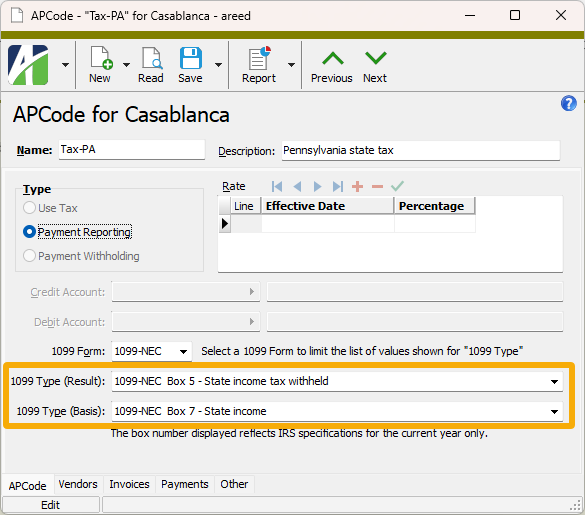
This field is enabled if "Payment Reporting" or "Payment Withholding" is selected in the Type field. From the drop-down list, select the 1099 type that corresponds to the item on the 1099 that should show the result amount (amount withheld) for the APCode. Valid types are:
Note
Because the IRS alters forms from time-to-time, box numbers may change. The dropdown lists box numbers for the current filing year only.
If you selected "1099-DIV" in the 1099 Form field, the following options are available:
- 1099-DIV Box 1a - Total ordinary dividends
- 1099-DIV Box 1b - Qualified dividends
- 1099-DIV Box 2a - Total capital gain distribution
- 1099-DIV Box 2b - Unrecaptured Section 1250 gain
- 1099-DIV Box 2c - Section 1202 gain
- 1099-DIV Box 2d - Collectibles (28%) gain
- 1099-DIV Box 2e - Section 897 ordinary dividends
- 1099-DIV Box 2f - Section 897 capital gains
- 1099-DIV Box 3 - Nondividend distributions
- 1099-DIV Box 4 - Federal income tax withheld
- 1099-DIV Box 5 - Section 199A dividends
- 1099-DIV Box 6 - Investment expenses
- 1099-DIV Box 7 - Foreign tax paid
- 1099-DIV box 9 - Cash liquidation distributions
- 1099-DIV Box 10 - Non-cash liquidation distributions
- 1099-DIV Box 11 - Exempt interest dividends
- 1099-DIV Box 12 - Specified private activity bond interest dividend
- 1099-DIV Box 15 - State income tax withheld
- 1099-DIV N/A - Local income tax withheld
If you selected "1099-INT" in the 1099 Form field, the following options are available:
- 1099-INT Box 1 - Interest income not included in Box 3
- 1099-INT Box 2 - Early withdrawal penalty
- 1099-INT Box 3 - Interest on U.S. Savings Bonds and Treasury obligations
- 1099-INT Box 4 - Federal income tax withheld (backup withholding)
- 1099-INT Box 5 - Investment expenses
- 1099-INT box 6 - Foreign tax paid
- 1099-INT Box 8 - Tax-exempt interest
- 1099-INT Box 9 - Specified private activity bond interest
- 1099-INT Box 10 - Market discount
- 1099-INT Box 11 - Bond premium
- 1099-INT Box 12 - Bond premium on Treasury obligations
- 1099-INT Box 13 - Bond premium on tax-exempt bond
- 1099-INT Box 17 - State income tax withheld
- 1099-INT N/A - Local income tax withheld
If you selected "1099-MISC" in the 1099 Form field, the following options are available:
- 1099-MISC Box 1 - Rents
- 1099-MISC Box 2 - Royalties
- 1099-MISC Box 3 - Other income
- 1099-MISC Box 4 - Federal income tax withheld (backup withholding or withholding on Indian gaming)
- 1099-MISC Box 5 - Fishing boat proceeds
- 1099-MISC Box 6 - Medical and health care payments
- 1099-MISC Box 8 - Substitute payments in lieu of dividends and interest
- 1099-MISC Box 9 - Crop insurance proceeds
- 1099-MISC Box 10 - Gross proceeds paid to an attorney in connection with legal services
- 1099-MISC Box 11 - Fish purchased for resale
- 1099-MISC Box 12 - Section 409A deferrals
- 1099-MISC Box 14 - Excess golden parachute payments
- 1099-MISC Box 15 - Nonqualified deferred compensation
- 1099-MISC Box 16 - State income tax withheld
- 1099-MISC Box 18 - State income
- 1099-MISC N/A - Local income tax withheld
If you selected "1099-NEC" in the 1099 Form field, the following options are available:
- 1099-NEC Box 1 - Nonemployee compensation
- 1099-NEC Box 4 - Federal income tax withheld
- 1099-NEC Box 5 - State income tax withheld
- 1099-NEC Box 7 - State income
- 1099-NEC N/A - Local income tax withheld
If you selected "1099-R" in the 1099 Form field, the following options are available:
- 1099-R Box 1 - Gross distribution
- 1099-R Box 2a - Taxable amount
- 1099-R Box 3 - Capital gain (included in taxable amount)
- 1099-R Box 4 - Federal income tax withheld
- 1099-R Box 7b - Traditional IRA/SEP/SIMPLE distribution or Roth conversion
- 1099-R Box 14 - State tax withheld
- 1099-R Box 16 - State distribution
- 1099-R Box 17 - Local tax withheld
- 1099-R Box 19 - Local distribution
If you did not make a selection in the 1099 Form field, all options above are available.
This field is enabled if "Payment Reporting" or "Payment Withholding" is selected in the Type field. From the drop-down list, select the 1099 type that corresponds to the item on the 1099 that should show the basis amount for the APCode. Valid types are:
Note
Because the IRS alters forms from time-to-time, box numbers may change. The dropdown lists box numbers for the current filing year only.
If you selected "1099-DIV" in the 1099 Form field, the following options are available:
- 1099-DIV Box 1a - Total ordinary dividends
- 1099-DIV Box 1b - Qualified dividends
- 1099-DIV Box 2a - Total capital gain distribution
- 1099-DIV Box 2b - Unrecaptured Section 1250 gain
- 1099-DIV Box 2c - Section 1202 gain
- 1099-DIV Box 2d - Collectibles (28%) gain
- 1099-DIV Box 2e - Section 897 ordinary dividends
- 1099-DIV Box 2f - Section 897 capital gains
- 1099-DIV Box 3 - Nondividend distributions
- 1099-DIV Box 4 - Federal income tax withheld
- 1099-DIV Box 5 - Section 199A dividends
- 1099-DIV Box 6 - Investment expenses
- 1099-DIV Box 7 - Foreign tax paid
- 1099-DIV box 9 - Cash liquidation distributions
- 1099-DIV Box 10 - Non-cash liquidation distributions
- 1099-DIV Box 11 - Exempt interest dividends
- 1099-DIV Box 12 - Specified private activity bond interest dividend
- 1099-DIV Box 15 - State income tax withheld
- 1099-DIV N/A - Local income tax withheld
If you selected "1099-INT" in the 1099 Form field, the following options are available:
- 1099-INT Box 1 - Interest income not included in Box 3
- 1099-INT Box 2 - Early withdrawal penalty
- 1099-INT Box 3 - Interest on U.S. Savings Bonds and Treasury obligations
- 1099-INT Box 4 - Federal income tax withheld (backup withholding)
- 1099-INT Box 5 - Investment expenses
- 1099-INT box 6 - Foreign tax paid
- 1099-INT Box 8 - Tax-exempt interest
- 1099-INT Box 9 - Specified private activity bond interest
- 1099-INT Box 10 - Market discount
- 1099-INT Box 11 - Bond premium
- 1099-INT Box 12 - Bond premium on Treasury obligations
- 1099-INT Box 13 - Bond premium on tax-exempt bond
- 1099-INT Box 17 - State income tax withheld
- 1099-INT N/A - Local income tax withheld
If you selected "1099-MISC" in the 1099 Form field, the following options are available:
- 1099-MISC Box 1 - Rents
- 1099-MISC Box 2 - Royalties
- 1099-MISC Box 3 - Other income
- 1099-MISC Box 4 - Federal income tax withheld (backup withholding or withholding on Indian gaming)
- 1099-MISC Box 5 - Fishing boat proceeds
- 1099-MISC Box 6 - Medical and health care payments
- 1099-MISC Box 8 - Substitute payments in lieu of dividends and interest
- 1099-MISC Box 9 - Crop insurance proceeds
- 1099-MISC Box 10 - Gross proceeds paid to an attorney in connection with legal services
- 1099-MISC Box 11 - Fish purchased for resale
- 1099-MISC Box 12 - Section 409A deferrals
- 1099-MISC Box 14 - Excess golden parachute payments
- 1099-MISC Box 15 - Nonqualified deferred compensation
- 1099-MISC Box 16 - State income tax withheld
- 1099-MISC Box 18 - State income
- 1099-MISC N/A - Local income tax withheld
If you selected "1099-NEC" in the 1099 Form field, the following options are available:
- 1099-NEC Box 1 - Nonemployee compensation
- 1099-NEC Box 4 - Federal income tax withheld
- 1099-NEC Box 5 - State income tax withheld
- 1099-NEC Box 7 - State income
- 1099-NEC N/A - Local income tax withheld
If you selected "1099-R" in the 1099 Form field, the following options are available:
- 1099-R Box 1 - Gross distribution
- 1099-R Box 2a - Taxable amount
- 1099-R Box 3 - Capital gain (included in taxable amount)
- 1099-R Box 4 - Federal income tax withheld
- 1099-R Box 7b - Traditional IRA/SEP/SIMPLE distribution or Roth conversion
- 1099-R Box 14 - State tax withheld
- 1099-R Box 16 - State distribution
- 1099-R Box 17 - Local tax withheld
- 1099-R Box 19 - Local distribution
If you did not make a selection in the 1099 Form field, all options above are available.
Custom tab
This tab is visible if custom fields exist for the entity. At a minimum, if there are custom fields, a Fields subtab will be present. One or more additional categories of subtabs may also be visible.
Fields subtab
This tab prompts for values for any custom fields set up for entity records of this entity type. Respond to the prompts as appropriate.
References subtab
This tab is visible if other records reference the current record.
Example
Suppose a custom field exists on PRCodes that references an ARCode. On the ARCode record, on the Custom > References subtab, you can view all the PRCodes which reference that ARCode.
Exchange Folder subtab
This tab is visible only if you set up a custom field with a data type of "Exchange Folder". The label on this tab is the name assigned to the custom field.
This tab shows the contents of the specified Exchange folder.
File subtab
This tab is visible only if you set up a custom field with a data type of "File". The label on the tab is the name assigned to the custom field.
This tab renders the contents of the specified file according to its file type.
Internet Address subtab
This tab is visible only if you set up a custom field with a data type of "Internet Address". The label on this tab is the name assigned to the custom field.
This tab shows the contents of the specified web page.
Network Folder subtab
This tab is visible only if you set up a custom field with a data type of "Network Folder". The label on this tab is the name assigned to the custom field.
This tab shows the contents of the specified network folder.
Vendors tab
The Vendors pane shows the Vendors HD view filtered to show all vendors with the APCode currently assigned. This tab is useful for cleaning up and investigating APCode assignments.
Double-click a row in the pane to drill down to its record in the Vendor window.
Invoices tab
The AP Invoice APCodes pane shows the AP Invoice APCodes HD view filtered to show all APCode detail for invoices with an APCode distribution that includes the selected APCode.
Double-click a row in the pane to drill down to its record in the AP Invoice window.
Payments tab
The Payment APCodes pane shows the Payment APCodes HD view filtered to show all APCode detail for payments with an APCode distribution that includes the selected APCode.
Double-click a row in the pane to drill down to its record in the Payment window.
Attachments tab
The Attachments tab is visible if any record for a given entity has an attachment. If the Attachments tab is not visible, this implies that no record of the entity type has an attachment on it; however, once an attachment is added to any record of the entity type, the Attachments tab will become available.
Change Logs tab
This tab is visible if the user has "Change Logs" access to the associated data folder resource.
The Change Logs pane shows the Change Logs HD view filtered to show all change logs for the selected entity record.
Double-click a row in the pane to drill down to its record in the Change Log window.
Other tab
Developer tab
This tab is visible only when developer features are enabled.
Automation subtab
This subtab shows field names and values for the current data record. Use the information in the subtab to assist when creating automation objects such as bots and import files. The field names and field values can be copied from the text box and pasted directly into your code or application. To copy content from the text box, highlight the content to copy and press Ctrl+C or right-click your selection and select Copy from the context menu.
Export (XML | JSON) subtab
This subtab shows the XML syntax for exporting the selected data record. The syntax can be copied from the text box as an exemplar for creating your own automation objects for bots, import files, ActivWebAPI, etc. To copy content from the text box, highlight the content to copy and press Ctrl+C or right-click your selection and select Copy from the context menu.
Import (XML | JSON) subtab
This subtab allows you to select a file for import and shows the XML syntax for importing data records. Use the subtab to explore the XML syntax for importing data records. In particular, you can investigate the syntax which results when using Data.Import and ActivWebAPI data POST and DELETE routes.
Change Log (XML | JSON) subtab
This subtab is visible only when the Enable Change Logs option is marked in System Options or Company Options (depending on whether the feature applies at the system or the company level). This is the default setting when developer features are enabled.
This subtab allows you to investigate changes to the current data record. The syntax can be copied for use in bots, dashboards, ActivWebAPI, and other automation. To copy content from the text box, highlight the content to copy and press Ctrl+C or right-click your selection and select Copy from the context menu.
Select Statement (SQL) subtab
This subtab allows you to investigate the SQL select statement used to retrieve the current data record. The syntax can be copied as an exemplar for data sources and other automation. To copy content from the text box, highlight the content to copy and press Ctrl+C or right-click your selection and select Copy from the context menu.
Preinstalled APCodes can be modified, deleted, and renamed as the user deems necessary.
Note
Preinstalled APCodes are preinstalled when the Accounts Payable package is initially installed into a company database.
| APCode Name | Description | Type | Result 1099 Type |
|---|---|---|---|
| Attorney | Gross proceeds paid to an attorney | Payment Reporting | 1099-MISC Box 10 |
| Dividends | Total ordinary dividends | Payment Reporting | 1099-DIV Box 1a |
| Interest | Interest income | Payment Reporting | 1099-INT Box 1 |
| MedPayments | Medical and healthcare payments | Payment Reporting | 1099-MISC Box 6 |
| NEC | Nonemployee compensation | Payment Reporting | 1099-NEC Box 1 |
| OtherIncome | Other miscellaneous income | Payment Reporting | 1099-MISC Box 3 |
| Rent | Rents | Payment Reporting | 1099-MISC Box 1 |
| Royalties | Royalties | Payment Reporting | 1099-MISC Box 2 |

|
|
APCodes security
Common accesses available on APCodes
| Access | A user with this access can... |
|---|---|
| Change | Use the mass change action on APCodes. |
| Change Logs | |
| Custom Fields | Create and edit custom fields for APCodes. |
| Data | Have read-only access to APCodes from anywhere in the software (e.g., field validations, filters, date expressions). |
| Delete | Delete APCodes. |
| Edit | Edit APCode records. |
| Export | Export APCode records from ActivityHD. |
| Import | Import APCode records into ActivityHD. |
| New | Create new APCode records. |
| Read | Have read-only access to APCode records. |
| Report | Run reports with APCode information. |
| Report Designs | Create and edit report designs with APCode information. This access enables the Report Designs button on the Output tab of report dialogs. |
| Shared Answers | Create and edit saved answers related to APCodes. |
| Shared Filters | Create and edit shared filters on APCodes. |
| Visible | View the APCodes folder in the Navigation pane. |
|
6224 34th Street Lubbock, TX 79407 806.687.8500 | 800.354.7152 |
© 2026 AccountingWare, LLC All rights reserved. |