The ActivityHD system provides access to the ActivityHD software and ActivityHD databases by company. The Companies folder contains all the companies currently set up in your system.
Note
If you use ActivityHD Payroll to generate W-2s, ensure that the Address tab is completed with the company's legal name and address as they should appear on the W-2s.
 Using the Company Configuration wizard
Create a company using the Company Configuration wizard
Note
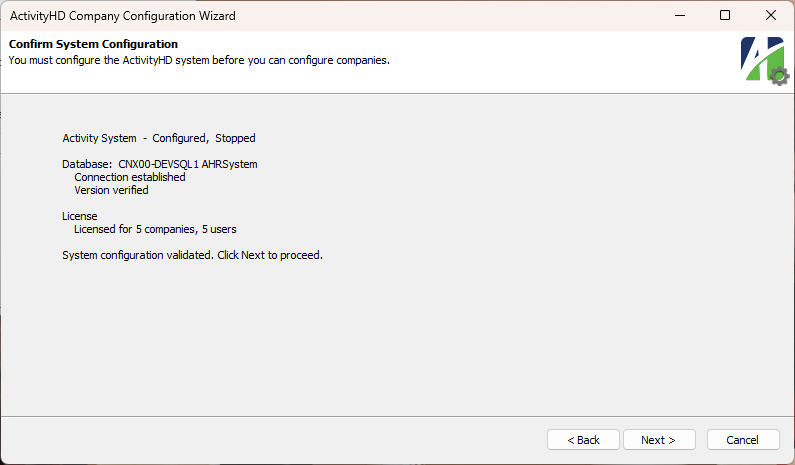
This procedure assumes that the ActivityHD System has already been configured and that you have adequate licenses to add a company.
-
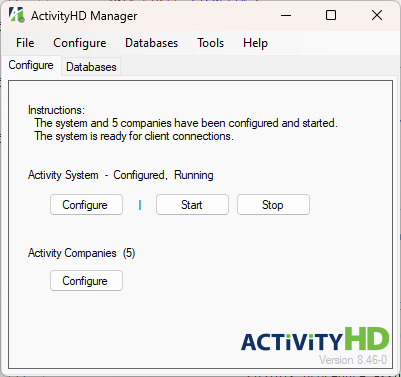
Start ActivityHD Manager.
-
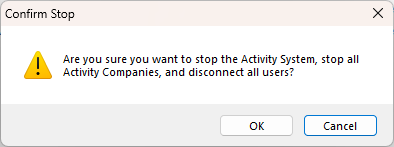
Click Stop. You are prompted to confirm you want to stop the system and all companies, and to disconnect all users.
-
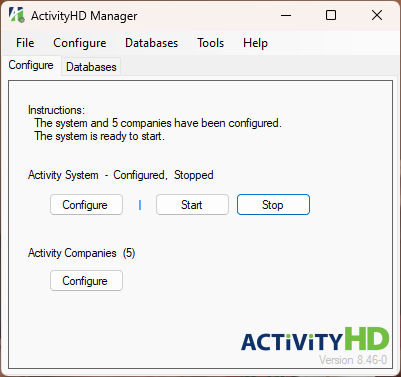
Click OK. The system stops.
-
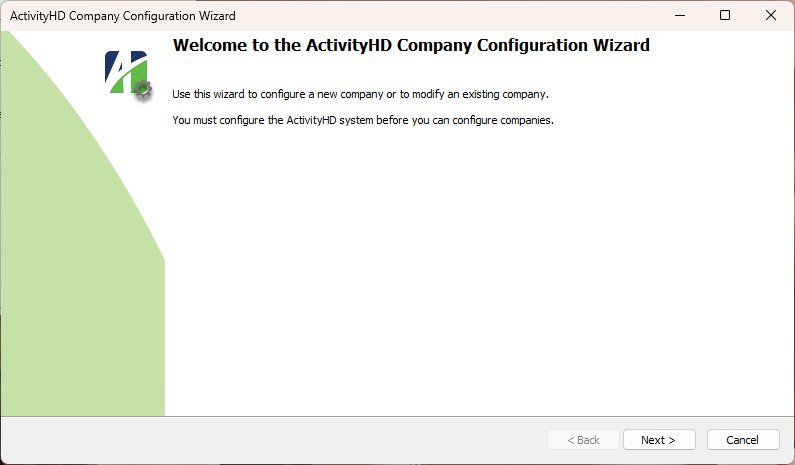
In the ActivityHD Companies section, click Configure. The Company Configuration wizard starts.
-
Click Next >.
-
Click Next >.
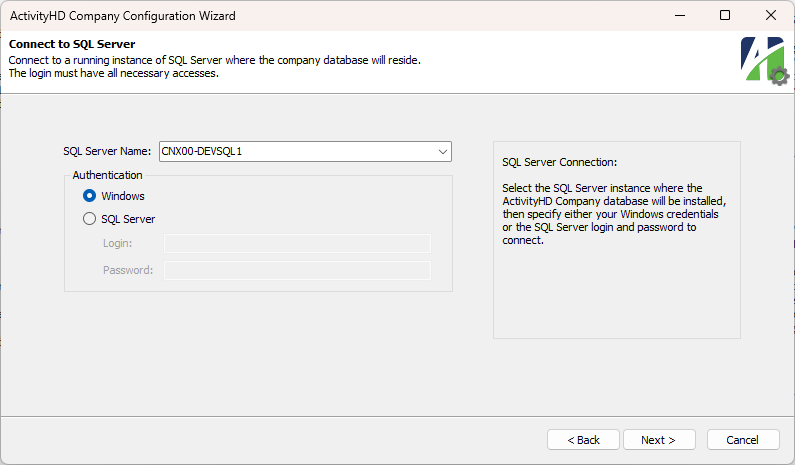
- In the SQL Server Name field, select or enter the name of the SQL Server instance where the company database will reside.
- In the Authentication section, select the credentials to use to log into the database. Your options are:
- Windows. If you select this option, ActivityHD will use your Windows credentials to log into SQL Server.
- SQL Server. If you select this option, provide your Login and Password for SQL Server. The login should represent a user with sufficient privileges to install database components. AccountingWare recommends using the system administrator (sa) login.
-
Click Next >.
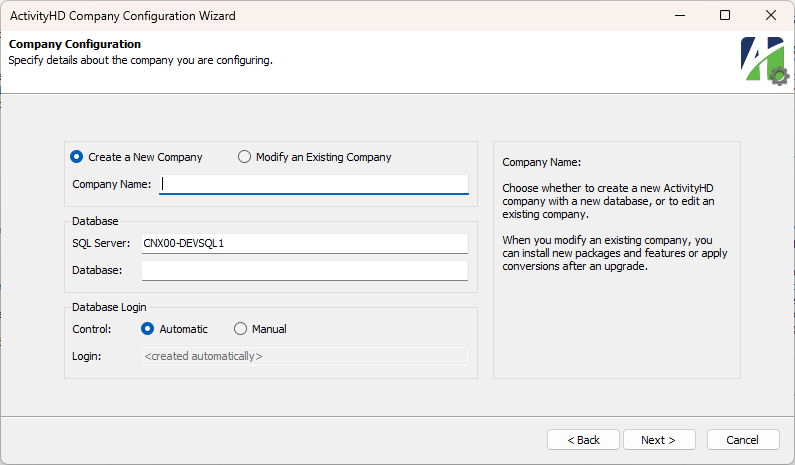
- Ensure the Create a New Company option is selected.
- Enter the Company Name to associate with the company database. The company name must be unique. It is used in ActivityHD to identify the company and typically prints on all ActivityHD financial reports.
- Enter the SQL Server instance where the company database will reside.
- Enter the Database name for the company.
- In the Control field, select how to create the database login and password for the company database. The login you set up here becomes the database owner and is used by all ActivityHD users to connect to the company database. Your options are:
- Automatic. Select this option to allow the wizard to create a unique SQL Server login and password for accessing the company database.
- Manual. Select this option to specify the SQL Server login and password yourself.
If you select "Manual", enter the Login and Password to use to access the company database.
-
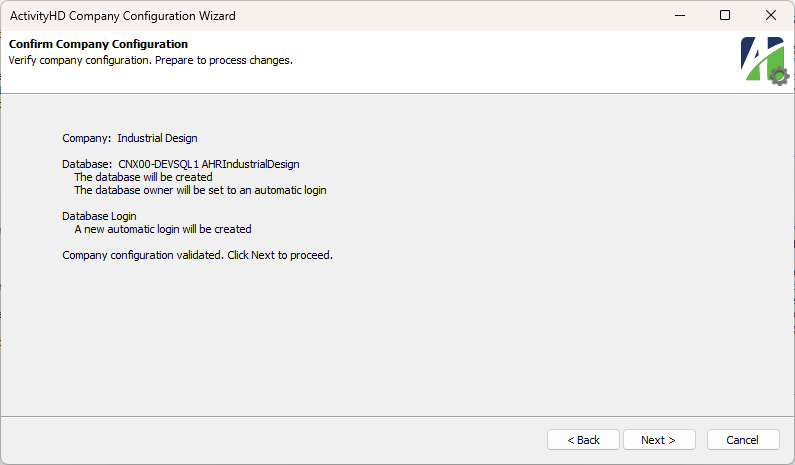
Click Next >.
-
Click Next >.
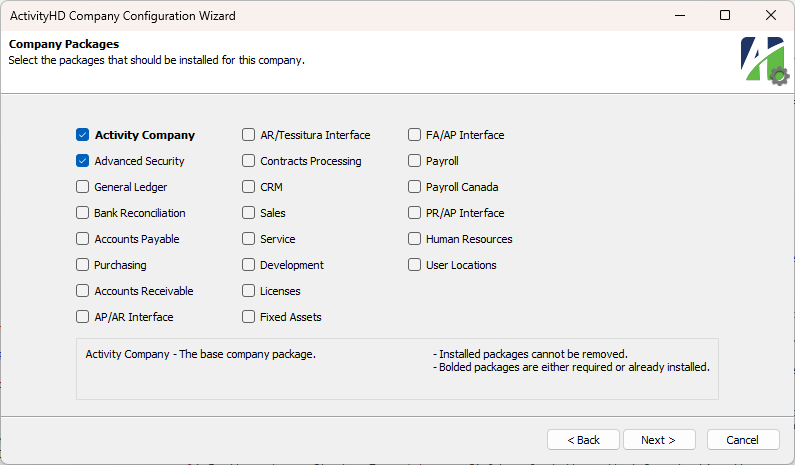
- In addition to the preselected packages, select the additional packages to install for the company.
-
Click Next >..
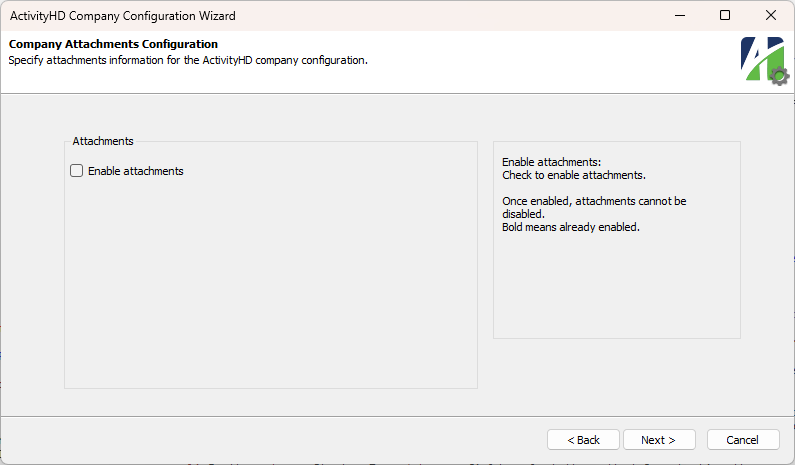
- To allow users to attach documents to records in ActivityHD, mark the Enable attachments checkbox. After attachments are enabled, they cannot be disabled.
-
Click Next >. Company updates begin.
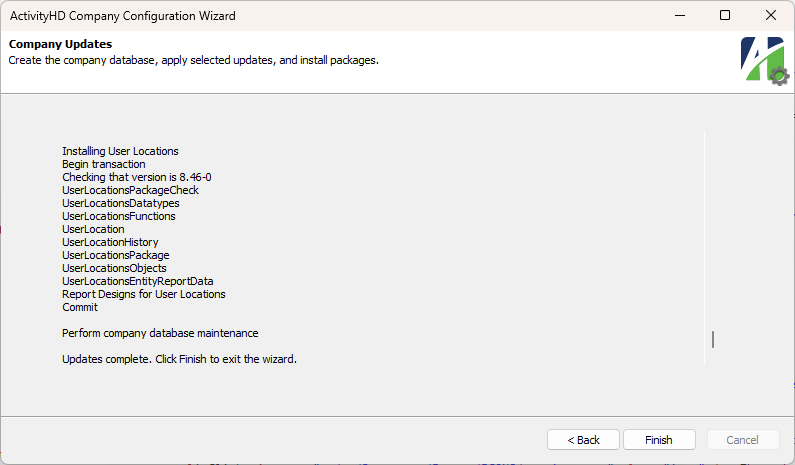
- Click Finish.
Create a company from ActivityHD Explorer
- In the Navigation pane, highlight the ActivityHD System > Companies folder.
- Click
 . The New Company window opens.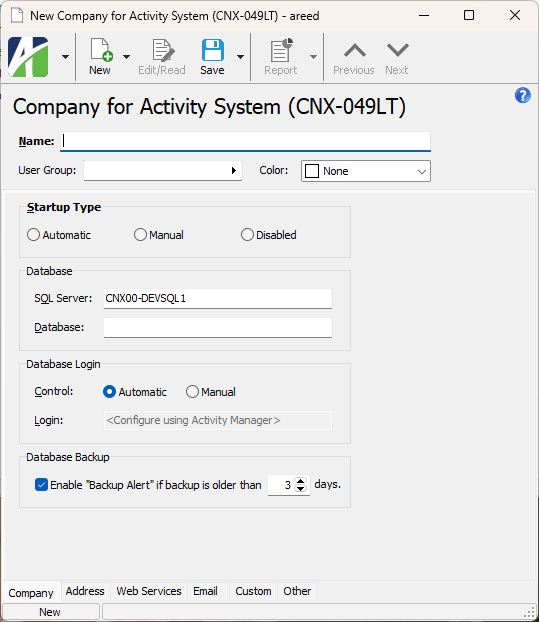
- In the Name field, enter a unique name for the company. This is the name that displays for the company in the Navigation pane.
- In the User Group field, select the system user group to associate with the authorized users for the company.
- From the Company Color drop-down list, select the highlight color to use to distinguish the company from other companies in ActivityHD Explorer. The list contains some colors suggested for esthetic purposes. If you don't want a highlight color, select "None". If you want to select a color that is not listed, select "Custom" to open the Color palette where you can select a basic color or define a custom color.
- In the Startup Type field, select the method for starting the company server. Your options are:
- Automatic. Start the company server automatically when the system server starts.
- Manual. Require the user to start the company server.
- Disabled. Prevent the company server from being started.
-
In the SQL Server field, enter the name of the SQL Server machine that holds this company's database. You can use up to 128 characters.
Note
Each company must be registered to use a different database.
Example
If the database is on a named instance of SQL Server 2017, enter the SQL Server machine name followed by "\" and then the named instance name; e.g., NTServer3\SQLServer2017.
- In the Database field, enter the name of the company database.
- In the Control field in the Database Login section, select how to provide credentials to the company database. Your options are:
Automatic. Select this option to allow the system to create a unique SQL Server login and password to access the database. AccountingWare recommends this option.
If you select this option, the Login field below is disabled and indicates you should
<Configure using Activity Manager> .Manual. Select this option if you want to provide the database login and password.
If you select this option, Login and Password fields are visible and enabled.
- In the Login field, enter the username for the owner of the company database.
- In the Password field, enter the password for the owner login.
- If you want to be reminded when the company database needs to be backed up, mark the Enable "Backup Alert" checkbox and enter the number of days since the last backup until you want the system to remind you.
- Select the Address tab. If you use ActivityHD Payroll, this is the address which prints on the W-2 forms issued by the company.
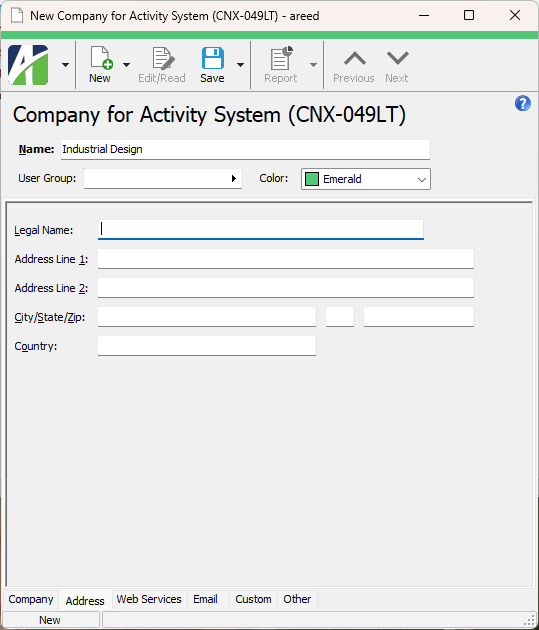
- Enter the company's Legal Name.
- Enter the company's address in the fields provided.
- Save the new company.
Select the companies to view in ActivityHD Explorer
If you do not need to see all the companies you have access to see in the navigation pane, you can remove the unneeded companies from your view. The companies which are available for a user to see are those to which the user is granted access on their system authorized user record. By default, all companies a user has access to are visible in the navigation pane. To hide the companies you do not want to see:
Select the companies to view in ActivityHD Explorer
- In the Navigation pane, right-click the Activity System folder.
-
From the shortcut menu, select Companies. The Select Companies popup opens.
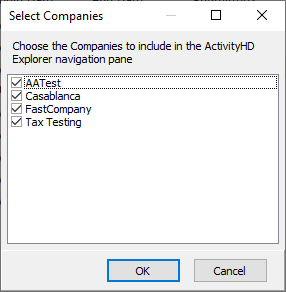
- Clear the checkbox(es) for any company(ies) you do not want to see in the navigation pane.
- Click OK.
To restore hidden companies to the navigation pane, simply open the Select Companies popup, mark the appropriate checkboxes, and click OK.
Video
Start and stop the company server
Start and stop the company server
The company server needs to be started at the time of installation. Later, a company will need to be restarted in the event of a power outage or if, for instance, someone stopped the system to perform maintenance or upgrades. You may need to stop the company server in order to obtain clean data before restoring the system. When a company is stopped, all users are disconnected.
You can start or stop a company server in one of the following ways:
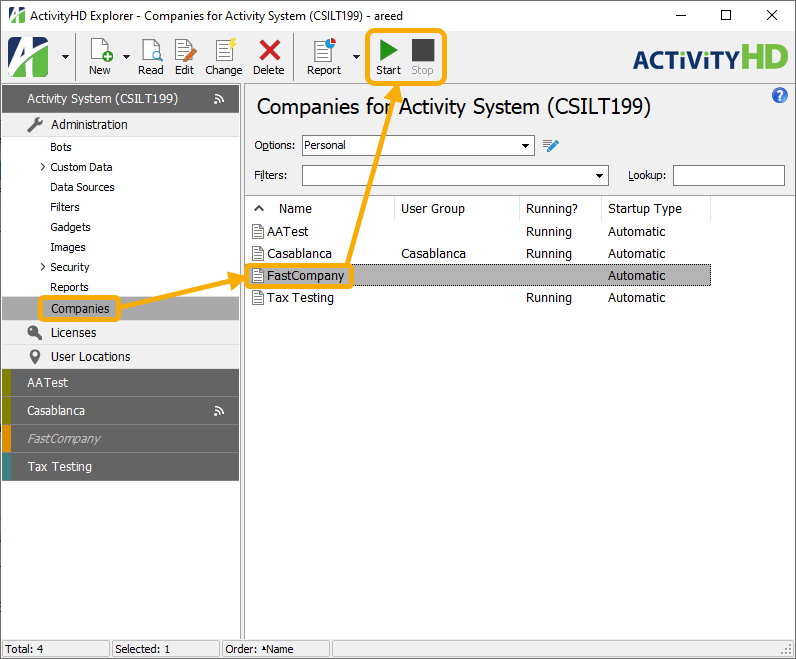
- In the Navigation pane, highlight the ActivityHD System > Companies folder, then select the company in the HD view and click
 or
or  .
.
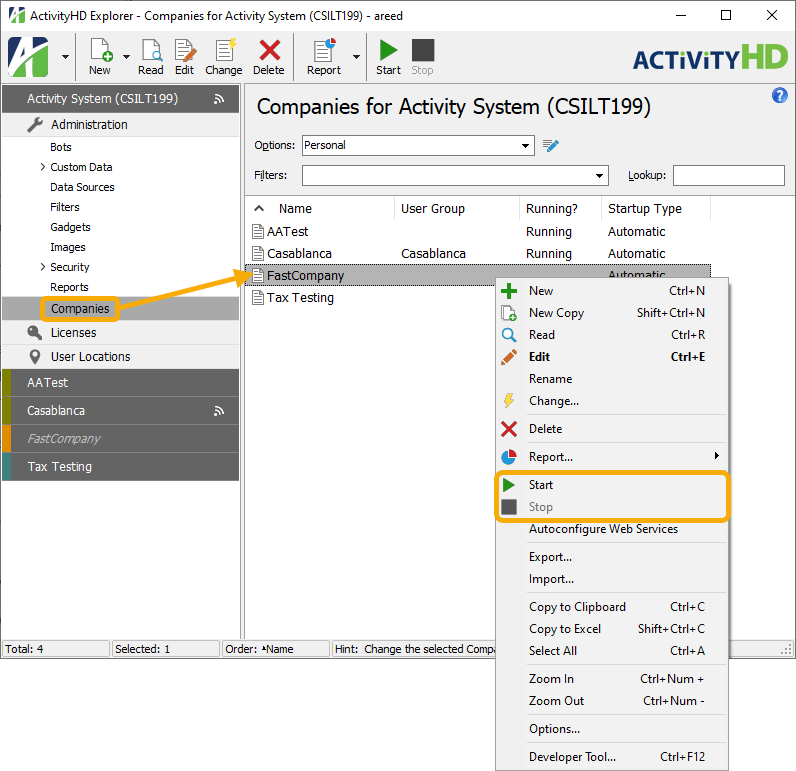
- In the Navigation pane, highlight the ActivityHD System > Companies folder, then right-click the company in the HD view and select Start or Stop from the shortcut menu.
- In the Navigation pane, highlight the ActivityHD System > Companies folder, then highlight a company in the HD view and select
 > Edit > Start or > Edit > Stop.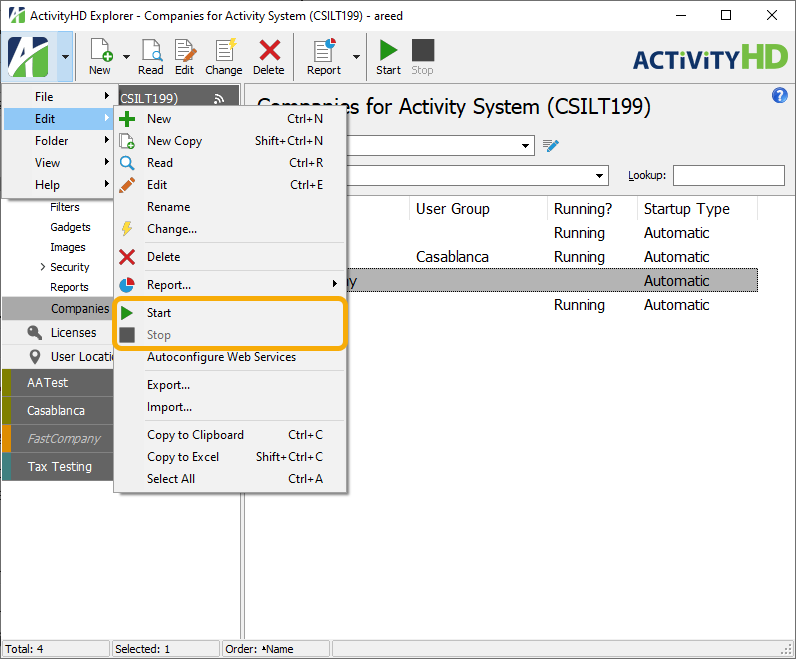
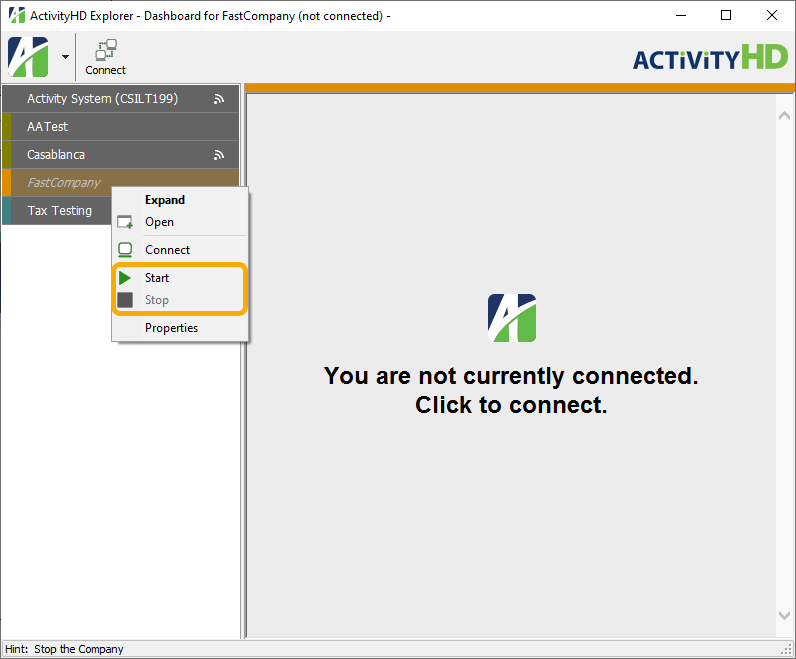
- In the Navigation pane, right-click the company folder and select Start or Stop from the shortcut menu.
Configure Web Services for a company
Part of the process for setting up ActivityHD Self-Serve is configuring the company record for Web Services.
Configure Web Services for a company
- In the Navigation pane, highlight the ActivityHD System > Companies folder.
- In the HD view, right-click the company you want to configure Web Services for and select Autoconfigure Web Services from the shortcut menu. You are prompted to confirm your action.
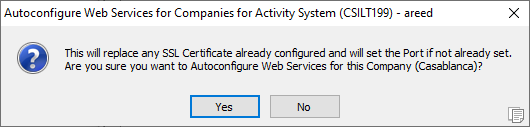
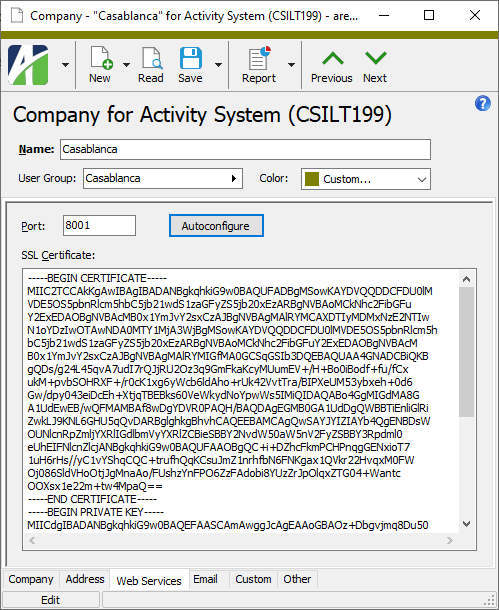
- Click Yes. ActivityHD writes the port number and SSL certificate to the company record.
Override system SMTP settings for a company
Override system SMTP settings for a company
To support certain email processes in ActivityHD such as Reset Password, it is necessary to set up an SMTP server for outgoing mail. System SMTP settings are configured through ActivityHD Manager. Companies inherit the system SMTP settings unless the system settings are overridden. Use this tab ONLY if you need to override one or more of the system SMTP settings for the company. Any settings which are not overridden are still inherited from the system SMTP settings. Settings which are overridden are displayed in bold font.
- In the Navigation pane, highlight the Activity System > Companies folder.
- In the HD view, locate and double-click the company for which you need to override SMTP server information. Its record opens in the Company window.
-
Select the Email tab.
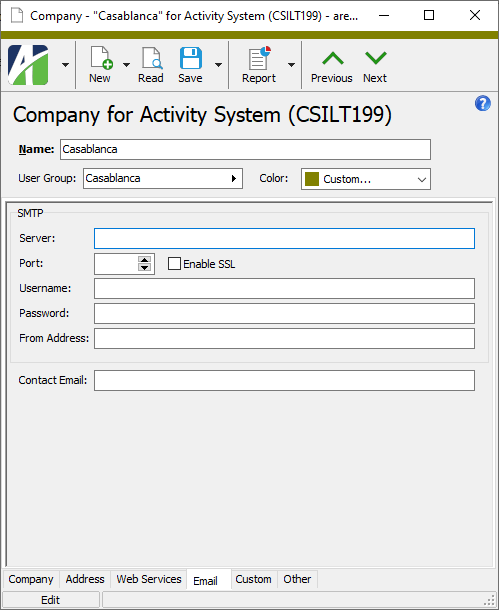
- In the Server field, enter the name of the outgoing mail server.
- In the Port field, enter the port number assigned to the outgoing mail server.
- To enable the Secure Sockets Layer (SSL) protocol to provide a more secure connection, mark the Enable SSL checkbox.
- In the Username field, enter the email account name.
- In the Password field, enter the password for the email account.
- In the From Address field, enter the address to use as the sender's address on outgoing email.
- In the Contact Email field, enter the email address of the person to contact about SMTP information.
- Save your changes.
Perform only the steps below for items which need to differ from the system SMTP settings.
Connect to a company as an administrator
Connect to a company as an administrator
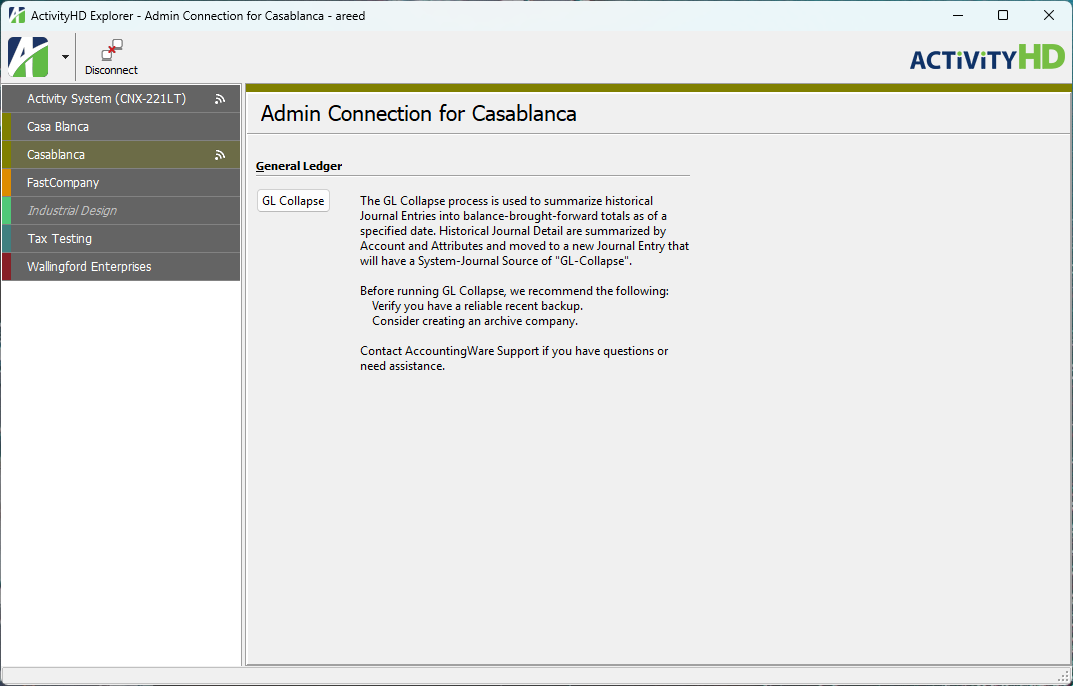
The Connect as Admin feature provides a way to perform administrative tasks that require exclusive user access to the database. As of ActivityHD 9.21-0, the only process which uses this feature is GL Collapse.
Connect as Admin limits what can be performed in an Admin connection to only registered Admin tasks. The menu item is only visible for company authorized users with Admin access. The Connect as Admin menu item is accessible when the company is put in a "Disconnect" state by right-clicking the company in the Navigation pane and select "Disconnect". Once disconnected, right-click again in the Navigation pane and select "Connect as Admin".
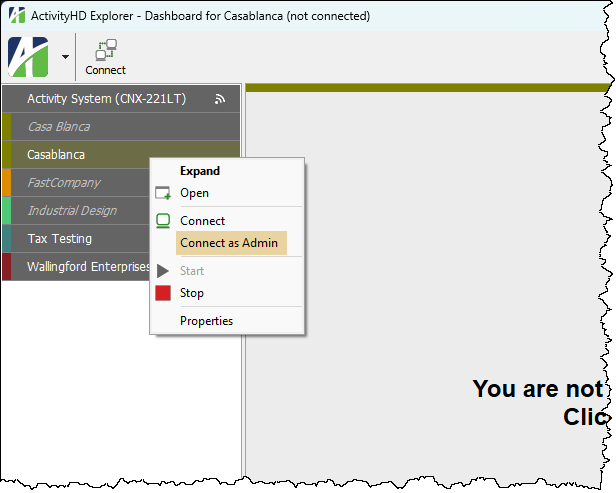
The "CompanyConnections" resource lock provides exclusive connection access. If other users are connected to the company, ActivityHD denies the connection as Admin and provides a list of the other users who are connected.
The Company Connections lock is held by 2 users.
<User2>
<User3>
Conversely, other users are not allowed to connect to a company when another user is connected as an Admin. The Company folder shows a lock icon to advise other users of the connection. Furthermore, if a user attempts to connect when a user is connected as Admin, they will see a message similar to this:
The Company Connections lock is held by <User1>.
The Admin tasks that are available are shown in the view pane.
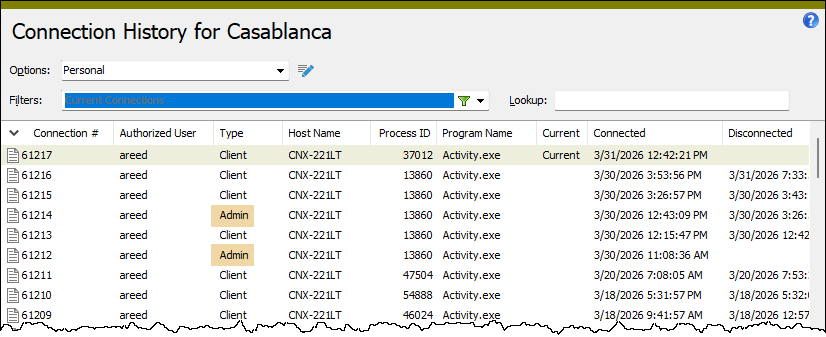
In addition, you can use the Connection History HD view to see a historical record of Admin connections.
Companies Listing
Purpose
The Companies Listing provides a list of the companies set up in your system.
Content
For each company included on the report, the listing shows:
- company name
- legal name
- SQL Server name
- database name
- database login name
- startup type
- backup alert status.
In addition, you can include one or more of the following:
- address
- timestamps
- memos
- custom fields.
The following total appears on the report:
- record count.
Print the report
- In the Navigation pane, highlight the ActivityHD System > Companies folder.
- Start the report set-up wizard.
- To report on all or a filtered subset of companies:
- Right-click the Companies folder and select Select and Report > Companies Listing from the shortcut menu.
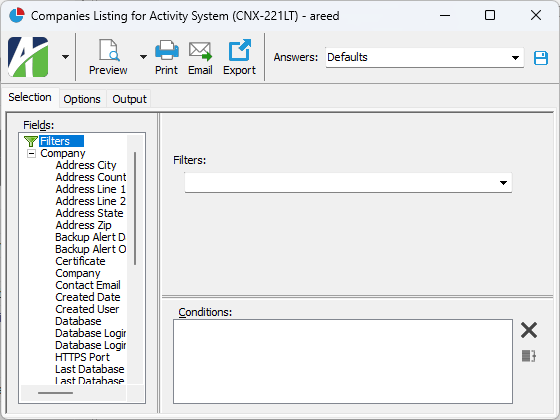
- On the Selection tab, define any filters to apply to the data.
- To report on specifically selected companies:
- In the HD view, select the companies to include on the report. You can use Ctrl and/or Shift selection to select multiple records.
- Click
 and select Companies Listing from the drop-down menu.
- To report on a particular company from the Company window:
- In the HD view, locate and double-click the company to report on. The Company window opens with the company loaded.
- Click and select Companies Listing from the drop-down menu.
- To report on all or a filtered subset of companies:
- Select the Options tab.
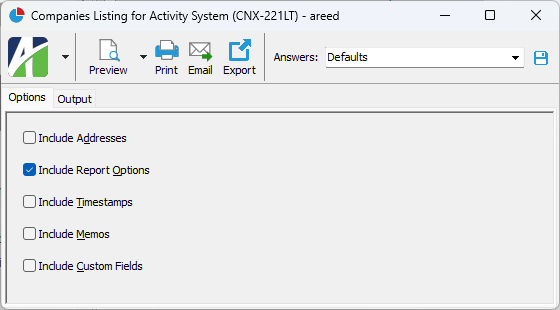
- Mark the checkbox(es) for the additional information to include:
- Addresses
- Report Options. To include a section at the end of the report with the report settings used to produce the report, leave the checkbox marked. To produce the report without this information, clear the checkbox.
- Timestamps
- Memos
- Custom Fields (only visible if custom fields are set up)
- Select the Output tab.
- In the Design field, look up and select the report design to use.
- In the toolbar, click the icon for the type of output you want:
 - Provides access to two preview options.
- Preview - Click the icon or click the drop-down arrow and select Preview from the drop-down menu to view the report in the Crystal Reports viewer.
- Preview to PDF - Click the drop-down arrow next to the icon and select Preview to PDF to view the report in the PDF reader.
 - Opens the Print dialog so that you can select and configure a printer and then print a paper copy of the report.
 - Opens the Report Email dialog so that you can address and compose an email that the report will be attached to. For best results, ensure your email client is running before you attempt to send a report via email.
 - Opens a drop-down menu with two export options:
 - Export Report - Opens a dialog so that you can save the report to a file. File types include Crystal Reports (.rpt), PDF (.pdf), Microsoft Excel (.xls), Microsoft Word (.doc), rich text (.rtf), and XML (.xml).
- Export Data - Opens a dialog so that you can export report data to XML or JSON file format.
- From
- The email account from which to send the email. Valid options are:
- Windows user default account. Sends email using the user's Windows default email account. For most users, this is the account configured in Outlook or another email client application.
- Server personal. Sends email using the email configuration for the system or company server and the email address on the current user's authorized user record. The authorized user record must have a confirmed email address.
- Server generic. Sends email using the email configuration and "from" address for the system or company server. This option requires "Send generic" access to the Server Email resource.
- To
- The email address(es) to which to send the email. Separate email addresses with semi-colons.
- CC
- The email addresses to copy on the email. Separate email addresses with semi-colons.
- BCC
- The email addresses to blind copy on the email. Separate email addresses with semi-colons.
- Subject
- The subject line.
- Text box
- The body of the email.
Data extensions
The following data extension is available for the report:
- Companies
Company Record ID
Press F3 to look up the value.
If a value is already selected, you can press F4 to open the record in its native editor.
Company tab
- Automatic. Start the company server automatically when the system server starts.
- Manual. Require the user to start the company server.
- Disabled. Prevent the company server from being started.
Note
Each company must be registered to use a different database.
The name of the SQL Server machine that holds the company database. This field can accept up to 128 characters.
Example
If the database is on a named instance of SQL Server 2017, enter the SQL Server machine name followed by "\" and then the named instance name; e.g., NTServer3\SQLServer2017.
- Automatic. The system creates a unique SQL Server login and password to access the database. This option is recommended.
- Manual. The database owner provides the database login and password.
If "Automatic" is selected in the Control field, this field is disabled and displays "
If "Manual" is selected in the Control field, this field shows the username specified for the owner of the company database.
If "Automatic" is selected in the Control field, this field is not visible.
If "Manual" is selected, this field is visible and shows the password for the user login.
Address tab
Enter your company's legal name and address information. If you use ActivityHD Payroll, this is the address which prints on the W-2 forms issued by the company.
Web Services tab
Email tab
The settings in this tab are used to override the SMTP settings at the company level which are otherwise inherited from the system SMTP settings. System SMTP settings are configured through ActivityHD Manager.
Settings can be overridden in piecemeal fashion. Any settings which are not overridden are still inherited from the system SMTP settings. Settings which have been overridden at the company level are displayed in bold font.
Custom tab
This tab is visible if custom fields exist for the entity. At a minimum, if there are custom fields, a Fields subtab will be present. One or more additional categories of subtabs may also be visible.
Fields subtab
This tab prompts for values for any custom fields set up for entity records of this entity type. Respond to the prompts as appropriate.
References subtab
This tab is visible if other records reference the current record.
Example
Suppose a custom field exists on PRCodes that references an ARCode. On the ARCode record, on the Custom > References subtab, you can view all the PRCodes which reference that ARCode.
Exchange Folder subtab
This tab is visible only if you set up a custom field with a data type of "Exchange Folder". The label on this tab is the name assigned to the custom field.
This tab shows the contents of the specified Exchange folder.
File subtab
This tab is visible only if you set up a custom field with a data type of "File". The label on the tab is the name assigned to the custom field.
This tab renders the contents of the specified file according to its file type.
Internet Address subtab
This tab is visible only if you set up a custom field with a data type of "Internet Address". The label on this tab is the name assigned to the custom field.
This tab shows the contents of the specified web page.
Network Folder subtab
This tab is visible only if you set up a custom field with a data type of "Network Folder". The label on this tab is the name assigned to the custom field.
This tab shows the contents of the specified network folder.
Authorized Users tab
The Authorized Users pane shows the Authorized Users HD view filtered to show all authorized users for the selected company.
Double-click a row in the pane to drill down to its record in the Authorized User window.
Attachments tab
The Attachments tab is visible if any record for a given entity has an attachment. If the Attachments tab is not visible, this implies that no record of the entity type has an attachment on it; however, once an attachment is added to any record of the entity type, the Attachments tab will become available.
Other tab
Companies security
Common accesses available on companies
| Access | A user with this access can... |
|---|---|
| Change | Use the mass change action on companies. |
| Change Logs | |
| Custom Fields | Create and edit custom fields for companies. |
| Data | Have read-only access to companies from anywhere in the software (e.g., field validations, filters, date expressions). |
| Delete | Delete companies. |
| Edit | Edit company records. |
| Export | Export company records from ActivityHD. |
| Import | Import company records into ActivityHD. |
| New | Create new company records. |
| Read | Have read-only access to company records. |
| Report | Run reports with company information. |
| Report Designs | Create and edit report designs with company information. This access enables the Report Designs button on the Output tab of report dialogs. |
| Shared Answers | Create and edit saved answers related to companies. |
| Shared Filters | Create and edit shared filters on companies. |
| Visible | View the Companies folder in the Navigation pane. |
|
6224 34th Street Lubbock, TX 79407 806.687.8500 | 800.354.7152 |
© 2026 AccountingWare, LLC All rights reserved. |