Maintain Company options
Maintain Company options
- In the Navigation pane, highlight a company folder.
- Right-click the company folder and select Options from the shortcut menu. The Options dialog box opens with the Company branch selected.
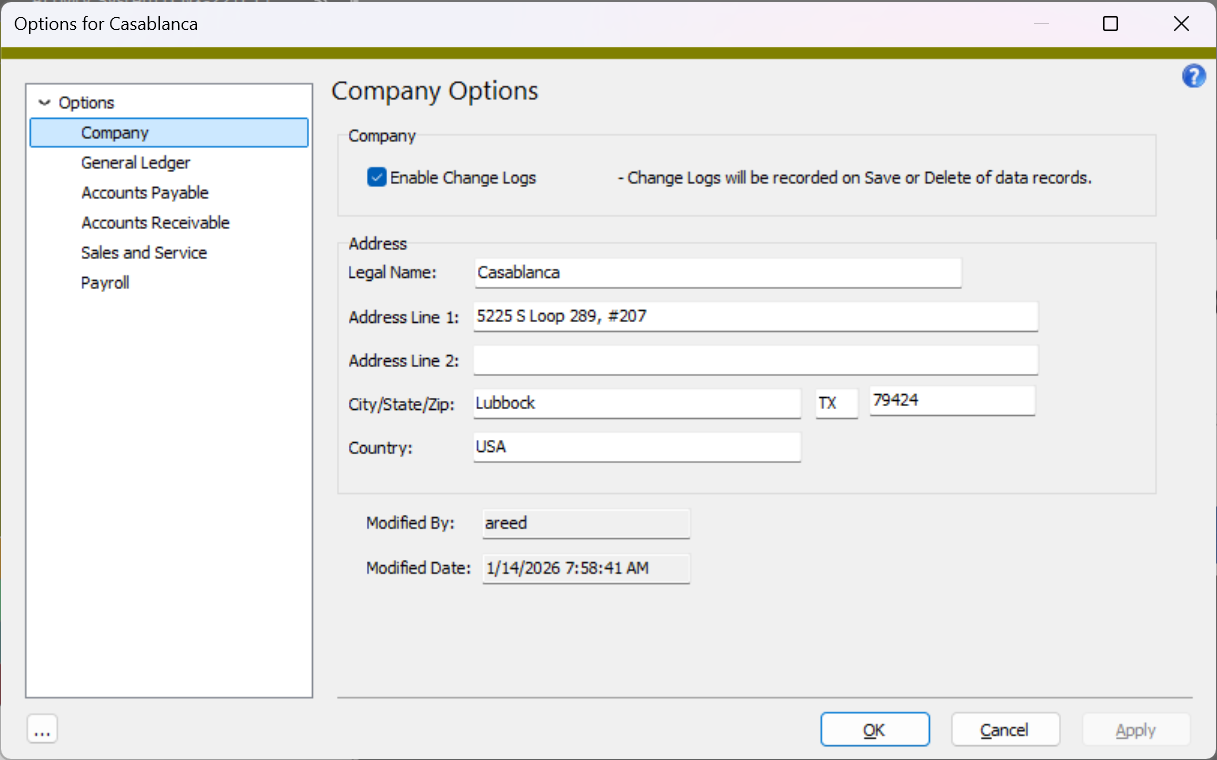
- To enable change logs so that saves and deletes of data records are recorded, ensure the Enable Change Logs checkbox is marked.
- In the Legal Name field, enter the company's legal name as used on legal documents, contracts, and tax filings.
- In the Address Line 1 field, enter the company's address.
- If additional space is needed for the company's address, enter it in the Address Line 2 field.
- Enter the company's City, State, and Zip.
- In the Country field, enter the postal abbreviation for the country of the company's mailing address.
- When you finish, click OK.
Note
Only users with "Options (Admin)" permission on the Company resource can edit change log settings.
Note
Only users with "Options (Controller)" permission on the Company resource can edit legal name and address settings.
Company Options tab
If marked, indicates that change logs for data records are enabled for the current company.
|
6224 34th Street Lubbock, TX 79407 806.687.8500 | 800.354.7152 |
© 2026 AccountingWare, LLC All rights reserved. |