Bank statements in ActivityHD correspond to the actual statements you receive from your bank to reconcile your accounts. You can keep historical statements indefinitely.
If there are transactions on your actual bank statement, such as additional charges, fees, or deposits, use the table on the Adjustments tab to manage these items. Each adjustment creates a posting to the reconciliation account and a posting to the offset account you specify. The adjustments for a particular statement are aggregated into a single journal entry. When you merge a statement's adjustment journal entry, the necessary bank transactions are created automatically and become available on the appropriate statement for reconciliation.
A reconciled transaction appears as an "outstanding" transaction when you view statements prior to the statement the transaction was reconciled on. This allows the transactions on the Outstanding tab of historical statements to match the outstanding total on those statements.
Create a bank statement whenever you receive an actual statement from the bank.
Create a bank statement
- In the Navigation pane, highlight the Bank Reconciliation > Statements folder.
- Click
 . The New Bank Statement window opens.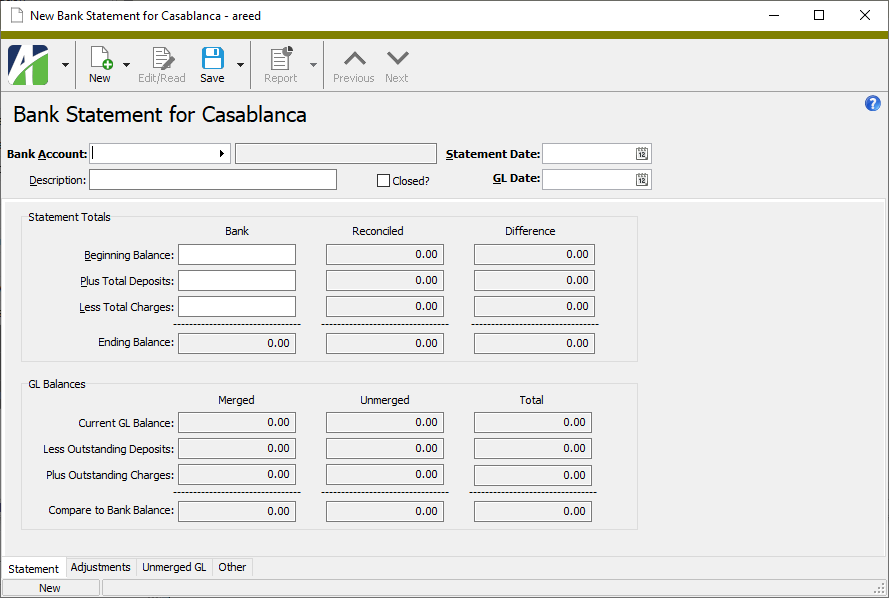
- Select the Bank Account the statement refers to.
- Enter a Description of the bank statement. You can use up to 40 characters.
- Enter the Statement Date that appears on the bank statement.
- The GL Date field defaults to the Statement Date you entered. If you need to change the date, the new reconciliation date must fall on or after the statement date in order to include all transactions cleared by the bank statement.
-
In the Beginning Balance, Plus Total Deposits, and Less Total Charges fields, enter the corresponding amounts from the actual bank statement.
Note
ActivityHD uses these fields to calculate the Ending Balance.
- When you finish, save your changes. Notice that Outstanding and Reconciled tabs are added to the window.
Create adjustments on bank statements for fees, interest, transfers, and other transactions. Each adjustment creates a posting to the reconciliation account and a posting to the offset account which is specified on the adjustment record. Separate journal entries are created for each statement's adjustments. When a statement's adjustment journal entry is merged, bank transactions are automatically created for the reconciliation account, making them available for reconciliation.
Create adjustments
- In the Navigation pane, highlight the Bank Reconciliation > Statements folder.
- In the HD view, highlight and double-click the statement you need to enter adjustments against to open it in the Bank Statement window.
-
Select the Adjustments tab.
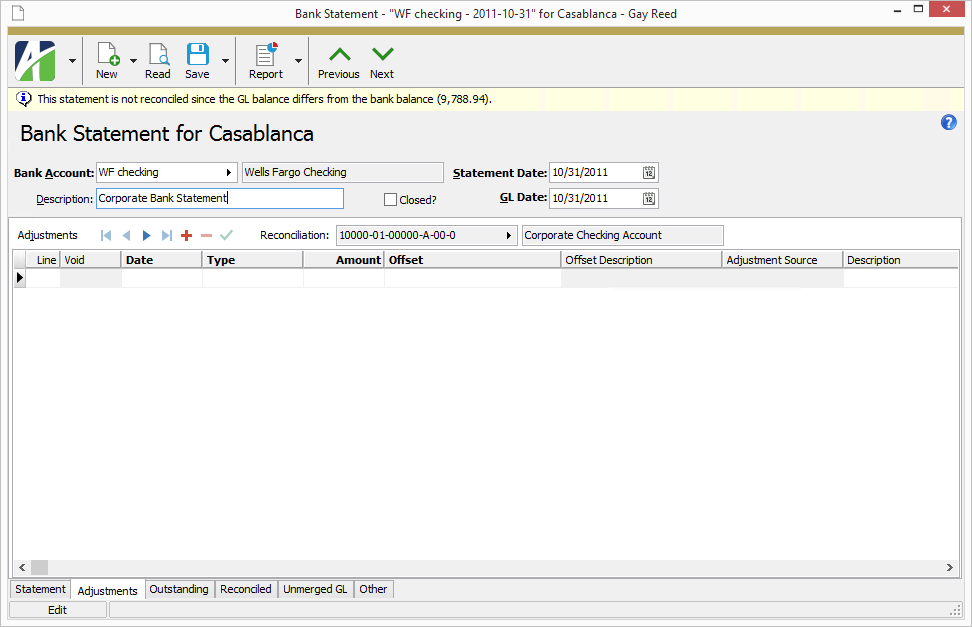
- In the Adjustments table, enter the following for each adjustment you need to make:
In the Reconciliation field above the table, select the reconciliation account for the adjustment you are entering. If only one GL account is registered for a bank account, that account number displays.
Note
If multiple GL accounts are registered to the bank account, be sure to select the GL account for each adjustment you enter.
- In the Date column, enter the date of the adjustment.
- From the Type dropdown, select the type of adjustment transaction. The list below indicates whether the adjustment type increases (+) or decreases (-) the reconcilation account. Your options are:
- Fee (-)
- Fee Correction (+) - Use this adjustment type to indicate a fee error by the bank.
- Interest (+)
- Interest Correction (-) - Use this adjustment type to indicate an interest error by the bank.
- Transfer In (+)
- Transfer Out (-)
- Other In (+)
- Other Out (-)
- Enter the Amount of the adjustment.
- In the Offset column, select the offset account to which to post the offsetting transaction.
- The table contains one column for each active attribute with statement usage. For each attribute, select the appropriate attribute value for the adjustment line.
- Enter a Description for the adjustment.
- If needed, enter a Memo about the adjustment.
- When you finish, save your changes.
- To make the adjustment available for reconciliation, you must merge the GL entry created for the adjustment. To do so:
- Select the Unmerged GL tab, then select the Unmerged GL Entries subtab.
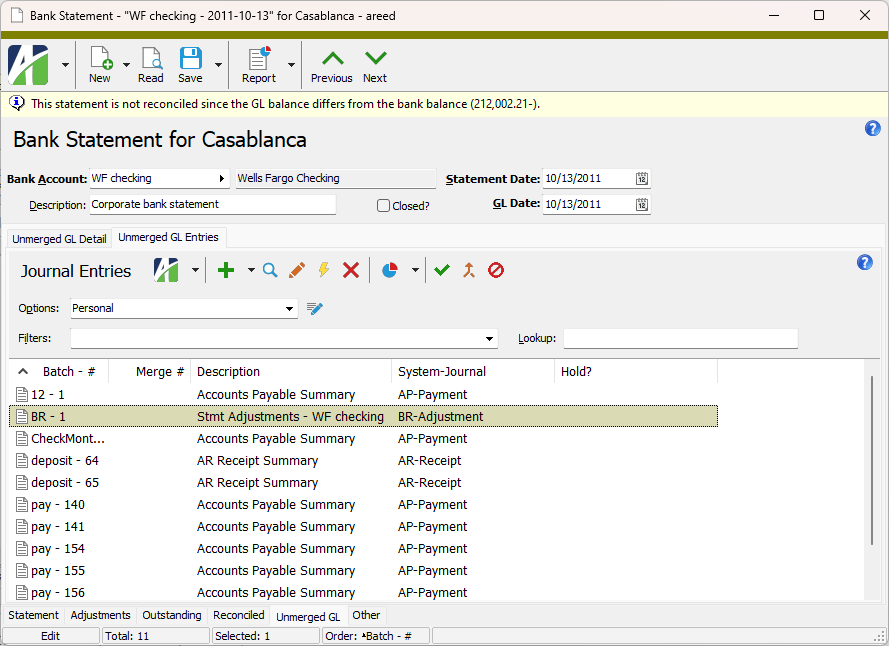
- Locate and highlight the adjustment entry to merge.
- In the local toolbar, click
 . The Merge Journal Entries process starts and you are prompted to confirm that you want to merge the adjustment journal entry.
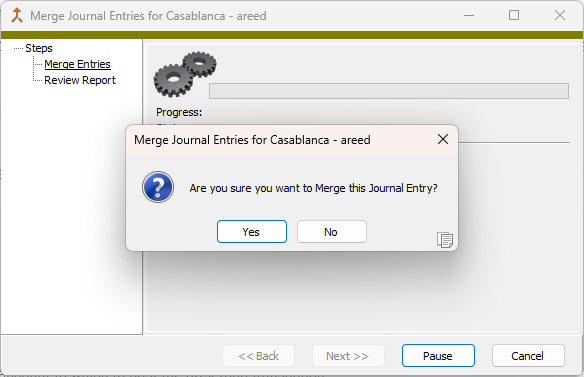
- Click Yes. The process completes.
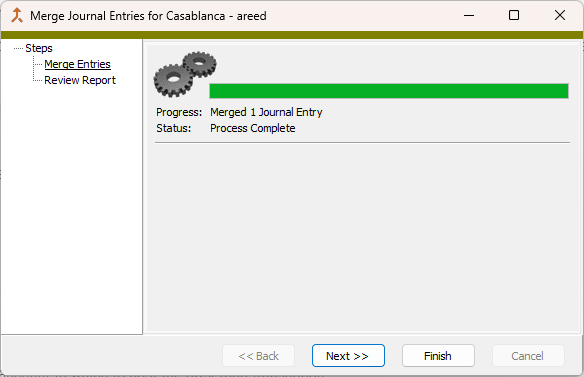
- Click Finish. The adjustment transaction is now available for reconciliation on the Outstanding tab.
- Select the Unmerged GL tab, then select the Unmerged GL Entries subtab.
 Reconcile the transactions on a bank statement
After you create a statement, you can reconcile transactions to the statement. Reconciliation simply means assigning transactions to a bank statement.
Reconcile a bank statement
- In the Navigation pane, highlight the Bank Reconciliation > Statements folder.
- In the HD view, locate and double-click the statement to reconcile to open it in the Bank Statement window.
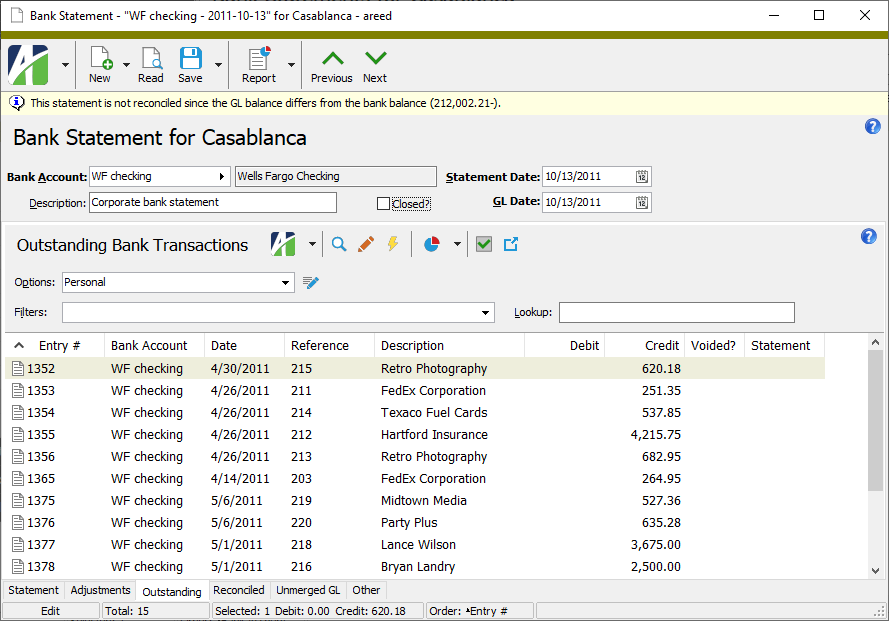
- Select the Outstanding tab.
-
In the Outstanding Bank Transactions pane, locate and highlight the transaction(s) to clear. You can use Ctrl and/or Shift selection to select multiple transactions.
Tip
Select a transaction in the HD view and click
 to drill down to the transaction record.
 - Click
 . The Reconcile Transactions wizard starts.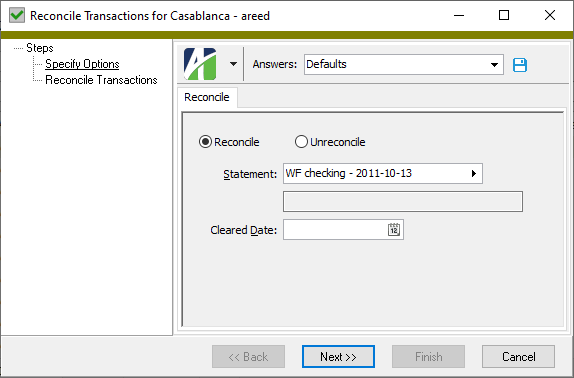
- Enter the Cleared Date to apply to the selected transactions.
- Click Next >>. ActivityHD prompts you to confirm your action.
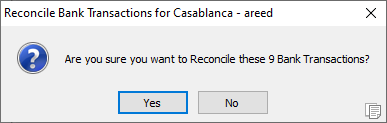
- Click Yes. ActivityHD notifies you of the results.
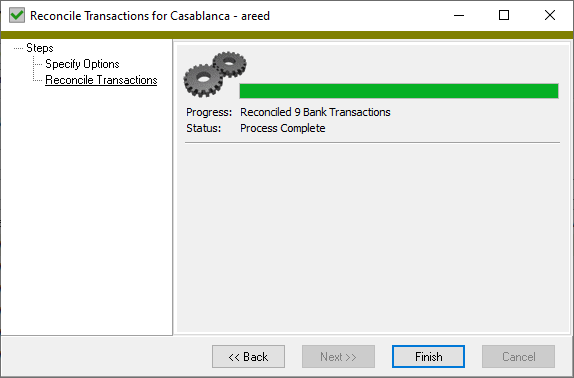
- Click Finish.
Unreconcile a transaction on a bank statement
Occasionally you may reconcile a transaction by mistake and need to "unreconcile" it, or return it to the list of transactions to be reconciled. Unreconciling a transaction removes its assignment to a bank statement and clears the statement date. To do this, you'll use the Reconcile Transactions wizard.
- In the Navigation pane, highlight the Bank Reconciliation > Statements folder.
- In the HD view, locate and double-click the statement with the transaction(s) to be unreconciled to open it in the Bank Statement window.
- Select the Reconciled tab.
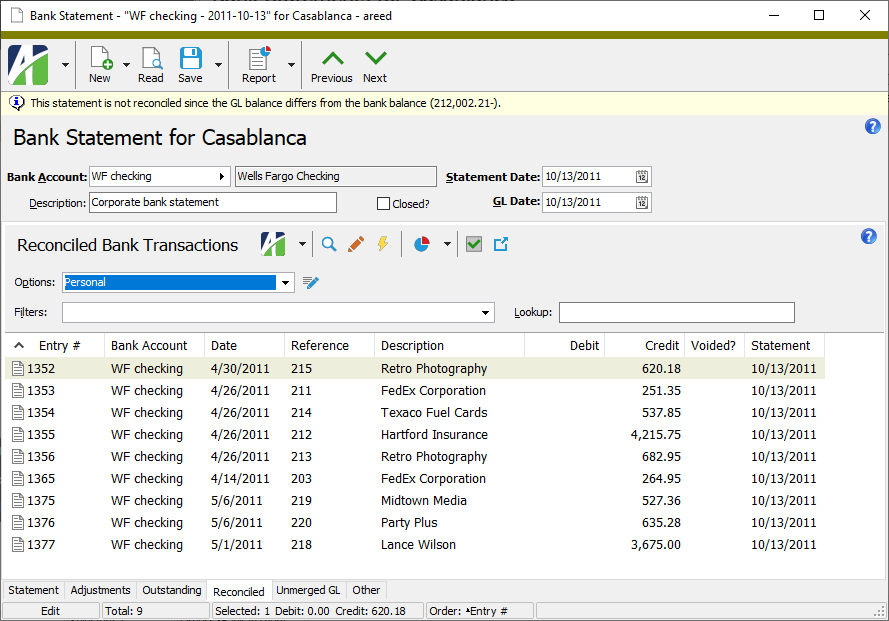
- In the Reconciled Bank Transactions pane, locate and highlight the transaction(s) to unreconcile. You can use Ctrl and/or Shift selection to select multiple transactions.
- Click . The Reconcile Transactions wizard starts.
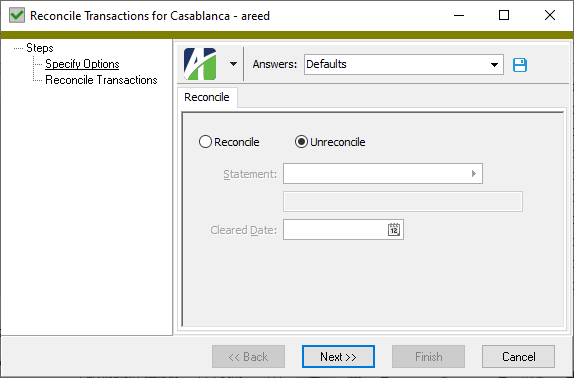
- Click Next >>. ActivityHD prompts you to confirm your action.
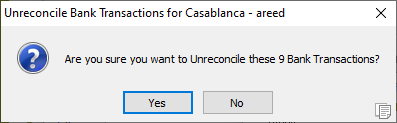
- Click Yes. ActivityHD notifies you of the results.
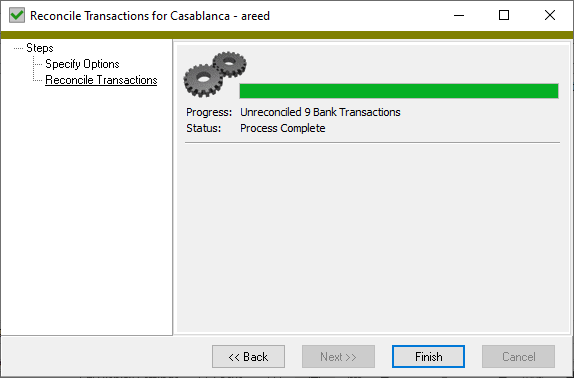
- Click Finish.
A merged adjustment which is found to be incorrect can be voided. When you select "Void" on an adjustment, a reversal adjustment is automatically created on the statement.
Void a merged adjustment
- In the Navigation pane, highlight the Bank Reconciliation > Statements folder.
- In the HD view, highlight and double-click the statement with an adjustment you need to void to open it in the Bank Statement window.
-
Select the Adjustments tab.
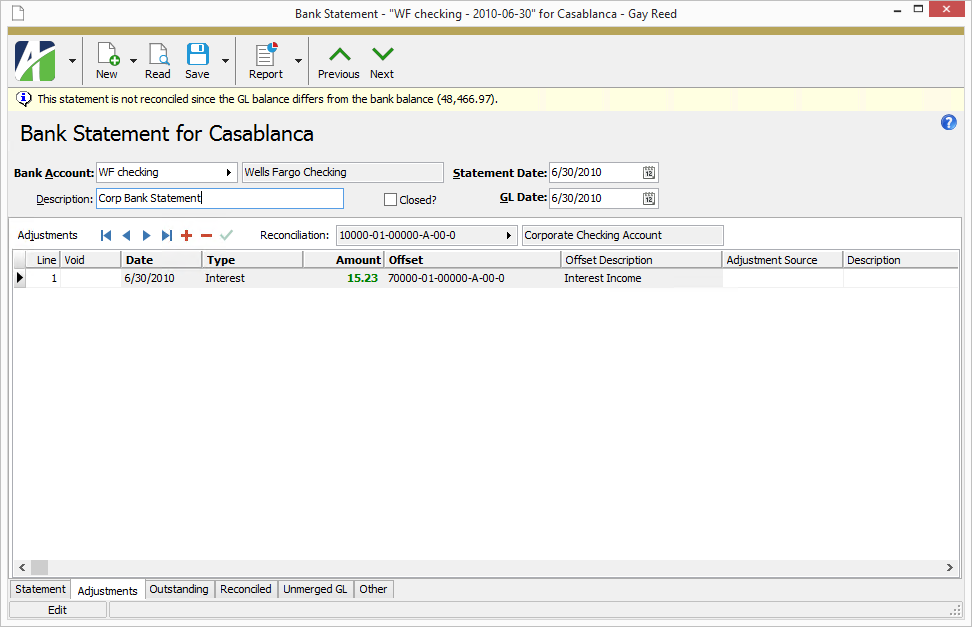
- In the Adjustments table, locate the adjustment to void.
-
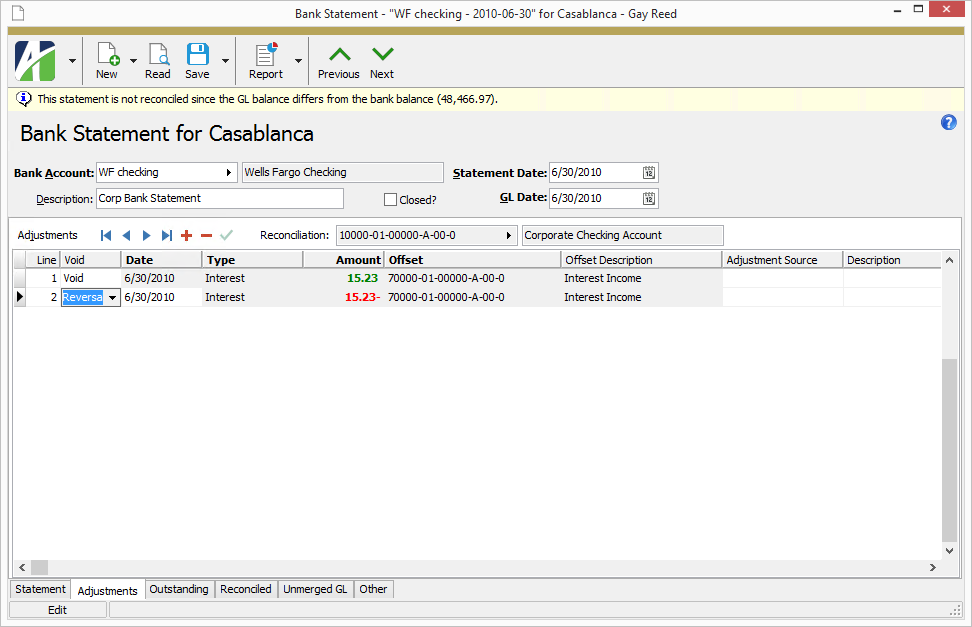
In the Void column of the adjustment you need to void, select "Void". A reversal adjustment is created automatically and added to the table.
-
In the Date column of the reversal record, enter the appropriate date for the reversal transaction if the default date is not correct.
Note
Dates on reversals are the only adjustment dates which can be later than the GL date. This flexibility allows the reversal to occur in a different accounting period if needed.
- Save your changes.
Additional notes
- Attributes on reversal adjustments are protected from manual changes.
- Any attribute changes to voided adjustments are automatically updated to the corresponding reversal adjustment.
- If the Type on an adjustment is changed from one that allows attributes to one that does not, the attribute values are cleared.
- If an attribute set to Post to GL is changed to not post to GL, the GL entries for both the void and reversal adjustment are updated with the changes--even for merged GL entries.
- Posting control restrictions can prevent changes to attributes. If an attribute is set to Follow Calendar Post Control, and the period for the GL date is closed to postings from Bank Reconciliation, an error is returned and the attributes are not changed. An error also occurs if the GL entry is locked by another user.
Tip
You can hide closed bank statements from the Bank Statements HD view by ensuring the Include Closed checkbox above the HD view is cleared. If you want to see all bank statements, whether open or closed, mark the checkbox.
When you close a bank statement, ActivityHD will not allow further changes to the statement. Once a bank statement is closed:
- The bank statement cannot be deleted.
- Transactions on the statement cannot be reconciled or unreconciled.
- You will receive an error if you try to delete the last register control that defines the GL account associated with the transactions on the statement.
To close a bank statement, open the statement record, mark the Closed checkbox, and save your changes.
If you must make changes to a closed statement, clear the Closed checkbox, make your changes, then reset the Closed flag.
Learn what the fields in the Bank Statement window mean
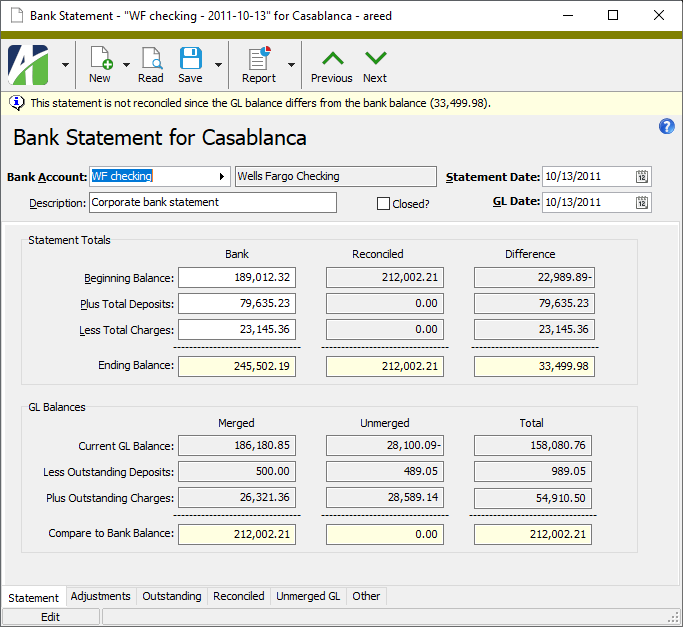
Click the blue dot to the right of a field in the Statement Totals or GL Balances sections of the image below to learn what the value in the field represents.
Reconciliation indicator
This banner indicates the difference in the GL balance and the bank balance. The banner disappears when the statement is reconciled.
Beginning Balance (Bank)
The beginning balance from the actual bank statement.
Total Deposits (Bank)
The total amount of deposits from the actual bank statement.
Total Charges (Bank)
The total amount of charges from the actual bank statement.
Ending Balance (Bank)
The statement ending balance calculated based on the beginning balance, total deposits, and total charges entered. This field is shaded yellow until the statement is reconciled.
Current GL Balance (Merged)
The total of all bank transactions, cleared or not, as of the GL date.
Outstanding Deposits (Merged)
The total of all outstanding deposit transactions on the GL date that were outstanding as of the bank statement date.
Outstanding Charges (Merged)
The total of all outstanding charge transactions on the GL date that were outstanding as of the bank statement date.
Compare to Bank Balance (Merged)
The adjusted reconciliation balance calculated from the ending book balance, outstanding deposits, and outstanding charges. The reconciliation is complete when this value equals the statement ending balance. This field is shaded yellow until the statement is reconciled.
Beginning Balance (Reconciled)
The beginning balance of reconciled entries as of the current bank statement.
Total Deposits (Reconciled)
The total amount of deposits reconciled to the current bank statement thus far.
Total Charges (Reconciled)
The total amount of charges reconciled to the current bank statement thus far.
Ending Balance (Reconciled)
The calculated ending balance based on the deposits and charges reconciled to the current bank statement thus far. This field is shaded yellow until the statement is reconciled.
GL Balance (Unmerged)
The total of unmerged bank transactions as of the GL date.
Outstanding Deposits (Unmerged)
The total of all unmerged deposits on the GL date.
Outstanding Charges (Unmerged)
The total of all unmerged charges on the GL date
Transaction Balance (Unmerged)
The unmerged transaction balance calculated from the unmerged GL balance, unmerged deposits, and unmerged charges. The unmerged entries balance when this value equals zero. This field is shaded yellow until the statement is reconciled.
Beginning Balance (Difference)
The difference in the bank's beginning balance and the book beginning balance.
Total Deposits (Difference)
The difference in the bank's total deposits for the statement and the deposits reconciled to the statement thus far.
Total Charges (Difference)
The difference in the bank's total charges for the statement and the charges reconciled to the statement thus far.
Ending Balance (Difference)
The difference in the bank's ending balance for the statement and the ending balance calculated from transactions reconciled to the statement thus far. This field is shaded yellow until the statement is reconciled.
GL Balance (Total)
The total of all bank transactions plus unmerged bank transactions as of the GL date.
Outstanding Deposits (Total)
The total of all outstanding deposits plus unmerged deposits on the GL date that were outstanding as of the bank statement date.
Outstanding Charges (Total)
The total of all outstanding charges plus unmerged charges on the GL date that were outstanding as of the bank statement date.
Balance (Total)
The total of the current bank balance plus the unmerged transaction balance. When the statement is reconciled, this total should equal the current bank balance. This field is shaded yellow until the statement is reconciled.
Bank Statements Listing
Purpose
The Bank Statements Listing provides a list of bank statements recorded in Bank Reconciliation.
Content
For each bank statement included on the report, the listing shows:
- bank account name and statement date
- description
- GL date
- whether the statement is closed
- a banner noting the difference in the GL balance and the bank balance, if the statement is not reconciled.
In addition, you can include one or more of the following:
- statement and reconciliation totals
- unmerged entries not on hold
- outstanding detail
- reconciled detail
- timestamps
- memos
- custom fields.
The following totals appear on the report:
- record count
- statement totals (optional)
- GL reconcilation totals (optional)
- outstanding transaction count (optional)
- outstanding transaction total (optional)
- reconciled transaction count (optional)
- reconciled debits total (optional)
- reconciled credits total (optional).
Print the report
- In the Navigation pane, highlight the Bank Reconciliation > Statements folder.
- Start the report set-up wizard.
- To report on all or a filtered subset of bank statements:
- Right-click the Statements folder and select Select and Report > Bank Statements Listing from the shortcut menu.
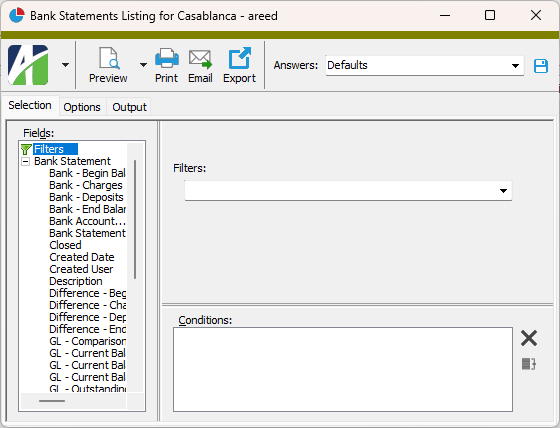
- On the Selection tab, define any filters to apply to the data.
- To report on specifically selected bank statements:
- In the HD view, select the bank statements to include on the report. You can use Ctrl and/or Shift selection to select multiple records.
- Click
 .
.
- To report on a particular bank statement from the Bank Statement window:
- In the HD view, locate and double-click the bank statement to report on. The Bank Statement window opens with the bank statement loaded.
- Click .
- To report on all or a filtered subset of bank statements:
- Select the Options tab.
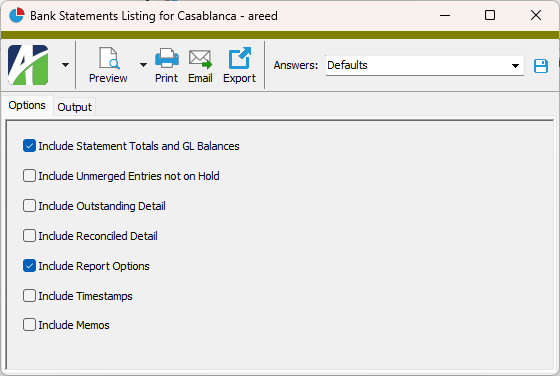
- Mark the checkbox(es) for the additional information to include:
- Statement and Reconciliation Totals
- Unmerged Entries not on Hold
- Outstanding Detail
- Reconciled Detail
- Report Options. To include a section at the end of the report with the report settings used to produce the report, leave the checkbox marked. To produce the report without this information, clear the checkbox.
- Timestamps
- Memos
- Custom Fields (only visible if custom fields are set up)
- Select the Output tab.
- In the Design field, look up and select the report design to use.
- In the toolbar, click the icon for the type of output you want:
 - Provides access to two preview options.
- Preview - Click the icon or click the drop-down arrow and select Preview from the drop-down menu to view the report in the Crystal Reports viewer.
- Preview to PDF - Click the drop-down arrow next to the icon and select Preview to PDF to view the report in the PDF reader.
 - Opens the Print dialog so that you can select and configure a printer and then print a paper copy of the report.
 - Opens the Report Email dialog so that you can address and compose an email that the report will be attached to. For best results, ensure your email client is running before you attempt to send a report via email.
 - Opens a drop-down menu with two export options:
 - Export Report - Opens a dialog so that you can save the report to a file. File types include Crystal Reports (.rpt), PDF (.pdf), Microsoft Excel (.xls), Microsoft Word (.doc), rich text (.rtf), and XML (.xml).
- Export Data - Opens a dialog so that you can export report data to XML or JSON file format.
- From
- The email account from which to send the email. Valid options are:
- Windows user default account. Sends email using the user's Windows default email account. For most users, this is the account configured in Outlook or another email client application.
- Server personal. Sends email using the email configuration for the system or company server and the email address on the current user's authorized user record. The authorized user record must have a confirmed email address.
- Server generic. Sends email using the email configuration and "from" address for the system or company server. This option requires "Send generic" access to the Server Email resource.
- To
- The email address(es) to which to send the email. Separate email addresses with semi-colons.
- CC
- The email addresses to copy on the email. Separate email addresses with semi-colons.
- BCC
- The email addresses to blind copy on the email. Separate email addresses with semi-colons.
- Subject
- The subject line.
- Text box
- The body of the email.
Data extensions
The following data extensions are available for the report:
- Bank statements
- Transactions
Bank Statements Report Datastream
| Field | Note |
|---|---|
| BankName | |
| BankDescription | |
| AccountName | |
| AccountDescription | |
| AccountNumber | |
| StatementGLDate | |
| StatementDescription | |
| StatementIsClosed | |
| StatementBankBeginBalance | |
| StatementBankDeposits | |
| StatementBankCharges | |
| StatementCreateDate | |
| StatementCreateUser | |
| StatementReviseDate | |
| StatementReviseUser | |
| StatementMemo | |
| StatementBookBeginBalance | |
| StatementBookDeposits | |
| StatementBookCharges | |
| StatementGLBalance | |
| StatementOutstandingDeposits | |
| StatementOutstandingCharges | |
| StatementUnmergedDebits | |
| StatementUnmergedCredits | |
| TransactionReconcilePositiveVoidDate | |
| TransactionEntrySeqno | |
| TransactionReconcileStatement | |
| TransactionReconcileClearedDate | |
| TransactionReconcileDate | |
| TransactionReconcileUser | |
| TransactionReconcileComment |
Statement Record ID
The bank account for the bank statement.
Press F3 to look up the value.
If a value is already selected, you can press F4 to open the record in its native editor.
Statement tab
Adjustments tab
Press F2 to open the Account Expand dialog box where you can look up an account number, find an account number by its alias, build the account number by segment, or view setup and setup sources.
Press F3 to look up the account.
If an account is already selected, you can press F4 to open the record in the Account window.
For rows which represent unmerged adjustments, the cells in this column are blank and disabled.
For rows which represent merged adjustments, the cells in this column are enabled and eligible to be voided if the adjustment is incorrect. To void an adjustment, select "Void" from the dropdown. A reversal adjustment is automatically created on the statement.
For rows which represent voided adjustments, the cells in this column are disabled and indicate "Reversal".
The date of the adjustment.
If the value in the Void column is "Reversal", the date is editable. Dates on reversals are the only adjustment dates which can be later than the GL date. This flexibility allows the reversal to occur in a different accounting period if needed.
- Fee
- Fee Correction
- Interest
- Interest Correction
- Transfer In
- Transfer Out
- Other In
- Other Out
Press F2 to open the Account Expand dialog box where you can look up an account number, find an account number by its alias, build the account number by segment, or view setup and setup sources.
Press F3 to look up the account.
If an account is already selected, you can press F4 to open the record in the Account window.
One column displays for each active direct attribute with statement usage. The column shows the attribute item on the offset posting for the statement adjustment for any adjustments except transfers.
Press F3 to look up the value.
If a value is already selected, you can press F4 to open the record in its native editor.
The journal detail entry created to the reconciliation account for the adjustment.
Press F3 to look up the value.
If a value is already selected, you can press F4 to open the record in its native editor.
The journal detail entry created to the offset account for the adjustment.
Press F3 to look up the value.
If a value is already selected, you can press F4 to open the record in its native editor.
Custom tab
This tab is visible if custom fields exist for the entity. At a minimum, if there are custom fields, a Fields subtab will be present. One or more additional categories of subtabs may also be visible.
Fields subtab
This tab prompts for values for any custom fields set up for entity records of this entity type. Respond to the prompts as appropriate.
References subtab
This tab is visible if other records reference the current record.
Example
Suppose a custom field exists on PRCodes that references an ARCode. On the ARCode record, on the Custom > References subtab, you can view all the PRCodes which reference that ARCode.
Exchange Folder subtab
This tab is visible only if you set up a custom field with a data type of "Exchange Folder". The label on this tab is the name assigned to the custom field.
This tab shows the contents of the specified Exchange folder.
File subtab
This tab is visible only if you set up a custom field with a data type of "File". The label on the tab is the name assigned to the custom field.
This tab renders the contents of the specified file according to its file type.
Internet Address subtab
This tab is visible only if you set up a custom field with a data type of "Internet Address". The label on this tab is the name assigned to the custom field.
This tab shows the contents of the specified web page.
Network Folder subtab
This tab is visible only if you set up a custom field with a data type of "Network Folder". The label on this tab is the name assigned to the custom field.
This tab shows the contents of the specified network folder.
Outstanding tab
The Outstanding Bank Transactions pane shows the Bank Transactions HD view filtered to show all outstanding bank transactions as of the statement date for the selected bank account.
Double-click a row in the pane to start the Reconcile Transactions wizard for the selected transaction.
Reconciled tab
The Reconciled Bank Transactions pane shows the Bank Transactions HD view filtered to show all bank transactions reconciled on the selected bank statement.
Double-click a row in the pane to drill down to its record in the Bank Transaction window.
Unmerged GL tab
Unmerged GL Detail subtab
The Unmerged GL Detail pane shows the Journal Detail HD view filtered to show all unmerged GL detail records for the selected bank account through the statement date. This view is useful for investigating items which are not available for reconciliation because they have not been merged in GL and for researching differences in GL amounts on the statement when unmerged entries are included.
Double-click a row in the pane to drill down to its record in the Journal Detail window.
Tip
If multiple GL accounts are used for one bank account, use the Lookup field to filter the view to show detail for the specific GL account you need to investigate.
Unmerged GL Entries subtab
The Unmerged GL Entries pane shows the Journal Entries HD view filtered to show a record for all journal detail rows in the Unmerged GL Detail tab. This view is useful for merging existing journal entries so that specific transactions can be made available for reconciliation, and for creating new journal entries for missing transactions (e.g., transfers, fees, interest, adjustments) which can be immediately merged and made available for reconciliation.
Double-click a row in the pane to drill down to its record in the Journal Entry window.
Attachments tab
The Attachments tab is visible if any record for a given entity has an attachment. If the Attachments tab is not visible, this implies that no record of the entity type has an attachment on it; however, once an attachment is added to any record of the entity type, the Attachments tab will become available.
Change Logs tab
This tab is visible if the user has "Change Logs" access to the associated data folder resource.
The Change Logs pane shows the Change Logs HD view filtered to show all change logs for the selected entity record.
Double-click a row in the pane to drill down to its record in the Change Log window.
Other tab
Developer tab
This tab is visible only when developer features are enabled.
Automation subtab
This subtab shows field names and values for the current data record. Use the information in the subtab to assist when creating automation objects such as bots and import files. The field names and field values can be copied from the text box and pasted directly into your code or application. To copy content from the text box, highlight the content to copy and press Ctrl+C or right-click your selection and select Copy from the context menu.
Export (XML | JSON) subtab
This subtab shows the XML syntax for exporting the selected data record. The syntax can be copied from the text box as an exemplar for creating your own automation objects for bots, import files, ActivWebAPI, etc. To copy content from the text box, highlight the content to copy and press Ctrl+C or right-click your selection and select Copy from the context menu.
Import (XML | JSON) subtab
This subtab allows you to select a file for import and shows the XML syntax for importing data records. Use the subtab to explore the XML syntax for importing data records. In particular, you can investigate the syntax which results when using Data.Import and ActivWebAPI data POST and DELETE routes.
Change Log (XML | JSON) subtab
This subtab is visible only when the Enable Change Logs option is marked in System Options or Company Options (depending on whether the feature applies at the system or the company level). This is the default setting when developer features are enabled.
This subtab allows you to investigate changes to the current data record. The syntax can be copied for use in bots, dashboards, ActivWebAPI, and other automation. To copy content from the text box, highlight the content to copy and press Ctrl+C or right-click your selection and select Copy from the context menu.
Select Statement (SQL) subtab
This subtab allows you to investigate the SQL select statement used to retrieve the current data record. The syntax can be copied as an exemplar for data sources and other automation. To copy content from the text box, highlight the content to copy and press Ctrl+C or right-click your selection and select Copy from the context menu.
Bank statements security
Common accesses available on bank statements
| Access | A user with this access can... |
|---|---|
| Change | Use the mass change action on bank statements. |
| Change Logs | Access change logs for bank statements. |
| Custom Fields | Create and edit custom fields for bank statements. |
| Data | Have read-only access to bank statements from anywhere in the software (e.g., field validations, filters, date expressions). |
| Delete | Delete bank statements. |
| Edit | Edit bank statement records. |
| Export | Export bank statement records from ActivityHD. |
| Import | Import bank statement records into ActivityHD. |
| New | Create new bank statement records. |
| Read | Have read-only access to bank statement records. |
| Report | Run reports with bank statement information. |
| Report Designs | Create and edit report designs with bank statement information. This access enables the Report Designs button on the Output tab of report dialogs. |
| Shared Answers | Create and edit saved answers related to bank statements. |
| Shared Filters | Create and edit shared filters on bank statements. |
| Visible | View the Bank Statements folder in the Navigation pane. |
Bank statements filters
The following built-in filters are available for bank statements:
| Filter Name | Effect |
|---|---|
| ? Bank Account | Prompts for a bank account and lists the bank statements for the bank account. |
| ? Statement Date | Prompts for a range of dates and lists the bank statements with a statement date in that date range. |
|
6224 34th Street Lubbock, TX 79407 806.687.8500 | 800.354.7152 |
© 2026 AccountingWare, LLC All rights reserved. |