Departments are organizational units within your company intended to handle purchasing functions including:
- Inventory posting. Purchasing departments can make inventory purchases.
- PO approvals. Purchasing departments determine the parameters for purchase order approval, including whether approvals are enabled, how many approval levels are required, and dollar limits/cutoffs for each approval level.
- Commitments. Purchasing departments can track and post commitments.
- Security. The ability to restrict who can enter purchase orders or miscellaneous purchases and the ability to restrict the vendors a purchasing department can use can be configured for each department.
Create a department
Create a department
- In the Navigation pane, highlight the Purchasing > Departments folder.
- Click
 . The New Department window opens.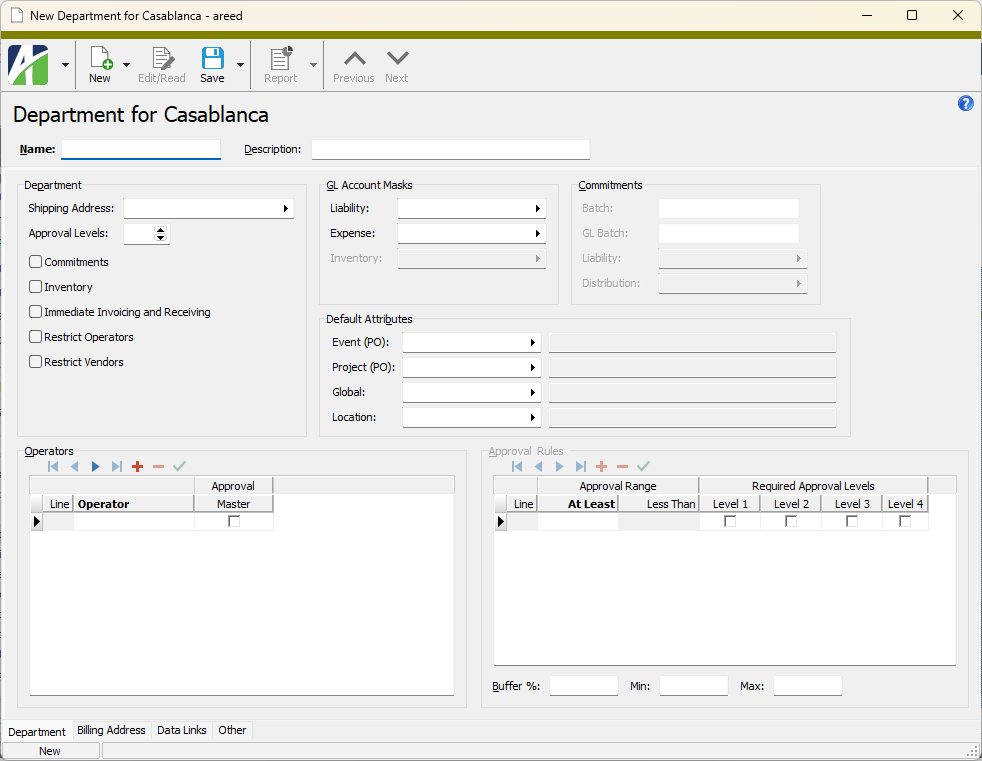
- Enter a unique Name for the department.
- Enter a Description of the department.
- In the Shipping Address field, select the shipping address for the department. This address is typically the address where goods on a purchase order are shipped. The shipping address might also indicate where services on the purchase order are to be performed. The default shipping address can be specified on attributes with PO usage (from last to first based on display order), on the department, and on an AP vendor's PO Defaults tab.
-
In the Approval Levels field, enter the maximum number of approval levels (up to 4) to require for the department's purchase orders. (The actual number of approval levels required for a given purchase order depends on the dollar value of the purchase order and the defined approval limits for the department.) If no approvals are required for this department's purchase orders, leave this field blank. Multiple approval levels are usually needed when multiple levels in an organization's hierarchy are involved in approving a purchase order before it is released to the vendor.
Example
If a department manager can approve purchases up to $10,000, the department vice president can approve purchases up to $25,000, and the CFO must approve purchases over $25,000, you would need 3 approval levels.
-
If you want to enable commitment postings for the department on standard purchase orders, mark the Commitments checkbox. If you mark this checkbox, purchases entered for the department are eligible for commitment postings and the Post Commitments checkbox on new purchase order records for the department is marked by default.
Commitments allow you to reserve funds from a budget to honor a purchase commitment for goods or services. The GL entries for a commitment are made when the purchase order is moved to a "Master" status. The entries are processed as a special AP commitment invoice which is not eligible for payment. When the purchase is invoiced or canceled, the commitment is reversed. Typically, commitments are recorded in a separate commitment ledger. Including the commitment ledger along with budgets and actuals in budgetary analysis gives a more complete picture of budgetary resources.
Note
Commitments are not available on miscellaneous purchases.
-
If you want to enable inventory postings for the department, mark the Inventory checkbox.
Note
If you mark this checkbox, a Type column is added to the Purchases table in the Purchase Order window so that you can designate whether a purchase is an expense or an inventory purchase. The purchase type determines whether the expense account or the inventory account is used to record the purchase when it is invoiced.
- If you want to allow immediate invoicing and receiving for the department, mark the Immediate Invoicing and Receiving checkbox. This allows you to process a purchase order to invoice or receipt if it has a status of "New", "Hold", "Ready", or "Master". Although you can record an invoice or receipt, it cannot be merged or paid until the purchase order is moved to "Master" status.
- If you want to restrict the operators who can enter standard purchase orders or miscellaneous purchases for the department, mark the Restrict Operators checkbox. If you mark the checkbox, you must specify the valid operators in the Operators table below.
- If you want to restrict the vendors who can be used on standard purchase orders and miscellaneous purchases for the department, mark the Restrict Vendors checkbox. The departments which a vendor is authorized for are specified on the PO tab of the vendor record in the Departments field.
- In the Liability field, select the account mask to use to help derive the liability account number for this department's purchases.
- In the Expense field, select the account mask to use to help derive the expense account number for this department's purchases.
- The Inventory field is enabled if you marked the Inventory checkbox. Select the account mask to use to help derive the inventory account number for this department's purchases.
-
If you marked the Commitments checkbox, the fields in the Commitments section are enabled.
- In the Batch field, enter a name for the AP invoice batch to use when commitment postings are made for the department's purchase orders. The batch name identifies a group of AP invoices.
Example
You could use a batch name in the form of Commit-DepartmentName to indicate the batch contains commitment postings for a particular department.
-
In the GL Batch field, enter a name for the GL batch to use when commitment postings are made for the department's purchase orders. The batch name identifies a group of GL postings. The GL batch is created when the commitment invoice is merged in Accounts Payable.
Example
You could use a batch name in the form of Commit-DepartmentName to indicate the GL batch contains commitment postings for a particular department.
- In the Liability field, select the account mask to use to help derive the GL commitment liability account number for the department's commitment postings on purchases. The liability account is credited when the commitment invoice is merged in Accounts Payable.
- In the Distribution field, select the account mask to use to help derive the GL expense or inventory commitment account number. The distribution account is debited when the commitment invoice is merged in Accounts Payable.
- In the Batch field, enter a name for the AP invoice batch to use when commitment postings are made for the department's purchase orders. The batch name identifies a group of AP invoices.
- In the Default Attributes section, select the default attribute items to apply for each listed attribute when the department is referenced on a purchase order or miscellaneous purchase. Default attributes are applied in order of precedence with the attribute item on the vendor having highest precedence, followed in decreasing order of precedence by the agent, the department, and the attribute record.
- The Operators table works in two modes.
- If the Approval Levels field is blank (i.e., the department does not require approvals), only the Operator, Master, and Memo columns are visible.
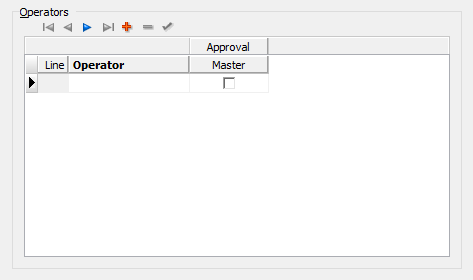
- In the Operator column, select the name of an operator with entry access for the department. Only the operators listed in this table are allowed to enter miscellaneous purchases and purchase orders for the department.
- In the Master column, mark the checkbox if the operator has master approval authority. Master approvers can approve any purchase order within the department.
Warning
Because a "Master" approver can approve any purchase order for any amount at any time, ensure that this access is what is desired. Generally, "Master" access should be reserved for special cases when it is necessary to bypass the normal approval workflow.
- In the Memo column, enter any additional information to record about the operator assigned in this row.
- Repeat steps a-c for each operator who has entry access for the department.
- If there is a value (1-4) in the Approval Levels field, five columns are visible in the Operators table.
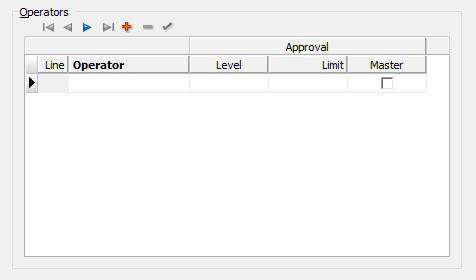
- In the Operator column, select the name of an operator with entry access and/or approval access for the department. Only the operators listed in this table are allowed to enter miscellaneous purchases and purchase orders for the department.
- In the Level column, enter the operator's approval level. If the operator is not an approver for the department, leave the cell blank and also skip the Limit and Master columns.
In the Limit column, enter the operator's approval limit when the operator's approval level is the highest level required for a given purchase order.
Example
Suppose an operator is level 2 with a limit of $40,000 and purchase orders up to $50,000 require level 2 approval. The operator cannot approve a purchase order for an amount between $40,000 and $50,000 and, therefore, cannot move such a purchase order from "Ready" status to "Master". Another level 2 operator with an appropriate approval limit would need to approve the purchase order.
If the operator is not an approver for the department, leave this column and the Level column blank. If the operator has no approval limit, ensure the Level column is filled in and leave this column blank.
- In the Master column, mark the checkbox if the operator has master approver authority. Master approvers can approve any purchase order within the department.
- In the Memo column, enter any additional information to record about the operator and approval definition in this row.
- Repeat steps a-e for each operator with entry access and/or approval access for the department.
- If the Approval Levels field is blank (i.e., the department does not require approvals), only the Operator, Master, and Memo columns are visible.
- The Approval Rules table is enabled only when some level of approval is required for the department (i.e., the Approval Levels field is set to 1, 2, 3, or 4). For each of the approval rules you need to define, do the following:
In the At Least column, enter the minimum approval amount for the approval rule defined on the current detail line. Approval ranges must be contiguous, so when you save the department record, the maximum boundaries of your ranges are filled into the Less Than column based on the next higher At Least value.
Note
Purchase order approval treats negative order amounts the same as it would the corresponding positive amount. So, even though you cannot enter negative amounts in the Approval Rules table, a purchase order for -$1000 requires the same approval as a purchase order for $1000.
- In the Level columns, mark the checkbox for each approval level required to approve a purchase order in the amount range for the current approval rule. The amount range is from the minimum approval amount specified on this detail line up to the next higher amount specified on a detail line.
- Purchase orders up to $1,000 require no approval.
- Purchase orders from $1,000 to $9,999.99 require level 1 approval. A level 2 operator could also approve the purchase order.
- Purchase orders from $10,000 to $99,999.99 require level 2 approval. A level 1 operator could optionally review and record their approval, but the purchase order is not considered approved until a level 2 operator approves.
- Purchase orders $100,000 or more require both level 1 and level 2 approval to be considered approved.
Mark each level of approval required for the corresponding amount range. A purchase order is deemed approved when it has at least as many approvals as there are marked levels and the levels that are approved rank at least as high as the levels marked. An approval by a higher-level operator satisfies a lower marked level; e.g., if only Level 1 is marked, a Level 3 operator can approve the order on their own. The approval is recorded at the operator's own level, not at the marked level. An approval below a marked level never satisfies that level but does count toward the number of approvals required.
Example
Consider the following approval setup:
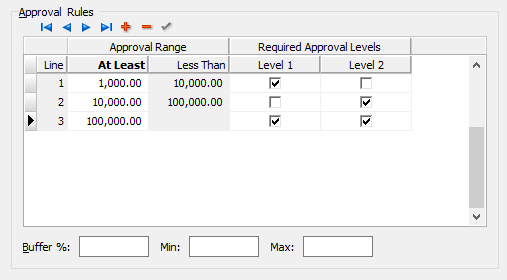
The following statements are true for this example:
-
In the Buffer % field, enter the percent change in the purchase order amount before additional approval is required.
Purchase Order Amount * Buffer % = Approval Buffer Amount
Example
If the purchase order amount is $3,000 and the buffer percent is 5%, the approval buffer amount is $150. A purchase order for $3,000 would need additional approval only when the change in the total amount exceeds $150.
-
In the Min field, enter the minimum purchase order amount change before additional approval is required. If the calculated approval buffer amount is less than this minimum, the purchase order must change by at least this minimum amount before additional approval is required.
If you do not want to apply a minimum amount, leave this field blank.
-
In the Max field, enter the maximum purchase order amount change before additional approval is required. If the calculated approval buffer amount is more than this maximum, the purchase order must change by this maximum amount before additional approval is required.
If you do not want to apply a maximum amount, leave this field blank.
- Select the Billing Address tab.
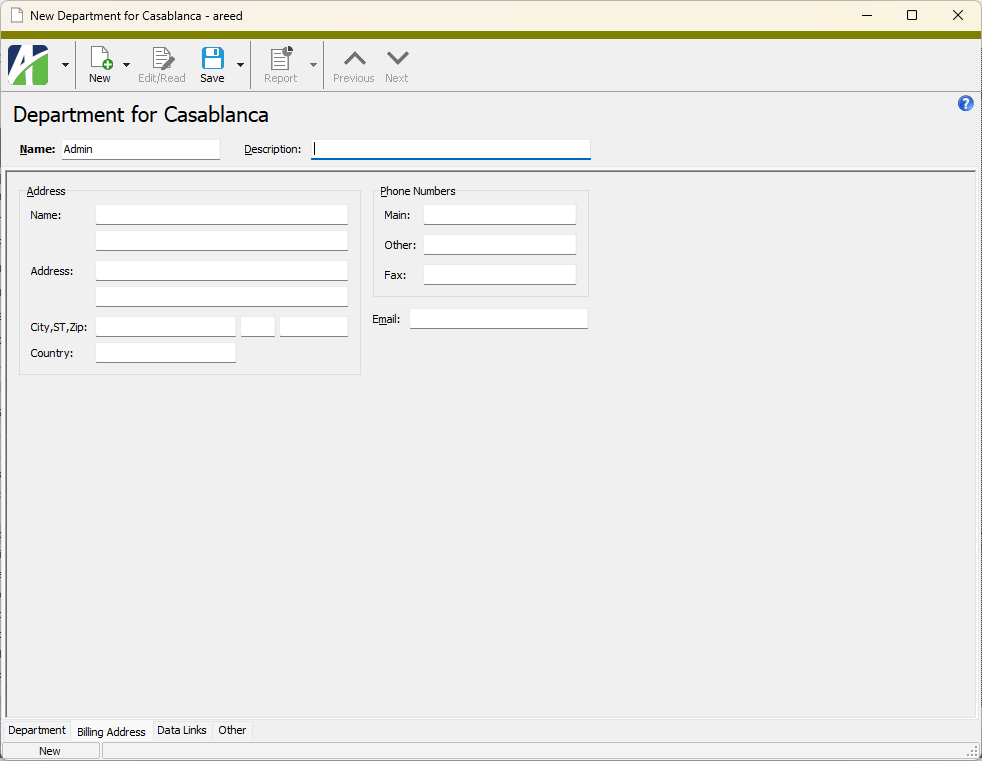
- In the Address section, enter name and address details for the department's billing address.
- In the Phone Numbers section, enter one or more phone numbers to call about billing issues for the department.
- In the Email field, enter an email address for billing questions. The field produces a hyperlink when you enter an email address. If you press Ctrl+click on the field contents, your mail client opens with a pre-addressed email.
- Save the new department.
The next three fields determine when additional approval is required if the purchase order amount changes after the original approval. For instance, sales tax and freight charges may change after the initial purchase order is entered and approved. These fields determine how much the total purchase order amount must change before reapproval is required. Reapproval must occur before unmerged invoices can be merged in Accounts Payable or before the purchase order can be closed.
Example
Consider the following values:
Buffer %: 5.00 | Min: 20.00 | Max: 500.00
The following table shows the effect of these values depending on the purchase order amount.
| PO Amount | Approval Buffer Amount = PO Amount * Buffer % | Applied Buffer Amount After %/Min/Max Comparison | Comment |
|---|---|---|---|
| $200 | $10 | $20 | Minimum applied |
| $2,000 | $100 | $100 | Buffer % applied |
| $20,000 | $1,000 | $500 | Maximum applied |
| $200,000 | $10,000 | $500 | Maximum applied |
Departments Listing
Purpose
The Departments Listing provides a list of departments defined in the Purchasing package.
Content
For each department included on the report, the listing shows:
- description
- approval levels
- whether inventory is enabled
- whether commitments are enabled.
In addition, you can include one or more of the following:
- billing address
- operators (name, approval level, approval limit)
- approval rules (amount, levels)
- timestamps
- memos
- custom fields.
The following total appears on the report:
- record count.
Print the report
- In the Navigation pane, highlight the Purchasing > Setup > Departments folder.
- Start the report set-up wizard.
- To report on all or a filtered subset of departments:
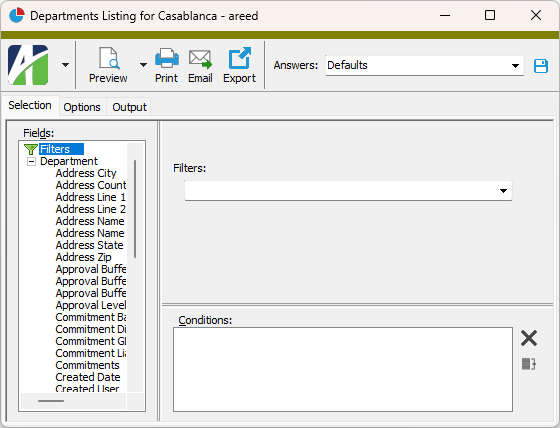
- Right-click the Departments folder and select Select and Report > Departments Listing from the shortcut menu.
- On the Selection tab, define any filters to apply to the data.
- To report on specifically selected departments:
- In the HD view, select the departments to include on the report. You can use Ctrl and/or Shift selection to select multiple records.
- Click
 .
.
- To report on a particular department from the Department window:
- In the HD view, locate and double-click the department to report on. The Department window opens with the department loaded.
- Click .
- To report on all or a filtered subset of departments:
- Select the Options tab.
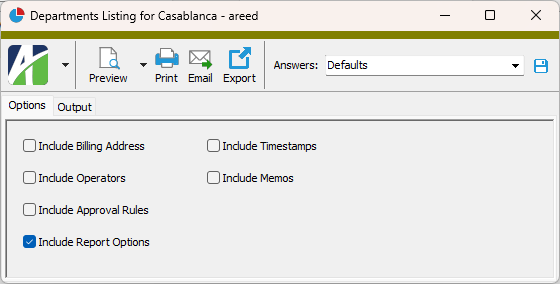
- Mark the checkbox(es) for the additional information to include:
- Billing Address
- Operators
- Approval Rules
- Report Options. To include a section at the end of the report with the report settings used to produce the report, leave the checkbox marked. To produce the report without this information, clear the checkbox.
- Timestamps
- Memos
- Custom Fields (only visible if custom fields are set up)
- Select the Output tab.
- In the Design field, look up and select the report design to use.
- In the toolbar, click the icon for the type of output you want:
 - Provides access to two preview options.
- Preview - Click the icon or click the drop-down arrow and select Preview from the drop-down menu to view the report in the Crystal Reports viewer.
- Preview to PDF - Click the drop-down arrow next to the icon and select Preview to PDF to view the report in the PDF reader.
 - Opens the Print dialog so that you can select and configure a printer and then print a paper copy of the report.
 - Opens the Report Email dialog so that you can address and compose an email that the report will be attached to. For best results, ensure your email client is running before you attempt to send a report via email.
 - Opens a drop-down menu with two export options:
 - Export Report - Opens a dialog so that you can save the report to a file. File types include Crystal Reports (.rpt), PDF (.pdf), Microsoft Excel (.xls), Microsoft Word (.doc), rich text (.rtf), and XML (.xml).
- Export Data - Opens a dialog so that you can export report data to XML or JSON file format.
- From
- The email account from which to send the email. Valid options are:
- Windows user default account. Sends email using the user's Windows default email account. For most users, this is the account configured in Outlook or another email client application.
- Server personal. Sends email using the email configuration for the system or company server and the email address on the current user's authorized user record. The authorized user record must have a confirmed email address.
- Server generic. Sends email using the email configuration and "from" address for the system or company server. This option requires "Send generic" access to the Server Email resource.
- To
- The email address(es) to which to send the email. Separate email addresses with semi-colons.
- CC
- The email addresses to copy on the email. Separate email addresses with semi-colons.
- BCC
- The email addresses to blind copy on the email. Separate email addresses with semi-colons.
- Subject
- The subject line.
- Text box
- The body of the email.
Data extensions
The following data extensions are available for the report:
- Departments
- Department operators
- Department approval
Department Record ID
Department tab
Press F3 to look up the value.
If a value is already selected, you can press F4 to open the record in its native editor.
The maximum number of approval levels (0 to 4) to require for the department's purchase orders. (The actual number of approval levels required for a given purchase order depends on the dollar value of the purchase order and the defined approval limits for the department.) If no approvals are required for the department's purchase orders, leave this field blank. Multiple approval levels are usually needed when multiple levels in an organization's hierarchy are involved in approving a purchase order before it is released to the vendor.
Example
If a department manager can approve purchases up to $10,000, the department vice president can approve purchases up to $25,000, and the CFO must approve purchases over $25,000, you would need at least three approval levels.
If this checkbox is marked, commitment postings are enabled for the department's standard purchase orders. If the checkbox is marked, purchases entered for the department are eligible for commitment postings and the Post Commitments checkbox on new purchase orders for the department is marked by default.
Commitments allow you to reserve funds from a budget to honor a purchase commitment for goods or services. The GL entries for a commitment are made when the purchase order is moved to "Master" status. The entries are processed as a special AP commitment invoice which is not eligible for payment. When the purchase is invoiced or canceled, the commitment is reversed. Typically, commitments are recorded in a separate commitment ledger. Including the commitment ledger along with budgets and actuals in budgetary analysis gives a more complete picture of budgetary resources.
Commitments are not available for miscellaneous purchases.
If this checkbox is marked, inventory postings are enabled for the department.
Note
If you mark this checkbox, a Type column is added to the Purchases table in the Purchase Order window so that you can designate whether a purchase is an expense or an inventory purchase. The purchase type determines whether the expense account or the inventory account is used to record the purchase when it is invoiced.
Press F2 to open the Account Expand dialog box where you can look up an account number, find an account number by its alias, build the account number by segment, or view setup and setup sources.
Press F3 to look up the account.
If an account is already selected, you can press F4 to open the record in the Account window.
Press F2 to open the Account Expand dialog box where you can look up an account number, find an account number by its alias, build the account number by segment, or view setup and setup sources.
Press F3 to look up the account.
If an account is already selected, you can press F4 to open the record in the Account window.
Press F2 to open the Account Expand dialog box where you can look up an account number, find an account number by its alias, build the account number by segment, or view setup and setup sources.
Press F3 to look up the account.
If an account is already selected, you can press F4 to open the record in the Account window.
This field is enabled if you mark the Commitments checkbox. A name for the AP invoice batch to use when commitment postings are made for the department's purchase orders.
Example
Consider using a batch name in the form Commit-DepartmentName so that the batch identifies the department associated with the commitment postings.
This field is enabled if you mark the Commitments checkbox. A name for the GL batch to use when commitment postings are made for the department's purchase orders. The GL batch is created when the commitment invoice is merged in Accounts Payable.
Example
Consider using a batch name in the form Commit-DepartmentName so that the batch identifies the department associated with the commitment postings.
Press F2 to open the Account Expand dialog box where you can look up an account number, find an account number by its alias, build the account number by segment, or view setup and setup sources.
Press F3 to look up the account.
If an account is already selected, you can press F4 to open the record in the Account window.
Press F2 to open the Account Expand dialog box where you can look up an account number, find an account number by its alias, build the account number by segment, or view setup and setup sources.
Press F3 to look up the account.
If an account is already selected, you can press F4 to open the record in the Account window.
- When the department requires no approval levels, the table looks like this:
- Operator
- The names of the operators who need entry access for the department. Only the operators listed in this table are allowed to enter miscellaneous purchases and purchase orders for the department.
Press F3 to look up the value.
If a value is already selected, you can press F4 to open the record in its native editor.
- Master
- If the checkbox is marked, indicates the operator has master approval authority. Master approvers can approve any purchase order within the department.
Warning
Because a "Master" approver can approve any purchase order for any amount at any time, ensure that this access is what is desired. Generally, "Master" access should be reserved for special cases when it is necessary to bypass the normal approval workflow.
- Memo
- Additional information about the operator on the corresponding row.
- When the department requires one or more approval levels, the table looks like this:
- Operator
- The names of the operators who need entry access and/or approval access for the department. Only the operators listed in this table are allowed to enter miscellaneous purchases and purchase orders for the department.
Press F3 to look up the value.
If a value is already selected, you can press F4 to open the record in its native editor.
- Level
- The approval level of the operator on this row. If the operator only enters purchases and is not an approver for the department, leave the cell blank and also skip the Limit and Master columns.
- Limit
The approval limit of the operator on this row when the operator's approval level is the highest level required for a given purchase order. If the operator is not an approver for the department, leave this column and the Level column blank. If the operator has no approval limit, ensure that the Level column is filled in and leave this field blank.
Example
Suppose an operator is level 2 with a limit of $40,000 and that purchase orders up to $50,000 require level 2 approval. The operator cannot approve purchase orders for amounts between $40,000 and $50,000 and, therefore, cannot move a purchase order in that range from "Ready" status to "Master". Another level 2 operator with an appropriate approval limit would need to approve the purchase order.
- Master
- If the checkbox is marked, indicates the operator has master approval authority. Master approvers can approve any purchase order within the department.
- Memo
- Additional information about the operator and approval definition on the corresponding row.
If one or more checkboxes are marked on a row, the corresponding level(s) of approval are required for amounts in the corresponding range.
Mark each level of approval required for the corresponding amount range. A purchase order is deemed approved when it has at least as many approvals as there are marked levels and the levels that are approved rank at least as high as the levels marked. An approval by a higher-level operator satisfies a lower marked level; e.g., if only Level 1 is marked, a Level 3 operator can approve the order on their own. The approval is recorded at the operator's own level, not at the marked level. An approval below a marked level never satisfies that level but does count toward the number of approvals required.
The next three fields control when additional approval is required if the purchase order amount changes after initial approval. For example, sales tax and freight charges may change after the initial purchase order is approved. These three fields determine how much the total purchase order amount can change before the purchase order must be reapproved. Reapproval must occur before any unmerged invoices can be merged in Accounts Payable and before the purchase order can be closed.
The percent change that can occur in the purchase order amount before additional approval is required.
Example
If the purchase order amount is $3,000 and the buffer percent is 5%, the approval buffer amount is $150. A purchase order for $3,000 would need additional approval only when the change in the total amount exceeds $150.
The minimum change in purchase order amount before additional approval is required. If the calculated buffer amount is less than this minimum, the purchase order must change by at least this minimum amount before additional approval is required.
If you do not want to apply a minimum amount, leave this field blank.
The maximum change in purchase order amount before additional approval is required. If the calculated approval buffer amount is more than this maximum, the purchase order must change by this maximum amount before additional approval is required.
If you do not want to apply a maximum amount, leave this field blank.
Billing Address tab
Custom tab
This tab is visible if custom fields exist for the entity. At a minimum, if there are custom fields, a Fields subtab will be present. One or more additional categories of subtabs may also be visible.
Fields subtab
This tab prompts for values for any custom fields set up for entity records of this entity type. Respond to the prompts as appropriate.
References subtab
This tab is visible if other records reference the current record.
Example
Suppose a custom field exists on PRCodes that references an ARCode. On the ARCode record, on the Custom > References subtab, you can view all the PRCodes which reference that ARCode.
Exchange Folder subtab
This tab is visible only if you set up a custom field with a data type of "Exchange Folder". The label on this tab is the name assigned to the custom field.
This tab shows the contents of the specified Exchange folder.
File subtab
This tab is visible only if you set up a custom field with a data type of "File". The label on the tab is the name assigned to the custom field.
This tab renders the contents of the specified file according to its file type.
Internet Address subtab
This tab is visible only if you set up a custom field with a data type of "Internet Address". The label on this tab is the name assigned to the custom field.
This tab shows the contents of the specified web page.
Network Folder subtab
This tab is visible only if you set up a custom field with a data type of "Network Folder". The label on this tab is the name assigned to the custom field.
This tab shows the contents of the specified network folder.
Purchases tab
The Purchases pane shows the Purchases HD view filtered to show all purchases for the selected department.
Double-click a row in the pane to drill down to its record in the Purchase window.
Orders tab
The Purchase Orders pane shows the Purchase Orders HD view filtered to show all purchase orders for the selected department.
Double-click a row in the pane to drill down to its record in the Purchase Order window.
Attachments tab
The Attachments tab is visible if any record for a given entity has an attachment. If the Attachments tab is not visible, this implies that no record of the entity type has an attachment on it; however, once an attachment is added to any record of the entity type, the Attachments tab will become available.
Change Logs tab
This tab is visible if the user has "Change Logs" access to the associated data folder resource.
The Change Logs pane shows the Change Logs HD view filtered to show all change logs for the selected entity record.
Double-click a row in the pane to drill down to its record in the Change Log window.
Other tab
Developer tab
This tab is visible only when developer features are enabled.
Automation subtab
This subtab shows field names and values for the current data record. Use the information in the subtab to assist when creating automation objects such as bots and import files. The field names and field values can be copied from the text box and pasted directly into your code or application. To copy content from the text box, highlight the content to copy and press Ctrl+C or right-click your selection and select Copy from the context menu.
Export (XML | JSON) subtab
This subtab shows the XML syntax for exporting the selected data record. The syntax can be copied from the text box as an exemplar for creating your own automation objects for bots, import files, ActivWebAPI, etc. To copy content from the text box, highlight the content to copy and press Ctrl+C or right-click your selection and select Copy from the context menu.
Import (XML | JSON) subtab
This subtab allows you to select a file for import and shows the XML syntax for importing data records. Use the subtab to explore the XML syntax for importing data records. In particular, you can investigate the syntax which results when using Data.Import and ActivWebAPI data POST and DELETE routes.
Change Log (XML | JSON) subtab
This subtab is visible only when the Enable Change Logs option is marked in System Options or Company Options (depending on whether the feature applies at the system or the company level). This is the default setting when developer features are enabled.
This subtab allows you to investigate changes to the current data record. The syntax can be copied for use in bots, dashboards, ActivWebAPI, and other automation. To copy content from the text box, highlight the content to copy and press Ctrl+C or right-click your selection and select Copy from the context menu.
Select Statement (SQL) subtab
This subtab allows you to investigate the SQL select statement used to retrieve the current data record. The syntax can be copied as an exemplar for data sources and other automation. To copy content from the text box, highlight the content to copy and press Ctrl+C or right-click your selection and select Copy from the context menu.
Departments security
Common accesses available on departments
|
6224 34th Street Lubbock, TX 79407 806.687.8500 | 800.354.7152 |
© 2026 AccountingWare, LLC All rights reserved. |