This topic covers USA tax functions. To learn about Canadian tax functions, click here.
Click "USA" or a state name to see tax function details and documentation for the selected tax entity.

|
...\Extras\Payroll\Tax\Test State Tax functions.xls contains models for each of the tax functions. |
Alaska
No state income tax!
Alabama
- Filing status: Comes from lines 1-3 of Form A-4 and must be one of the following:
- 0 - No personal exemption
- S - Single exemption
- MS - Married filing separately exemption
- M - Married exemption
- H - Head of family exemption
- Supplemental pay: Taxed separately at a flat percent.
- Link to tax tables and instructions: 2025 (use bookmarks in PDF to skip to relevant sections)
- Link to A4: 2025
- If an employee's A4 is missing, state tax is calculated using a filing status of "0".
Example of tax function
Preferred method using data from employee state W-4 records:
StateW4.Withholding('AL')
Alternate method:
Arkansas
- Supplemental pay: Taxed separately at a flat rate.
- Link to instructions: Arkansas
- Link to tax withholding formula: Formula
- Link to AR4EC: 2025
- If an employee's AR4EC is missing, state tax is calculated using a filing status of "Single" with 0 exemptions.
Example of tax function
Preferred method using data from employee state W-4 records:
StateW4.Withholding('AR')
Alternate method:
Arizona
- Arizona applies a flat tax rate. If you choose not to use the built-in StateW4.Withholding tax function, store the rate in a segment item parameter.
- Link to instructions: current
- Link to A-4: 2025
- If an employee's A-4 is missing, state tax is calculated using a flat rate of 2.0%.
Example
Preferred method using data from employee state W-4 records:
StateW4.Withholding('AZ')
California
- Filing status: "S", "M", or "H"
- Supplemental and bonus pay: Taxed at flat percents only when paid on a separate check (i.e., source amount = supplemental + bonus).
- Link to instructions: 2025 Employer's Guide (use bookmarks in PDF to skip to relevant sections)
- Link to current tax tables: 2025
- Link to DE 4: 2025
- If an employee's DE 4 is missing, state tax is calculated using a filing status of "Single" with 0 allowances.
Example of tax function
Preferred method using data from employee state W-4 records:
StateW4.Withholding('CA')
Alternate method:
Colorado
- Filing status: "M" or "S"
- Supplemental pay: Taxed at a flat percent only when paid on a separate check (i.e., source amount = supplemental amount).
- Link to tax tables and instructions: 2024 witholding guide, 2025 withholding worksheet
- Link to USA W-4: current
- Link to DR 0004: 2025
- If an employee's DR 0004 is missing, state tax is calculated based on the employee's IRS Form W-4. If the Form W-4 is missing, state tax is calculated using a filing status of "Single" and a Two Jobs value of "False".
Example of tax function
Preferred method using data from employee state W-4 records:
StateW4.Withholding('CO')
Alternate method:
Connecticut
- Filing status: "A", "B", "C", "D", "E", or "F"
- Supplemental pay: No special treatment of supplemental pay. "The employer must compute the tax on the combined regular and supplemental wages."
- Link to employer's tax guide: 2025
- Link to withholding calculation rules: 2025
- Link to CT-W4: 2025
- If an employee's CT-W4 is missing, state tax is calculated using a flat rate of 6.99% with no exemptions.
Example of tax function
Preferred method using data from employee state W-4 records:
StateW4.Withholding('CT')
Alternate method:
CT(Source, Tax:CT:Filing Status)
District of Columbia
- Filing status:
- S - Single
- M1 - Married Filing Jointly
- M2 - Married Filing Separate Returns or a Combined Separate Return
- H - Head of Household
- Supplemental pay: No special treatment.
- Link to tax tables and instructions: 2022 (use bookmarks in PDF to skip to relevant sections)
- Link to D-4: 2018
- If an employee's D-4 is missing, state tax is calculated using a filing status of "Single" with 0 allowances.
Example of tax function
DC(Source, Tax:DC:FilingStatus, Tax:DC:Exemptions)
Delaware
- Filing status:
- S - Single
- M - Married Filing Joint Return
- M1 - Married Filing Separate Return
- Supplemental pay: Special taxation only occurs when paid on a separate check (i.e., source amount = supplemental amount). Tax on supplemental pay = tax on annual salary with supplemental pay minus tax on salary without supplemental pay.
- Link to tax tables and instructions: Delaware - supplemental wages, withholding
- Link to DE W-4: 2023
- If an employee's DE W-4 is missing and a pre-2020 federal Form W-4 is in effect for the employee as of the check date, state tax is calculated based on the federal Form W-4. If no pre-2020 Form W-4 is available, tax is calculated using a filing status of "Single" with 0 allowances.
Example of tax function
Preferred method using data from employee state W-4 records:
StateW4.Withholding('DE')
Alternate method:
Florida
No state income tax!
Georgia
- Filing status:
- S - Single
- M2 - Married Filing Joint Return, both spouses working
- M1 - Married Filing Joint Return, one spouse working
- M - Married Filing Separate Return
- H - Head of Household
- Supplemental pay: Taxed separately at a graduated flat percent.
- Link to tax tables and instructions: 2025 (use bookmarks in PDF to skip to relevant sections)
- Link to G-4: 2025
- If an employee's G-4 is missing, state tax is calculated using a filing status of "Single" with 0 allowances.
Example of tax function
Preferred method using data from employee state W-4 records:
StateW4.Withholding('GA')
Alternate method:
Hawaii
- Filing status:
- S - Single
- M - Married
- H - Head of Household
- Supplemental pay: Special taxation only occurs when paid on a separate check (i.e., source amount = supplemental amount). Tax on supplemental pay = tax on annual salary with supplemental pay minus tax on annual salary without supplemental pay.
- Link to instructions: 2025
- Link to HW-4: 2022
- If an employee's HW-4 is missing, state tax is calculated using a filing status of "Single" with 0 allowances.
Example of tax function
Preferred method using data from employee state W-4 records:
StateW4.Withholding('HI')
Alternate method:
Iowa
- Supplemental pay: Taxed separately at a flat percent.
- Link to withholding formula: 2025
- Link to IA W-4: 2025
- If an employee's IA W-4 is missing or is dated before 1/1/2024, state tax is calculated using a filing status of "Other" with a total allowance amount of $40 and no additional withholding.
Example of tax function
Preferred method using data from employee state W-4 records:
StateW4.Withholding('IA')
Alternate method:
Idaho
- Filing status: "S" or "M"
- Supplemental pay: Taxed separately at a flat percent.
- Link to tax tables and instructions: Idaho State Tax Commission
- Link to percentage computation method: 04-28-2025 revision
- Link to ID W-4: 2025
- If an employee's ID W-4 is missing and a pre-2020 federal Form W-4 is in effect for the employee as of the check date, state tax is calculated based on the federal Form W-4. If no pre-2020 Form W-4 is available, tax is calculated using a filing status of "Single" with 0 allowances.
Example of tax function
Preferred method using data from employee state W-4 records:
StateW4.Withholding('ID')
Alternate method:
Illinois
- Allowances: Line 1 and Line 2 allowances come from the employee's IL-W-4.
- Supplemental pay: No special treatment.
- Link to tax tables and instructions: 2025 (use bookmark in PDF to skip to relevant section)
- Link to IL-W-4: 2024
- If an employee's IL W-4 is missing, state tax is calculated using 0 basic personal allowances and 0 additional allowances.
Example of tax function
Preferred method using data from employee state W-4 records:
StateW4.Withholding('IL')
Alternate method:
IL(Source, Tax:IL:Line1Allowances, Tax:IL:Line2Allowances)
Indiana
- Exemptions: The number of exemptions and dependents come from Lines 4 and 5 of the employee's Form WH-4.
- Supplemental pay: No special treatment.
- Link to tax tables and instructions: 10/2024 1/2025
- Link to WH-4: 2023
- If an employee's WH-4 is missing, state tax is calculated using 0 exemptions and 0 dependents.
Example of tax function
Preferred method using data from employee state W-4 records:
StateW4.Withholding('IN')
Alternate method:
IN(Source, Tax:IN:Exemptions, Tax:IN:Dependents)
Indiana counties
- Filing status:
- R - Resident
- N - Non-Resident
- Exemptions and dependents: From Indiana Form WH-4.
- County Code: A text argument with values from "01" through "92".
- Supplemental pay: No special treatment.
- Link to tax tables and instructions: 2025
Example of tax function
Preferred method using data from employee state W-4 records:
StateW4.LocalWithholding('IN')
Alternate method:
INC(Source, Tax:INC:FilingStatus, Tax:IN:Exemptions, Tax:IN:Dependents, "01"))
Kansas
- Filing status: "S" or "M"
- Supplemental pay: Taxed at a flat percent only when paid on a separate check (i.e., source amount = supplemental amount).
- Link to tax tables and instructions: 2024; 2024 instructions
- Link to K-4: 2024
- If an employee's K-4 is missing, state tax is calculated using a filing status of "Single" with 0 allowances.
Example of tax function
Preferred method using data from employee state W-4 records:
StateW4.Withholding('KS')
Alternate method:
Kentucky
- Supplemental pay: No special treatment.
- Link to instructions and formula: 2025 instructions; 2025 formula
- Link to K-4: 2025
- If an employee's K-4 is missing, state tax is calculated with no exempt claim allowed and no additional withholding.
Example of tax function
Preferred method using data from employee state W-4 records:
StateW4.Withholding('KY')
Alternate method:
KY(Source, Tax:KY:Exemptions)
Louisiana
- Filing status: "S", "M", or "N"
- Exemptions: 0, 1, 2 (from the L-4).
- Dependents: From the L-4.
- Supplemental pay: No special treatment.
- Link to tax tables and instructions: 2025, withholding formula 2022
- Link to L-4: 2025
- If an employee's L-4 is missing, state tax is calculated using a filing status of "No exemptions or dependents claimed", 0 dependents, and 0 exemptions.
Example of tax function
Preferred method using data from employee state W-4 records:
StateW4.Withholding('LA')
Alternate method:
LA(Source, Tax:LA:FilingStatus, Tax:LA:Exemptions, Tax:LA:Dependents)
Massachusetts
- Filing status: Corresponds to the boxes marked on the employee's Form M-4. For example:
- Blank. No boxes marked.
- A. Box A (Head of Household) is marked.
- AC. Boxes A (Head of Household) and C (spouse is blind) are marked.
- Exemptions: The total from Box 4 of Form M-4.
- FICA withheld: The total deducted from this check for Social Security (FICA), Medicare, Massachusetts, or Railroad Retirement systems.
- FICA year-to-date: The year-to-date total deducted (before the current check).
- Supplemental pay: No special treatment.
- Link to tax tables and instructions: 2025 (use bookmark in PDF to skip to relevant section)
- Link to M-4: 2020
- If an employee's M-4 is missing, state tax is calculated using 0 exemptions.
Example of tax function
Preferred method using data from employee state W-4 records:
StateW4.Withholding('MA')
Alternate method:
MA(Source, Tax:MA:FilingStatus, Tax:MA:Exemptions, SumCheck('FICA Result'), SumYTD('FICA Result'))
Maryland
- Filing status: "S" or "M"
- County codes:
- AL - Allegany
- AA - Anne Arundel
- BC - Baltimore City
- BA - Baltimore County
- CV - Calvert
- CA - Caroline
- CR - Carroll
- CE - Cecil
- CH - Charles
- DO - Dorchester
- FR - Frederick
- GA - Garrett
- HA - Harford
- HO - Howard
- KE - Kent
- MO - Montgomery
- PG - Prince George's
- QA - Queen Anne's
- SM - St. Mary's
- SO - Somerset
- TA - Talbot
- WA - Washington
- WI - Wicomico
- WO - Worcester
- NR - Nonresident
- DE - Delaware
- Supplemental pay: Taxed separately at a flat percent.
- Links: 2025 Withholding Guide, 2025 Withholding Facts
- Link to MW507: 2025
- If an employee's MW507 is missing, state tax is calculated using a filing status of "Single" with 1 exemption; employee is not exempt from state or local.
Example of tax function
Preferred method using data from employee state W-4 records:
StateW4.Withholding('MD')
Alternate method:
MD(Source, Tax:MD:FilingStatus, Tax:MD:Exemptions, Max(0, SumCheck('Supplemental Result') - (SumCheck('PreIncomeTax Result') * SumCheck('Supplemental Result') / SumCheck('Compensation Result'))), AttributeItem('MDCounty', CheckDate))
Maine
- Filing status: "S" or "M"
- Supplemental pay: Taxed at a flat percent only when paid on a separate check (i.e., source amount = supplemental amount).
- Link to withholding tables and instructions: 2025
- Link to W-4ME: 2025
- If an employee's W-4ME is missing, state tax is calculated using a filing status of "Single" with 0 allowances.
Example of tax function
Preferred method using data from employee state W-4 records:
StateW4.Withholding('ME')
Alternate method:
Michigan
- Supplemental pay: Taxed at a flat percent only when paid on a separate check (i.e., source amount = supplemental amount).
- Link to tax tables and instructions: 2025 guide
- Link to MI-W4: 2021
- If an employee's MI-W4 is missing, state tax is calculated using 0 exemptions.
Example of tax function
Preferred method using data from employee state W-4 records:
StateW4.Withholding('MI')
Alternate method:
Michigan Cities
- Filing status:
- R - Resident
- N - Non-Resident
- Exemptions: Depending on the city, the number comes from the federal, state, or local W-4. For example, Detroit requires a Form DW-4.
- City code: See list in the link below.
- Supplemental pay: No special treatment.
- Link to tax tables and instructions: Michigan City
Example of tax function
MIC(Source, Tax:MIC:FilingStatus, Tax:MIC:Exemptions, "ALB")
Minnesota
- Filing status: "M" or "S"
- Supplemental pay: Taxed separately at a flat percent.
- Link to tax tables and instructions: 2025 instructions
- Link to W-4MN: 2025
- If an employee's W-4MN is missing, state tax is calculated using a filing status of "Single" with 0 allowances.
Example of tax function
Preferred method using data from employee state W-4 records:
StateW4.Withholding('MN')
Alternate method:
Missouri
- Filing status:
- S - Single
- M - Married, Spouse Works
- M1 - Married, Spouse Does Not Work
- H - Head of Household
- Supplemental pay: Taxed at a flat percent only when paid on a separate check (i.e., source amount = supplemental amount).
- Link to tax tables and instructions: 2025 tax guide (use bookmarks in PDF to skip to relevant sections), calculator
- Link to MO W-4: 2025
- If an employee's MO W-4 is missing, state tax is calculated using a filing status of "Single".
Example of tax function
Preferred method using data from employee state W-4 records:
StateW4.Withholding('MO')
Alternate method:
Mississippi
- Filing status:
- S - Single
- M - Married, One Spouse Employed
- B - Married, Both Spouses Employed
- H - Head of Family
- Exemption: Amount is the total from Line 6 of MS Form 89-350 (Mississippi Employee's Withholding Exemption Certificate)
- Supplemental pay: No special treatment.
- Link to tax tables and instructions: 2025 (use bookmarks in PDF to skip to relevant sections)
- Link to 89-350: 2025
- If an employee's 89-350 is missing, state tax is calculated using a filing status of "Single" with 0 exemptions.
Example of tax function
Preferred method using data from employee state W-4 records:
StateW4.Withholding('MS')
Alternate method:
MS(Source, Tax:MS:FilingStatus, Tax:MS:ExemptionAmount)
Montana
- Supplemental pay: Taxed separately at a flat percent.
- Link to tax tables and instructions: Montana - 2025 guide
- Link to MW-4: 2025
- If an employee's MW-4 is missing and a pre-2020 federal Form W-4 is in effect for the employee as of the check date, state tax is calculated based on the federal Form W-4. If no pre-2020 Form W-4 is available, tax is calculated using a filing status of "Single" with 0 allowances.
Example of tax function
Preferred method using data from employee state W-4 records:
StateW4.Withholding('MT')
Alternate method:
North Carolina
- Filing status: "M", "S", or "H".
- Supplemental pay: Taxed separately at a flat percent.
- Link to tax tables and instructions: 2025
- Link to NC-4: 2025
- If an employee's NC-4 is missing, state tax is calculated using a filing status of "Single" with 0 allowances.
Example of tax function
Preferred method using data from employee state W-4 records:
StateW4.Withholding('NC')
Alternate method:
North Dakota
- Filing status: "S" or "M"
- Supplemental pay: Taxed separately at a flat percent.
- Link to tax tables and instructions: 2025 (use bookmarks in PDF to skip to relevant sections)
- Link to USA W-4: current
- The state tax calculation differs depending on whether the employee's current federal Form W-4 is dated before 2020 or is dated 2020 and thereafter. If the employee does not have a federal Form W-4 on file, state tax is calculated using a filing status of "Single" and Two Jobs = "False".
Example of tax function
Preferred method using data from employee state W-4 records:
StateW4.Withholding('ND')
Alternate method:
Nebraska
- Filing status: "S" or "M"
- Supplemental pay: Taxed separately at a flat percent.
- Link to tax tables and instructions: 2025 [use bookmarks in PDF to skip to relevant sections]
- Link to W-4N: 2022
- If an employee has a pre-2020 federal Form W-4 in effect as of the check date, state tax is calculated based on the pre-2020 federal Form W-4. If an employee's W-4N is missing and the Form W-4 in effect is dated 2020 or later, tax is calculated using a filing status of "Single" with 0 allowances.
Example of tax function
Preferred method using data from employee state W-4 records:
StateW4.Withholding('NE')
Alternate method:
New Jersey
- Filing status:
- A. Box 1 or Box 3 on Line 2 of Form NJ-W4 is marked, employee selected Rate A on Line 3, or "Single" or "Married But Withhold at a Higher Single Rate" is marked on the federal W-4.
- B. Box 2, 4, or 5 on Line 2 of Form NJ-W4 is marked, employee selected Rate B on Line 3, or "Married" is marked on the federal W-4.
- C, D, or E. Employee selected this rate on Line 3 of Form NJ-W4.
- Supplemental pay: No special treatment.
- Link to instructions: 2024
- Link to tax tables: 2021
- Link to NJ-W4: 2021
- If an employee's NJ-W4 is missing, state tax is calculated using a wage letter of "A" and 0 allowances.
Example of tax function
Preferred method using data from employee state W-4 records:
StateW4.Withholding('NJ')
Alternate method:
NJ(Source, Tax:NJ:FilingStatus, Tax:NJ:Exemptions)
New Hampshire
No state income tax!
New Mexico
- Filing status: "S" or "M"
- Supplemental pay: Taxed separately at a flat percent.
- Link to tax tables and instructions: 2025 (use bookmarks in PDF to skip to relevant sections)
- Link to USA W-4: current
- The employee's filing status from the federal Form W-4 in effect for the employee as of the check date is used to calculate state tax. If the employee's federal Form W-4 is missing, state tax is calculated using a filing status of "Single".
Example of tax function
Preferred method using data from employee state W-4 records:
StateW4.Withholding('NM')
Alternate method:
Nevada
No state income tax!
New York
- Filing status: "S" or "M"
- Supplemental pay: Taxed separately at a flat percent.
- Link to tax tables and instructions: 2023 (use bookmarks in PDF to skip to relevant sections)
- Link to IT-2104: 2025
- If an employee's IT-2104 is missing and a pre-2020 federal Form W-4 is in effect for the employee as of the check date, state tax is calculated based on the federal Form W-4. If no pre-2020 Form W-4 is available, tax is calculated using a filing status of "Single" with 0 allowances.
Example of tax function
Preferred method using data from employee state W-4 records:
StateW4.Withholding('NY')
Alternate method:
New York cities
New York City
- Filing status: "S" or "M"
- Supplemental pay: Taxed separately at a flat percent.
- Link to tax tables and instructions: 2018 (use bookmarks in PDF to skip to relevant sections)
Example of tax function
Preferred method using data from employee state W-4 records:
StateW4.LocalWithholding('NY')
Alternate method:
Yonkers
- Filing status: "S" or "M"
- Supplemental pay: Taxed separately at a flat percent.
- Link to tax tables and instructions: 2023 (use bookmarks in PDF to skip to relevant sections)
Ohio
- Supplemental pay: Taxed separately at a flat percent.
- Link to tax tables and instructions: 2025 instructions, 10/2025 computer formula
- Link to IT-4: 2024
- If an employee's IT-4 is missing, state tax is calculated using 0 allowances.
Example of tax function
Preferred method using data from employee state W-4 records:
StateW4.Withholding('OH')
Alternate method:
Oklahoma
- Filing status: "S" or "M"
- Supplemental pay: Taxed separately at a flat percent.
- Link to tax tables and instructions: Oklahoma - 2025 (use bookmarks in PDF to skip to relevant sections)
- Link to OK-W-4: 2021
- If an employee's OK-W-4 is missing, state tax is calculated using a filing status of "Single" with 0 allowances.
Example of tax function
Preferred method using data from employee state W-4 records:
StateW4.Withholding('OK')
Alternate method:
Oregon
- Filing status: "S" or "M"
- Supplemental pay: Taxed at a flat percent only when paid on a separate check (i.e., source amount = supplemental amount).
- Link to tax tables and instructions: 2025 formulas
- Link to OR-W-4: 2025
- If an employee has a pre-2020 federal "Oregon only" Form W-4 in effect as of the check date and no OR-W-4 on file, state tax is calculated based on the filing status from the pre-2020 federal "Oregon only" Form W-4. If an employee's OR-W-4 is missing and the Form W-4 in effect is dated 2020 or later, tax is calculated using a flat rate of 8%.
Example of tax function
Preferred method using data from employee state W-4 records:
StateW4.Withholding('OR')
Alternate method:
Pennsylvania
- Pennsylvania applies a flat tax rate. If you choose not to use the built-in StateW4.Withholding tax function, store the state AND local tax rates in segment item parameters.
- Link to instructions: 1/2023 revision
- Link to REV-419 (nonwithholding): 2021
Example
Preferred method using data from employee state W-4 records:
StateW4.Withholding('PA')
Rhode Island
- Supplemental pay: Taxed at a flat percent only when paid on a separate check (i.e., source amount = supplemental amount). Tax on supplemental pay = tax on annual salary with supplemental pay minus tax on annual salary without supplemental pay.
- Link to tax tables and instructions: 2025 (use bookmarks in PDF to skip to relevant sections)
- Link to RI W-4: 2025
- If an employee's RI W-4 is missing, state tax is calculated using 0 allowances.
Example of tax function
Preferred method using data from employee state W-4 records:
StateW4.Withholding('RI')
Alternate method:
South Carolina
- Supplemental pay: No special treatment.
- Link to tax tables and instructions: formula
- Link to SC W-4: 2025
- If an employee's SC W-4 is missing and a pre-2020 federal Form W-4 is in effect for the employee as of the check date, state tax is calculated based on the filing status and allowances from the federal Form W-4. If no pre-2020 Form W-4 is available and the SC W-4 is missing, tax is calculated using a filing status of "Single" with 0 allowances.
Example of tax function
Preferred method using data from employee state W-4 records:
StateW4.Withholding('SC')
Alternate method:
SC(Source, Tax:SC:Exemptions)
South Dakota
No state income tax!
Tennessee
No state income tax!
Texas
No state income tax!

USA
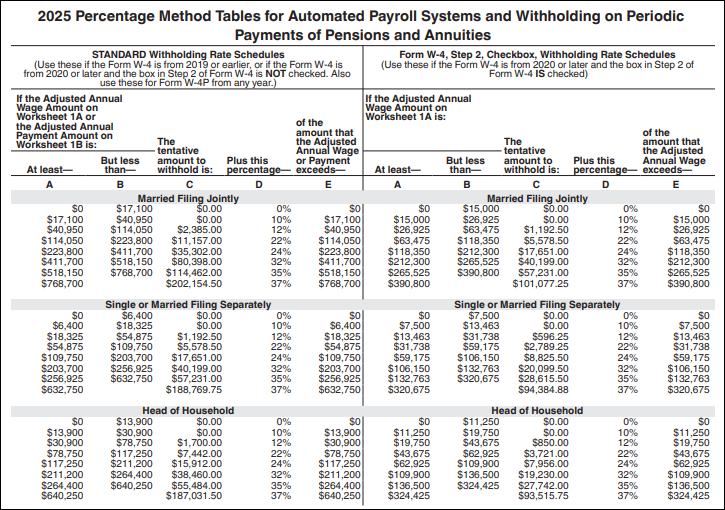
2020 introduced a new W-4 form. The withholding calculation for an employee differs depending on the year of their current W-4.
For W-4s prior to 2020, these facts apply:
- Withholding allowance: $4,300.00 per allowance
- Filing status: "S" or "M"
- Supplemental pay: Taxed separately at a flat percent.
For W-4s on or after 2020, these facts apply:
- No withholding allowance.
- Filing status: "S", "M", or "H"
- Supplemental pay: Taxed separately at a flat percent.
Percentage method withholding table for annual payroll period (2020 and pre-2020):
Link to Publication 15-T: 2025
Link to withholding calculator: USA
Link to W-4: current
Examples of tax functions
Preferred method using data from employee W-4 records:
W4.Withholding(FixedRate)
Alternate method:
Utah
- Filing status: "S" or "M"
- Supplemental pay: No special treatment.
- Link to tax tables and instructions: website; 2025 (use bookmark in PDF to skip to relevant section)
- Link to USA W-4: current
- If an employee's USA W-4 is missing, state tax is calculated using a filing status of "Single".
Example of tax function
Preferred method using data from employee state W-4 records:
StateW4.Withholding('UT')
Alternate method:
UT(Source, Tax:UT:FilingStatus, Tax:UT:Allowances)
Virginia
- Filing status: "M" or "S"
- Supplemental and pension/annuity pay: Taxed at flat percents only when paid on a separate check (i.e., source amount = supplemental + pension/annuity).
- Link to tax tables and instructions: 2025 revision (use bookmarks in PDF to skip to relevant sections)
- Link to withholding calculator: Virginia
- Link to VA-4: 2011
- If an employee's VA-4 is missing, state tax is calculated using 0 personal allowances and 0 age and blindness allowances.
Example of tax function
Preferred method using data from employee state W-4 records:
StateW4.Withholding('VA')
Alternate method:
Vermont
- Filing status: "S" or "M"
- Supplemental pay: Taxed at a flat percent only when paid on a separate check (i.e., source amount = supplemental amount).
- Link to tax tables and instructions: 2025 (use bookmarks in PDF to skip to relevant sections)
- Link to W-4VT: 2019
- If an employee's W-4VT is missing, state tax is calculated using a filing status of "Single" with 0 allowances.
Example of tax function
Preferred method using data from employee state W-4 records:
StateW4.Withholding('VT')
Alternate method:
Washington
No state income tax!
Wisconsin
- Filing status: "S" or "M"
- Supplemental pay: Taxed separately at a graduated flat percent.
- Link to tax tables and instructions: 2024 (still valid for 2026) (use bookmarks in PDF to skip to relevant sections)
- Link to WT-4: 2024
- If an employee's WT-4 is missing and a pre-2020 federal Form W-4 is in effect for the employee as of the check date, state tax is calculated based on the filing status and allowances from the federal Form W-4. If no pre-2020 Form W-4 is available and the WT-4 is missing, tax is calculated using a filing status of "Single" with 0 allowances.
Example of tax function
Preferred method using data from employee state W-4 records:
StateW4.Withholding('WI')
Alternate method:
West Virginia
- Filing status:
- 1. One earner/one job. Single, head of household, or married with non-employed spouse.
- 2. Two earners/two or more jobs. Married filing jointly, both working; individual earning wages from two jobs.
- Supplemental pay: No special treatment.
- Link to tax tables and instructions: 2025
- Link to WV/IT-104: 2023
- If an employee's WV/IT-104 is missing, state tax is calculated using a filing status of "2" and 0 exemptions.
Example of tax function
Preferred method using data from employee state W-4 records:
StateW4.Withholding('WV')
Alternate method:
WV(Source, Tax:WV:FilingStatus, Tax:WV:Exemptions)
Wyoming
No state income tax!