Important!
1099s can no longer be transmitted through the FIRE system as of tax year 2026. Beginning in filing year 2027, the IRS requires 1099 transmitters to use the IRIS (Information Returns Intake System) application.
Software changes to ActivityHD are underway to support filing through IRIS. This documentation will be updated when those changes are finalized.
Meanwhile, to prepare for the 2027 filing season, your organization should apply for a new Transmitter Control Code (TCC) specific to IRIS. Follow this link to learn more: IRIS.
The Generate 1099s process creates a 1099 transmission record for each 1099 e-file submission to the IRS FIRE system. The submitted e-file is attached for future reference. In addition, you can use the transmission record to record the following information from the FIRE system: filename assigned by the FIRE system, the filename of your submission, the date the submission was received, the count of payees in the submission, and the current status of the submission. The 1099s tab shows all 1099 records included in the transmission.
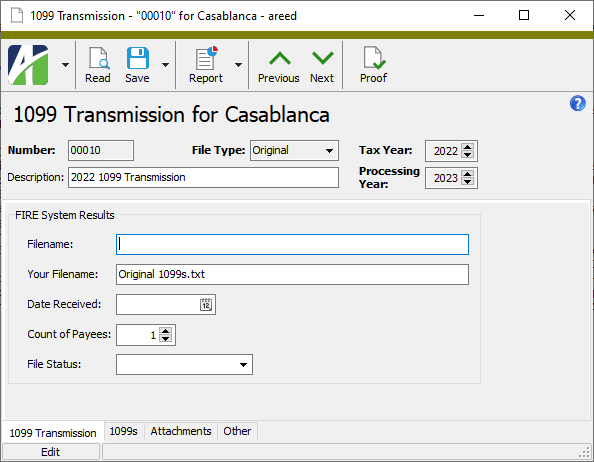
The 1099 process creates the 1099 file for electronic submission to the government or for actual printing of 1099 forms. The 1099 transmission is not created if any required information is missing. The 1099 Detail Report can show you the vendors with missing required information.
1099 information is determined by the APCodes assigned to payments. The proper setup of APCodes is essential to the accuracy of 1099 reporting. You can define default 1099 APCodes on vendors who will require a 1099 at year's end. You can change APCodes on payments before or after merge to ensure 1099 information is correct.
When you create an invoice for a vendor, its default APCodes are copied to the invoice record. When a payment is made on the invoice, the APCodes from the invoice are copied to the payment. The 1099 amount is adjusted proportionately based on the payment amount. You can specify multiple APCodes on each invoice and payment so that it is possible to have multiple 1099 types on invoices, payments, and vendors; however, any given APCode can only appear in the table once.
Note
In 2020 the IRS introduced Form 1099-NEC which now reports the non-employee compensation data which was formerly reported on Form 1099-MISC. While this resulted in significant changes to the 2020 (and later) Form 1099-MISC, ActivityHD still produces correct 1099s for prior and current tax years.
Generate 1099s is available from the Vendors, 1099s, and 1099 Transmissions folders.
Tip
During the Generate 1099s process, avoid the following common mistakes:
- Do not skip fields marked with an asterisk (*). These fields are required.
- Do not forget to assign a reporting location for each vendor. If you receive an error when you create the 1099 file that indicates the vendor doesn't have a name or if the 1099 Detail Report indicates the vendor is missing address information, the likely culprit is that none of the vendor's locations is specified as a default reporting location.
- Do not leave the Federal ID field on the vendor blank. Each vendor must have a federal ID on record. Per the IRS instructions, be sure to include dashes when entering federal IDs. The federal ID entered on the vendor prints on the 1099s.
- In the Navigation pane, highlight the Accounts Payable > Vendors folder.
- Start the Generate 1099s wizard.
- To generate 1099s for all or a filtered subset of vendors:
- Right-click the Vendors folder and select Select and Generate 1099s from the shortcut menu.
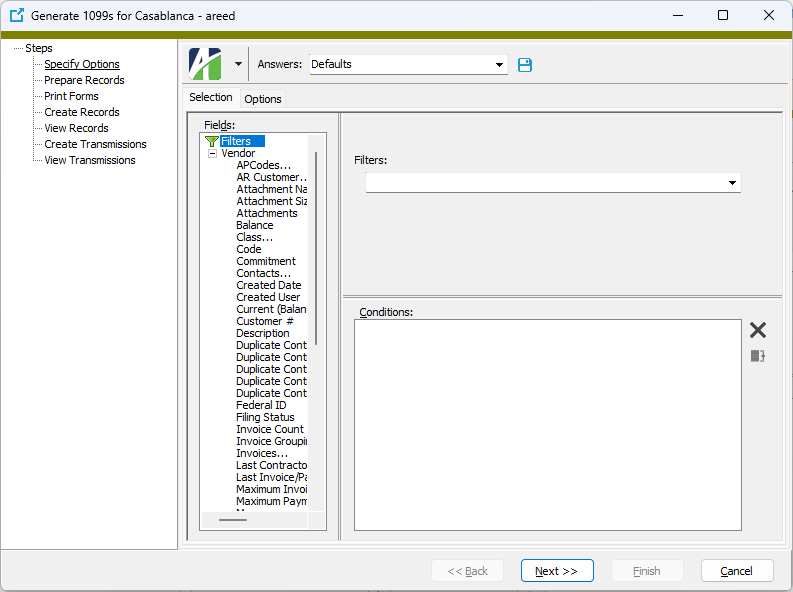
On the Selection tab, define any filters to apply to the vendors.
- To generate 1099s for specifically selected vendors:
- In the HD view, select the vendors to include in 1099 generation. You can use Ctrl and/or Shift selection to select multiple vendors.
- Right-click on your selection and select Generate 1099s from the shortcut menu.
Select the Options tab.
- To generate 1099s for all or a filtered subset of vendors:
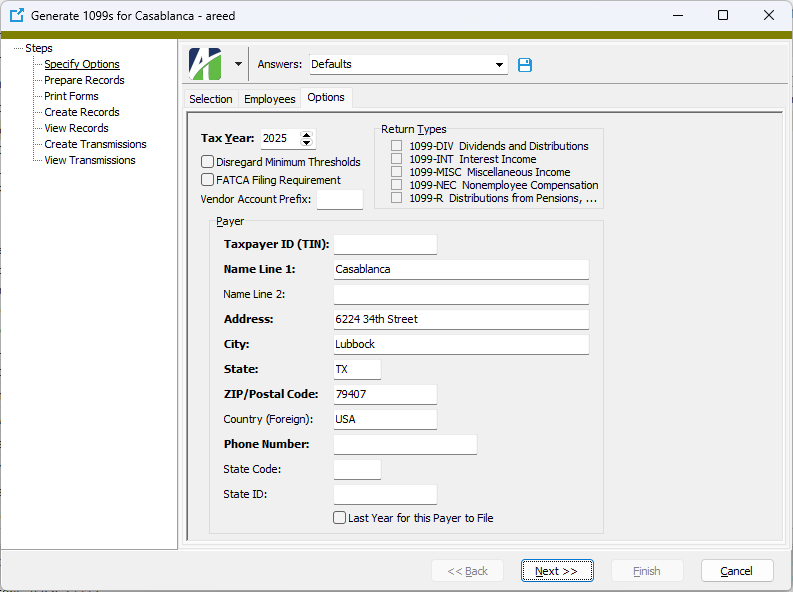
- Select the four-digit Tax Year to generate 1099s for.
- This step applies only to sites with multiple companies which share the same Payer TIN. Mark the Disregard Minimum Thresholds checkbox only if you want the process to include vendors with payments less than the minimum threshold reporting amounts. For example, if the threshold is $2000 and a vendor has $1450 of non-employee compensation, marking the checkbox would cause a 1099-NEC to be generated for the vendor even though the amount is below the threshold amount. For more on reporting 1099 information for multiple companies with the same Payer TIN, follow this link.
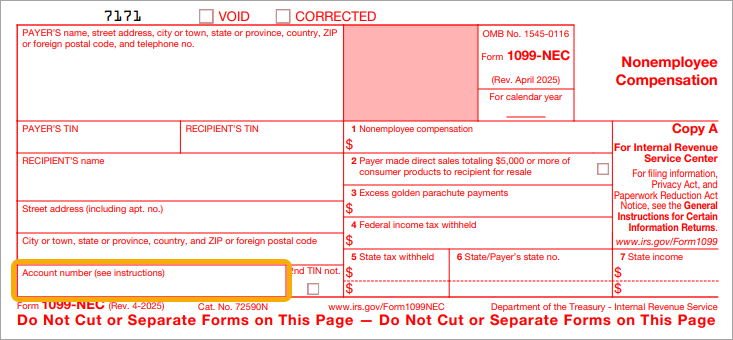
- Mark the FATCA Filing Requirement checkbox if your organization must comply with FATCA provisions. If you mark this checkbox, the vendor code will print in the "Account number" box on the 1099 form.
- This step applies only to sites with multiple companies which share the same Payer TIN. The Vendor Account Prefix affects only vendors with the Separate 1099 Form checkbox marked on the Vendor tab of the vendor record. Enter the text to prepend to the vendor account code to form the value that prints in the Account Number box of Form 1099 or that is transmitted in the "Payer's Account Number for Payee" field of the electronic file.
Notes
- The prefix can include a delimiter, if desired. For example, a vendor code of ABCDE with a prefix of xyz- would look like xyz-ABCDE in the Account Number box.
- The "Payer Account for Payee" field is limited to 20 characters in the electronic file. Be mindful of this limitation when setting the prefix.
For more on reporting 1099 information for multiple companies with the same Payer TIN, follow this link.
- In the Return Types section, mark the checkbox for each return type to generate. Your options are:
- 1099-DIV Dividends and Distributions
- 1099-INT Interest Income
- 1099-MISC Miscellaneous Income
- 1099-NEC Nonemployee Compensation
- 1099-R Distribution from Pensions, ...
- In the Taxpayer ID (TIN) field, enter the payer's nine-digit taxpayer identification number (TIN). The TIN may be an employer identification number (EIN), social security number (SSN), or individual taxpayer identification number (ITIN). This field allows up to 11 characters so that you can include dashes in the TIN.
- In the Name Line 1 field, enter the name of the payer whose TIN appears in the Taxpayer ID (TIN) field. This field allows up to 40 characters.
- Use the Name Line 2 field to continue the name of the payer from the Name Line 1 field or leave the field blank. This field allows up to 40 characters.
- In the Address, City, State, ZIP/Postal Code, Country (Foreign), and Phone Number fields, enter address and phone information for the payer's shipping address. The address and city fields allow up to 40 characters each.
-
If the payer participates in the Combined Federal/State Filing Program and/or is required to file paper copies of the 1099 with a state tax entity, enter the abbreviated name of the state in the State Code field.
Note
State reporting is currently only supported for a single state; i.e., there is one payer state code and it is the same for all payments to all vendors. Look for multi-state 1099 reporting in future releases.
- If the payer participates in the Combined Federal/State Filing Program and/or is required to file paper copies of the 1099 with a state tax entity, enter the payer's state identification number assigned by the state in the State ID field.
- If the payer will not be filing 1099s after this year, mark the Last Year for this Payer to File checkbox.
-
Click Next >>.
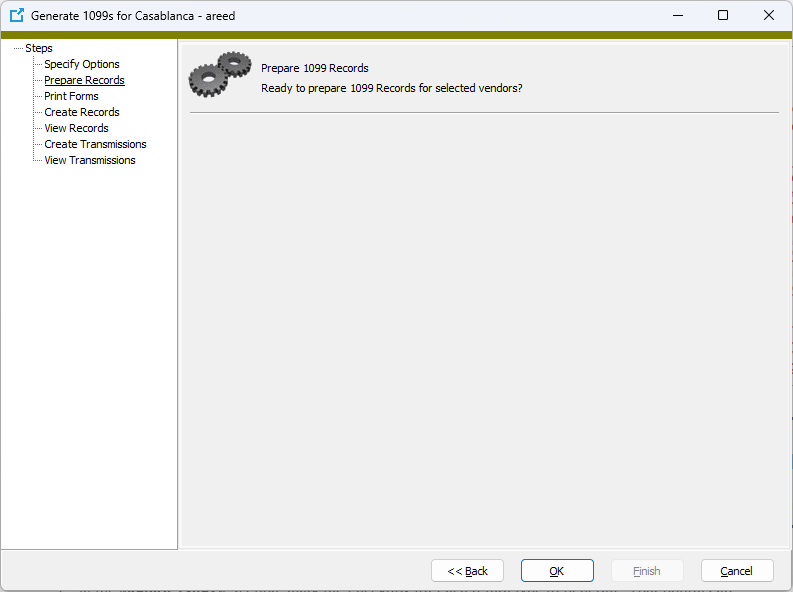
- If you are ready for ActivityHD to prepare and validate the 1099 data, click OK.
-
ActivityHD prepares and validates the data and reports its results.
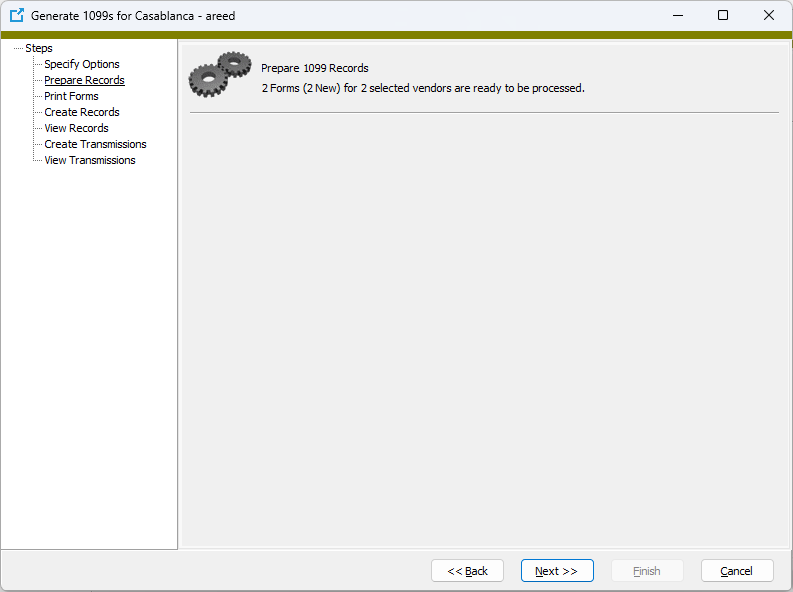
If errors are encountered, the error messages are reported here. You cannot continue with 1099 generation until all errors are resolved. 1099s cannot be generated if required information is missing. Run the 1099 Detail Report to see which vendors are missing required information.
If no errors are reported, continue with step 18.
-
Click Next >>.
Use the "Print Forms" step to print Forms 1099 Copy B for mailing to payees.
If you have fewer than ten federal information returns and choose not to file electronically, use this step to also print Forms 1099 Copy A and the 1096 Summary Report for submission to the IRS.
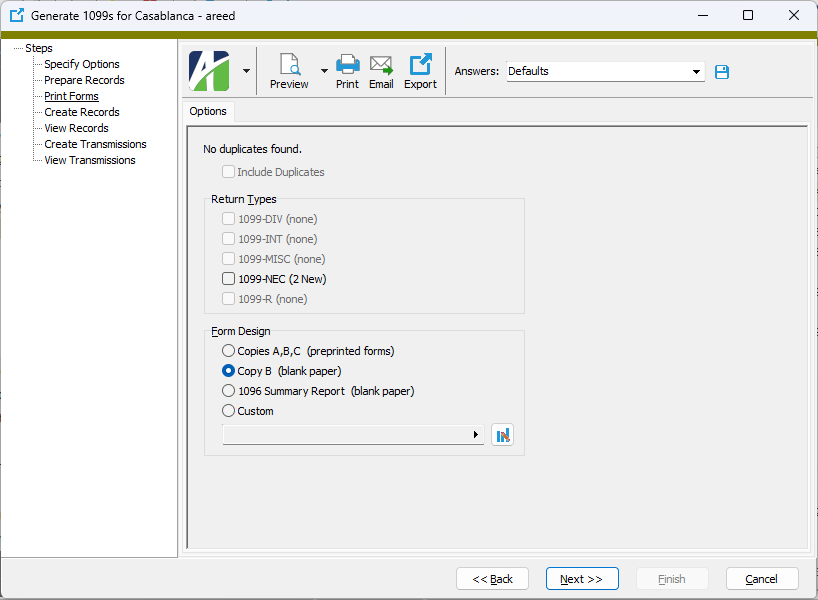
- If the 1099 process builds one or more 1099s which match existing 1099 records (same payer TIN, payee TIN, tax year, and form type), it determines whether each of the new 1099s is a duplicate or a correction. If any of the payer or payee name fields, address fields, or box code amounts differ, the new 1099 is flagged as a correction; otherwise, it is considered a duplicate. The number of duplicates found is reported on the Options tab of the "Print Forms" step. If there is at least one duplicate 1099, the Include Duplicates checkbox is enabled. Mark the checkbox if you want to include duplicates when you print 1099s. To skip reprinting 1099s which may have been printed when the previous 1099 records were created, leave the checkbox cleared.
- In the Return Types section, mark the checkbox for each return type to print. If there are no records of a particular return type to print, its checkbox is disabled. Valid options include:
- 1099-DIV
- 1099-INT
- 1099-MISC
- 1099-NEC
- 1099-R
-
In the Form Design section, select the type of report design to use. Your options are:
- Copies A, B, C - Prints on pre-printed Copy A and/or Copy B and/or Copy C forms.
- Copy B - (Recommended) Prints Copy B forms on blank paper for sending to 1099 recipients. An image of the 1099 form is incorporated in the printing.
- 1096 Summary Report - Prints the 1096 Summary Report of 1099 information for accompanying submission of printed Forms 1099 Copy A to the IRS.
- Custom - Enables the field below so that you can select and print a custom form design.
- In the toolbar, click the icon for the type of output you want:
 - Provides access to two preview options.
- Preview - Click the icon or click the drop-down arrow and select Preview from the drop-down menu to view the report in the Crystal Reports viewer.
- Preview to PDF - Click the drop-down arrow next to the icon and select Preview to PDF to view the report in the PDF reader.
 - Opens the Print dialog so that you can select and configure a printer and then print a paper copy of the report.
 - Opens the Report Email dialog so that you can address and compose an email that the report will be attached to. For best results, ensure your email client is running before you attempt to send a report via email.
 - Opens a drop-down menu with two export options:
 - Export Report - Opens a dialog so that you can save the report to a file. File types include Crystal Reports (.rpt), PDF (.pdf), Microsoft Excel (.xls), Microsoft Word (.doc), rich text (.rtf), and XML (.xml).
- Export Data - Opens a dialog so that you can export report data to XML or JSON file format.
- From
- The email account from which to send the email. Valid options are:
- Windows user default account. Sends email using the user's Windows default email account. For most users, this is the account configured in Outlook or another email client application.
- Server personal. Sends email using the email configuration for the system or company server and the email address on the current user's authorized user record. The authorized user record must have a confirmed email address.
- Server generic. Sends email using the email configuration and "from" address for the system or company server. This option requires "Send generic" access to the Server Email resource.
- To
- The email address(es) to which to send the email. Separate email addresses with semi-colons.
- CC
- The email addresses to copy on the email. Separate email addresses with semi-colons.
- BCC
- The email addresses to blind copy on the email. Separate email addresses with semi-colons.
- Subject
- The subject line.
- Text box
- The body of the email.
-
When you finish printing 1099s, click Next >>.
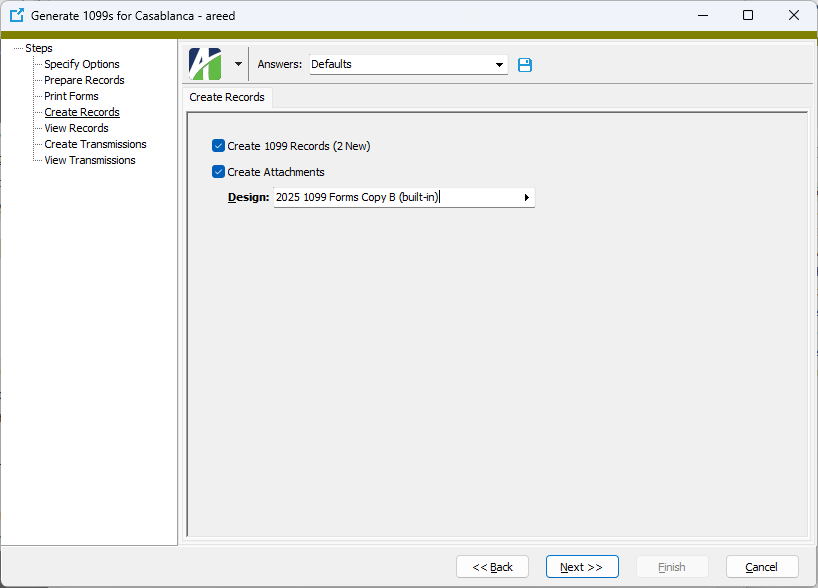
- To create 1099 records for the 1099 forms generated in the process, ensure the Create 1099 Records checkbox is marked. If you clear the checkbox, the Create Attachments checkbox is cleared and disabled.
- If the Create 1099 Records checkbox is marked and you want to create 1099 forms to attach to their corresponding 1099 records, ensure the Create Attachments checkbox is marked. If you want to create records but skip attachments, clear the checkbox.
- If the Create Attachments checkbox is marked, the Design field is enabled. Select the form design to use to create the attachments.
-
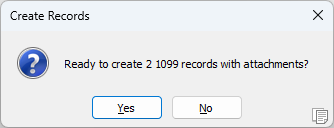
Click Next >>. You are prompted to confirm that you want to create 1099 records and attachments.
-
Click Yes.
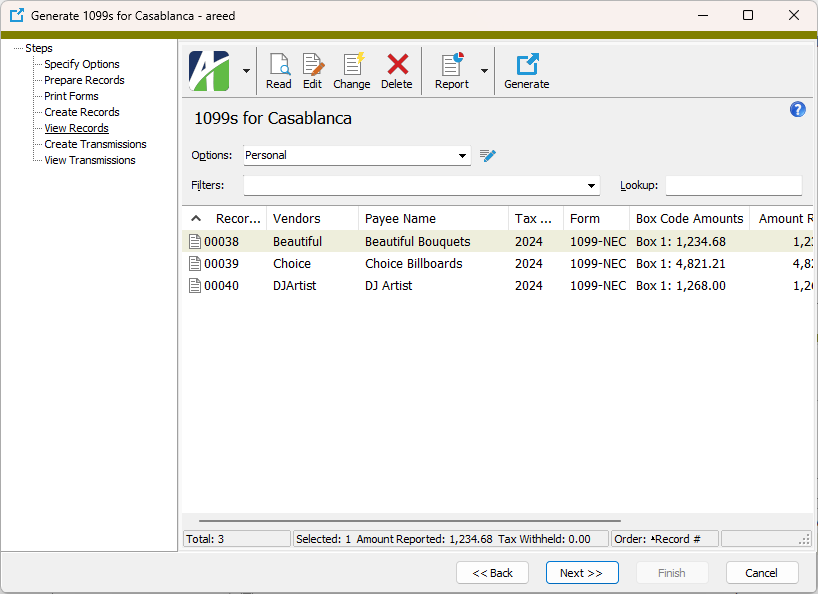
At this point, you can double-click a 1099 record in the right pane to drill down to the 1099 window.
-
When you finish working with 1099 records, click Next >>.
Use the "Create Transmissions" step to create the electronic 1099 transmission file for submission to the IRS.
This step is not necessary if you printed paper Forms 1099 Copy A for submission to the IRS in the "Print Forms" step. You can click Finish to exit the process.
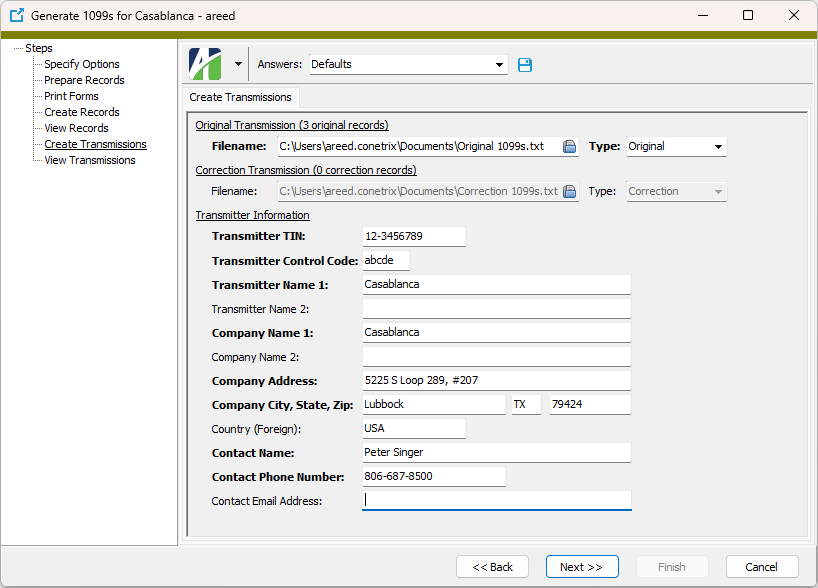
- In the Original Transmission section, the Filename and Type fields are enabled if original records are detected. If these fields are disabled, skip to step 32. Otherwise, in the Filename field, browse to the folder to save the electronic transmission file to and specify a file name.
- From the Type drop-down list, select the type of transmission file being created. If this is an original transmission, the value defaults to "Original". Valid types are:
- Original
- Replacement
- Correction
- Test.
- In the Correction Transmission section, the Filename and Type fields are enabled if correction records are detected. If these fields are disabled, skip to step 33. Otherwise, in the Filename field, browse to the folder to save the electronic transmission file to and specify a file name.
- From the Type drop-down list, select the type of transmission file being created. If this is a correction transmission, the value defaults to "Correction". Valid types are:
- Original
- Replacement
- Correction
- Test.
- In the Transmitter TIN field, enter the transmitter's nine-digit taxpayer identification number (TIN). The TIN may be an employer identification number (EIN), social security number (SSN), or individual taxpayer identification number (ITIN).
- In the Transmitter Control Code field, enter the five-character code assigned to you by the IRS. You must have a Transmitter Control Code (TCC) to submit 1099 information electronically.
- In the Transmitter Name 1 field, enter the usual business name of the transmitter. If you need a second line for the name, use the Transmitter Name 2 field.
- In the Company Name 1 field, enter the name of the company to which correspondence about the electronic transmission should be directed. If you need a second line for the company name, use the Company Name 2 field.
- In the Company Address; Company City, State, Zip; and Country (Foreign) fields, enter address details about the address to which correspondence about the electronic transmission should be sent.
- In the Contact Name field, enter the name of the person the IRS should contact regarding problems with the electronic file or its transmission.
- Enter the Contact Phone Number.
- Enter the Contact Email Address.
- Click Next >>. You are prompted to confirm that you want to create the 1099 electronic transmission file.
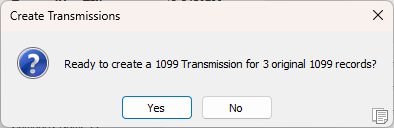
- Click Yes.
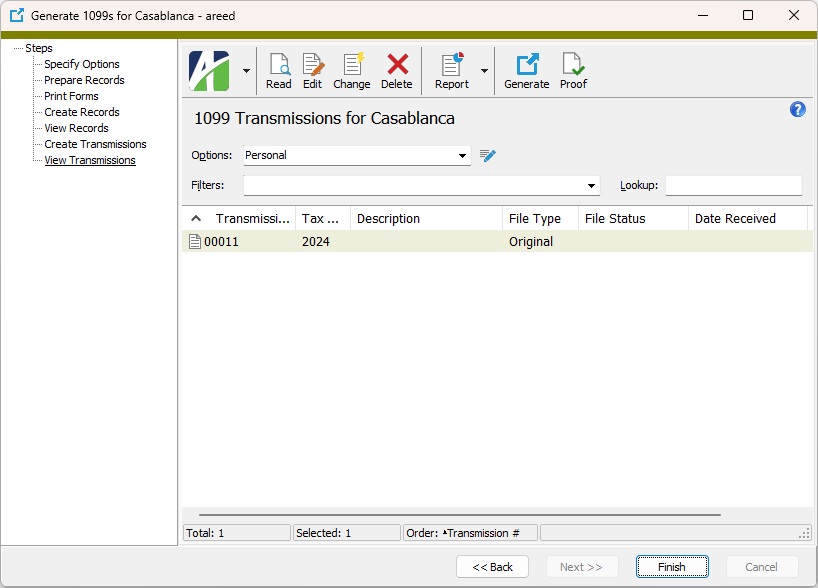
At this point, you can double-click a 1099 transmission record in the right pane to drill down to the 1099 Transmission window.
- When you finish working with 1099 transmission records, click Finish.
Note
Vendors that do not meet the $2000 reporting threshold will be excluded from validation. They will not cause missing-information errors, and 1099s will not be generated for these vendors.
Data extensions
The following data extension is available for 1099s:
- 1099 Returns
 Submit a 1099 transmission to the IRS
Important!
1099s can no longer be transmitted through the FIRE system as of tax year 2026. Beginning in filing year 2027, the IRS requires 1099 transmitters to use the IRIS (Information Returns Intake System) application.
Software changes to ActivityHD are underway to support filing through IRIS. This documentation will be updated when those changes are finalized.
Meanwhile, to prepare for the 2027 filing season, your organization should apply for a new Transmitter Control Code (TCC) specific to IRIS. Follow this link to learn more: IRIS.
Reporting 1099 information for multiple companies with the same Payer TIN
The following items are required for proper processing of 1099s when multiple ActivityHD companies share the same Payer TIN:
- The company information (payer name, address, and TIN) must be identical for all companies which share the same TIN.
- The Separate 1099 Form checkbox must be marked on all reportable vendors in all ActivityHD companies.
- The length of the vendor account prefix plus the longest reportable vendor code must not exceed 20 characters.
- In the Generate 1099s process:
- Mark the Disregard Minimum Thresholds checkbox.
- In the Vendor Account Prefix field, enter the company prefix. Each company's prefix must be unique among all ActivityHD companies; however, ActivityHD does not validate uniqueness.
Create saved answers to store settings for each company.
Note
A company's vendor account prefix must be the same each time the Generate 1099s process is run in order for corrections to work properly.
About correction 1099s and duplicate 1099s
You can run Generate 1099s when there are existing 1099 records for the same payer TIN, payee TIN, tax year, and 1099 form type. When the Prepare Records step creates a 1099 record that matches an existing record against all four criteria, it determines whether the new record is a duplicate or a correction. If the payer and payee name fields, address fields, and box code amounts match exactly, the new record is considered to be a "duplicate". If any of the aforementioned is different, the new record is deemed a "correction".
You can determine how duplicate records are handled in the Print Forms step. If you do not mark the Include Duplicates checkbox, duplicate records are not printed. If you mark the checkbox, duplicates are printed. This lets you control which records are printed based on whether forms were actually printed when the previous 1099 records were created.
When you produce printed correction forms, the "Corrected" checkbox on the form is automatically marked. In addition, the correction date is shown on the Copy B forms to help the payee/recipient determine which is the most current correction in case multiple corrections are issued. When you file electronically, correction records are automatically grouped into separate "Payer A" sections when the electronic file is constructed.
The following methodology is applied when determining how to handle records prepared in the Generate 1099s process for transmission:
- If no previous transmission record is found, the 1099 record is added to the "Original" transmission.
- If the previous transmission record is identical, the prepared 1099 record is a duplicate and is excluded from transmission.
- If the previous transmission record is different and has a status of "Good", a correction 1099 record is created.
- if the previous transmission record is different and has a "Not Yet Processed" status, the prepared 1099 record is excluded from transmission to provide you the opportunity to cancel the previous transmission if needed.
One-transaction corrections
Certain types of corrections require only one transaction to effect the change. One-transaction corrections occur when the original return was filed with one or more of the following error types:
- Incorrect payment amount codes in the Payer "A" record
- Incorrect payment amounts in the Payee "B" record
- Incorrect code in the distribution code field in the Payee "B" record
- Incorrect payee indicator
- Return should not have been filed
Two-transaction corrections
Other corrections require two transactions to effect the change. Two-transaction corrections occur when the original return was filed with one or more of the following error types:
- No payee TIN
- Incorrect payee TIN
- Incorrect payee name
- Wrong return-type indicator
The first transaction contains a section of A/B/C records for the original information. The B records are coded with "G" (corrected return code) and all amounts are set to zero.
The second transaction contains a section of A/B/C records for the corrected information. The B records are coded with "C" (corrected return code) and the amounts are set to the correct amounts.
Example of two-transaction correction - incorrect federal ID
If the tax identification number (TIN) on a 1099 record is incorrect, you need to produce a correction 1099 record and a new 1099 record for the same tax year, form type, payer ID, and payee ID (provided a corresponding duplicate/correction record isn't already generated). To do so, update the federal ID on the vendor record and rerun the Generate 1099s process. The following 1099 records are created:
- A zero-amount correction 1099 record is created for the old payee TIN.
- A new 1099 record is created with the correct amounts and the new payee TIN.
Use the Proof 1099 Transmission process to produce a list of the contents of the electronic file that is attached to a 1099 transmission. Use the list as an additional way to verify the 1099 information before submitting it to the IRS.
Note
You must have "Proof" access on AP 1099 transmissions to use this feature.
Proof a 1099 transmission
- In the Navigation pane, highlight the Accounts Payable > Government > 1099 Transmissions folder.
- In the HD view, highlight the 1099 transmission to proof.
-
Click
 . The Proof 1099 Transmission wizard starts.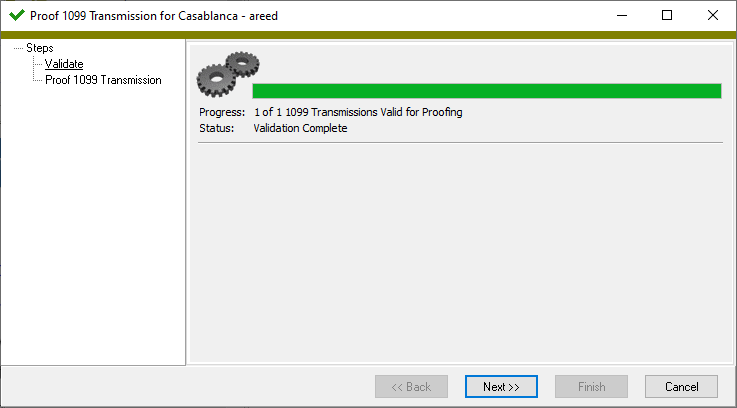
-
Click Next >>.
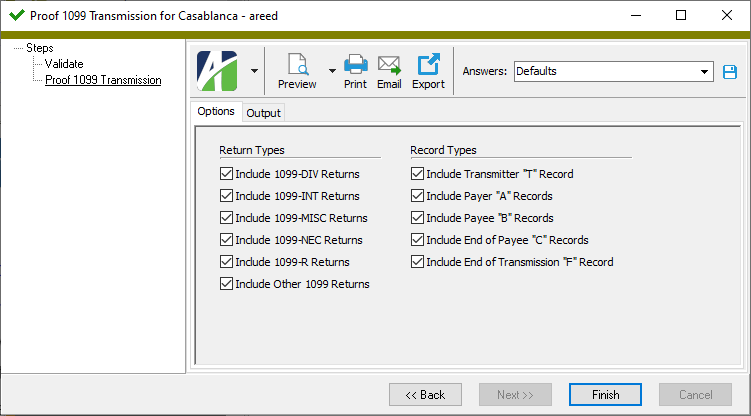
- In the Return Types section, ensure that each return type you want to include in the list is marked and that all other checkboxes are cleared. Valid return types are:
- 1099-DIV
- 1099-INT
- 1099-MISC
- 1099-NEC
- 1099-R
- Other 1099
- In the Record Types section, ensure that each record type you want to include in the list is selected and that all other checkboxes are cleared. Valid record types are:
- Transmitter "T"
- Payer "A"
- Payee "B"
- End of Payee "C"
- End of Transmission "F"
- Select the Output tab.
- In the Design field, look up and select the report design to use.
- In the toolbar, click the icon for the type of output you want:
- - Provides access to two preview options.
- Preview - Click the icon or click the drop-down arrow and select Preview from the drop-down menu to view the report in the Crystal Reports viewer.
- Preview to PDF - Click the drop-down arrow next to the icon and select Preview to PDF to view the report in the PDF reader.
- - Opens the Print dialog so that you can select and configure a printer and then print a paper copy of the report.
- - Opens the Report Email dialog so that you can address and compose an email that the report will be attached to. For best results, ensure your email client is running before you attempt to send a report via email.
- - Opens a drop-down menu with two export options:
- Export Report - Opens a dialog so that you can save the report to a file. File types include Crystal Reports (.rpt), PDF (.pdf), Microsoft Excel (.xls), Microsoft Word (.doc), rich text (.rtf), and XML (.xml).
- Export Data - Opens a dialog so that you can export report data to XML or JSON file format.
- From
- The email account from which to send the email. Valid options are:
- Windows user default account. Sends email using the user's Windows default email account. For most users, this is the account configured in Outlook or another email client application.
- Server personal. Sends email using the email configuration for the system or company server and the email address on the current user's authorized user record. The authorized user record must have a confirmed email address.
- Server generic. Sends email using the email configuration and "from" address for the system or company server. This option requires "Send generic" access to the Server Email resource.
- To
- The email address(es) to which to send the email. Separate email addresses with semi-colons.
- CC
- The email addresses to copy on the email. Separate email addresses with semi-colons.
- BCC
- The email addresses to blind copy on the email. Separate email addresses with semi-colons.
- Subject
- The subject line.
- Text box
- The body of the email.
- When you finish, click Finish.
By default, every return type and record type on the Options tab is marked. If this is satisfactory, skip to step 7. Otherwise, continue with the next step.
Update the status of a 1099 transmission
Important!
1099s can no longer be transmitted through the FIRE system as of tax year 2026. Beginning in filing year 2027, the IRS requires 1099 transmitters to use the IRIS (Information Returns Intake System) application.
Software changes to ActivityHD are underway to support filing through IRIS. This documentation will be updated when those changes are finalized.
Meanwhile, to prepare for the 2027 filing season, your organization should apply for a new Transmitter Control Code (TCC) specific to IRIS. Follow this link to learn more: IRIS.
It is important to keep the status of your 1099 transmissions up-to-date as the IRS reports status changes. To do so:
- In the Navigation pane, highlight the Accounts Payable > Government > 1099 Transmissions folder.
-
In the 1099 Transmissions HD view, locate and double-click the transmission record you need to update to open it in its 1099 Transmission window.
- Enter a Description of the 1099 transmission.
- In the Filename field, enter the name assigned to the transmission file by the FIRE system. The name format is typically NAME.TCC.NUMBER where NAME is the name you assigned to the transmission file, TCC is your transmitter control code, and NUMBER is a four-digit number that indicates the order of the file among your transmissions (0001, 0002, 0003, etc.).
- In the Date Received field, enter the date the IRS indicates that it received the transmission file.
- Enter the Count of Payees in the transmission file.
- Select the current File Status from the drop-down list. Valid file statuses are:
- Good. If the reported count of payees agrees with your count, you are finished; the file is either released or pending release.
- Bad. The file contains errors which must be corrected and then resubmitted as a replacement.
- Not Yet Processed. The file has been received but results are not yet available. Check back another day for an updated status.
Note
The corrections process depends on the file status on previous transmissions being accurate. Ensure that the status here is updated to match the current status in the FIRE System.
- When you finish, save your changes.
Perform only the steps below which are necessary to update the 1099 transmission record. If this is a subsequent update, you may only need to update the File Status field.
1099 Transmissions Listing
Important!
1099s can no longer be transmitted through the FIRE system as of tax year 2026. Beginning in filing year 2027, the IRS requires 1099 transmitters to use the IRIS (Information Returns Intake System) application.
Software changes to ActivityHD are underway to support filing through IRIS. This documentation will be updated when those changes are finalized.
Meanwhile, to prepare for the 2027 filing season, your organization should apply for a new Transmitter Control Code (TCC) specific to IRIS. Follow this link to learn more: IRIS.
Purpose
The 1099 Transmissions Listing provides a list of the 1099 transmissions prepared for submission to the IRS along with the FIRE System results for each transmission.
Content
For each 1099 transmission included on the report, the listing shows:
- transmission number
- transmission description
- tax year
- file type
- summary of FIRE System results for the transmission including filename, your filename, date received, payee count, and file status.
In addition, you can include one or more of the following:
- timestamps
- memos
- custom fields.
The following total appears on the report:
- record count.
Print the report
- In the Navigation pane, highlight the Accounts Payable > Government > 1099 Transmissions folder.
- Start the report set-up wizard.
- To report on all or a filtered subset of 1099 transmissions:
- Right-click the 1099 Transmissions folder and select Select and Report > 1099 Transmissions Listing from the shortcut menu.
- On the Selection tab, define any filters to apply to the data.
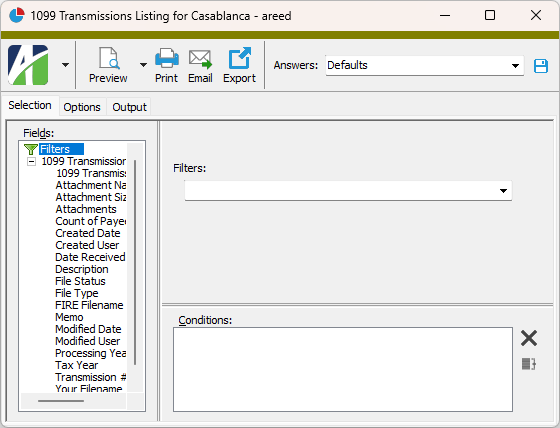
- To report on specifically selected 1099 transmissions:
- In the HD view, select the 1099 transmissions to include on the report. You can use Ctrl and/or Shift selection to select multiple records.
- Click
 and select 1099 Transmissions Listing from the drop-down menu.
- To report on a particular 1099 transmission from the 1099 Transmission window:
- In the HD view, locate and double-click the 1099 transmission to report on. The 1099 Transmissions window opens with the 1099 transmission loaded.
- Click .
- To report on all or a filtered subset of 1099 transmissions:
- Select the Options tab.
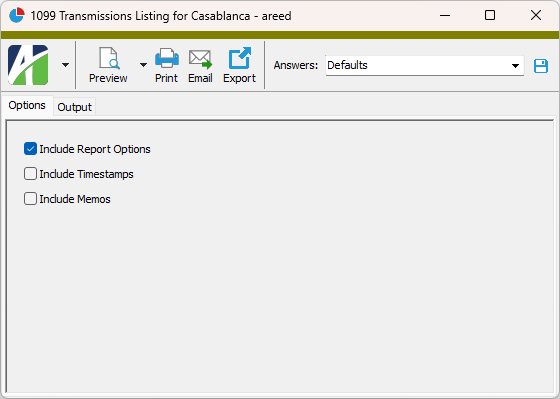
- To include a section at the end of the report with the report settings used to produce the report, leave the Include Report Options checkbox marked. To produce the report without this information, clear the checkbox.
- Mark the checkbox(es) for the additional information to include:
- Timestamps
- Memos
- Custom Fields (only visible if custom fields are set up)
- Select the Output tab.
- In the Design field, look up and select the report design to use.
- In the toolbar, click the icon for the type of output you want:
- - Provides access to two preview options.
- Preview - Click the icon or click the drop-down arrow and select Preview from the drop-down menu to view the report in the Crystal Reports viewer.
- Preview to PDF - Click the drop-down arrow next to the icon and select Preview to PDF to view the report in the PDF reader.
- - Opens the Print dialog so that you can select and configure a printer and then print a paper copy of the report.
- - Opens the Report Email dialog so that you can address and compose an email that the report will be attached to. For best results, ensure your email client is running before you attempt to send a report via email.
- - Opens a drop-down menu with two export options:
- Export Report - Opens a dialog so that you can save the report to a file. File types include Crystal Reports (.rpt), PDF (.pdf), Microsoft Excel (.xls), Microsoft Word (.doc), rich text (.rtf), and XML (.xml).
- Export Data - Opens a dialog so that you can export report data to XML or JSON file format.
- From
- The email account from which to send the email. Valid options are:
- Windows user default account. Sends email using the user's Windows default email account. For most users, this is the account configured in Outlook or another email client application.
- Server personal. Sends email using the email configuration for the system or company server and the email address on the current user's authorized user record. The authorized user record must have a confirmed email address.
- Server generic. Sends email using the email configuration and "from" address for the system or company server. This option requires "Send generic" access to the Server Email resource.
- To
- The email address(es) to which to send the email. Separate email addresses with semi-colons.
- CC
- The email addresses to copy on the email. Separate email addresses with semi-colons.
- BCC
- The email addresses to blind copy on the email. Separate email addresses with semi-colons.
- Subject
- The subject line.
- Text box
- The body of the email.
Data extensions
The following data extension is available for the report:
- 1099 transmissions
1099 Transmission Record ID
- Original
- Replacement
- Correction
- Test
1099 Transmission tab
The current status of the transmission. As the IRS updates the status of your transmission, this field should be updated to reflect the current status.
Valid file statuses are:
- Good. If the reported count of payees agrees with your count, you are finished; the file is either released or pending release.
- Bad. The file contains errors which must be corrected and resubmitted as a replacement.
- Not Yet Processed. The file has been received but results are not yet available. Check back another day for an updated status.
Note
Accurate processing and reporting from the system relies on timely upkeep of the file status.
Custom tab
This tab is visible if custom fields exist for the entity. At a minimum, if there are custom fields, a Fields subtab will be present. One or more additional categories of subtabs may also be visible.
Fields subtab
This tab prompts for values for any custom fields set up for entity records of this entity type. Respond to the prompts as appropriate.
References subtab
This tab is visible if other records reference the current record.
Example
Suppose a custom field exists on PRCodes that references an ARCode. On the ARCode record, on the Custom > References subtab, you can view all the PRCodes which reference that ARCode.
Exchange Folder subtab
This tab is visible only if you set up a custom field with a data type of "Exchange Folder". The label on this tab is the name assigned to the custom field.
This tab shows the contents of the specified Exchange folder.
File subtab
This tab is visible only if you set up a custom field with a data type of "File". The label on the tab is the name assigned to the custom field.
This tab renders the contents of the specified file according to its file type.
Internet Address subtab
This tab is visible only if you set up a custom field with a data type of "Internet Address". The label on this tab is the name assigned to the custom field.
This tab shows the contents of the specified web page.
Network Folder subtab
This tab is visible only if you set up a custom field with a data type of "Network Folder". The label on this tab is the name assigned to the custom field.
This tab shows the contents of the specified network folder.
1099s tab
The 1099s pane shows the 1099s HD view filtered to show all 1099s in the selected transmission.
Double-click a row in the pane to drill down to its record in the 1099 window.
Attachments tab
The Attachments tab is visible if any record for a given entity has an attachment. If the Attachments tab is not visible, this implies that no record of the entity type has an attachment on it; however, once an attachment is added to any record of the entity type, the Attachments tab will become available.
Change Logs tab
This tab is visible if the user has "Change Logs" access to the associated data folder resource.
The Change Logs pane shows the Change Logs HD view filtered to show all change logs for the selected entity record.
Double-click a row in the pane to drill down to its record in the Change Log window.
Other tab
Developer tab
This tab is visible only when developer features are enabled.
Automation subtab
This subtab shows field names and values for the current data record. Use the information in the subtab to assist when creating automation objects such as bots and import files. The field names and field values can be copied from the text box and pasted directly into your code or application. To copy content from the text box, highlight the content to copy and press Ctrl+C or right-click your selection and select Copy from the context menu.
Export (XML | JSON) subtab
This subtab shows the XML syntax for exporting the selected data record. The syntax can be copied from the text box as an exemplar for creating your own automation objects for bots, import files, ActivWebAPI, etc. To copy content from the text box, highlight the content to copy and press Ctrl+C or right-click your selection and select Copy from the context menu.
Import (XML | JSON) subtab
This subtab allows you to select a file for import and shows the XML syntax for importing data records. Use the subtab to explore the XML syntax for importing data records. In particular, you can investigate the syntax which results when using Data.Import and ActivWebAPI data POST and DELETE routes.
Change Log (XML | JSON) subtab
This subtab is visible only when the Enable Change Logs option is marked in System Options or Company Options (depending on whether the feature applies at the system or the company level). This is the default setting when developer features are enabled.
This subtab allows you to investigate changes to the current data record. The syntax can be copied for use in bots, dashboards, ActivWebAPI, and other automation. To copy content from the text box, highlight the content to copy and press Ctrl+C or right-click your selection and select Copy from the context menu.
Select Statement (SQL) subtab
This subtab allows you to investigate the SQL select statement used to retrieve the current data record. The syntax can be copied as an exemplar for data sources and other automation. To copy content from the text box, highlight the content to copy and press Ctrl+C or right-click your selection and select Copy from the context menu.
Create Transmissions
Error:
The 1099 transmission cannot be created.
xx prepared records do not have a permanent 1099 record.
There are missing 1099 records. Permanent 1099 records must be linked to the transmission so that future corrections are possible.
1099 transmissions security
Common accesses available on 1099 transmissions
| Access | A user with this access can... |
|---|---|
| Change | Use the mass change action on 1099 transmissions. |
| Change Logs | |
| Custom Fields | Create and edit custom fields for 1099 transmissions. |
| Data | Have read-only access to 1099 transmissions from anywhere in the software (e.g., field validations, filters, date expressions). |
| Delete | Delete 1099 transmissions. |
| Edit | Edit 1099 transmission records. |
| Export | Export 1099 transmission records from ActivityHD. |
| Proof | Run the Proof 1099 Transmission process. |
| Read | Have read-only access to 1099 transmission records. |
| Report | Run reports with 1099 transmission information. |
| Report Designs | Create and edit report designs with 1099 transmission information. This access enables the Report Designs button on the Output tab of report dialogs. |
| Shared Answers | Create and edit saved answers related to 1099 transmissions. |
| Shared Filters | Create and edit shared filters on 1099 transmissions. |
| Visible | View the 1099 Transmissions folder in the Navigation pane. |
|
6224 34th Street Lubbock, TX 79407 806.687.8500 | 800.354.7152 |
© 2026 AccountingWare, LLC All rights reserved. |