Companies commonly use two methods to depreciate each asset; one method for financial statements and a second method for income tax. Numerous depreciation methods are accepted across the accounting industry and still other methods are approved by the IRS for tax reporting.
ActivityHD uses calculation controls to determine how depreciation is calculated. Many calculation controls are predefined for you. If you don't find the calculation you need among the built-in controls, ActivityHD lets you select the depreciation method and averaging convention combination you need to define your own controls.
 Create a straight line calculation control
Create a straight line calculation control
- In the Navigation pane, highlight the Fixed Assets > Setup > Calculation Controls folder.
- Click
 . The New Calculation Control window opens.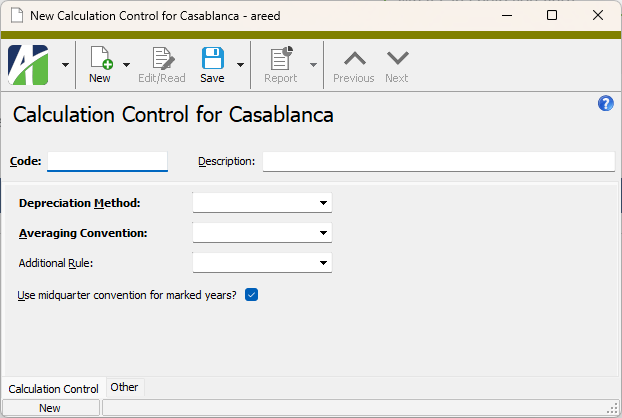
- Enter a unique Code for the calculation control.
- Enter a Description of the calculation control.
- From the Depreciation Method drop-down list, select "Straight Line".
- From the Averaging Convention drop-down list, select the averaging convention to use. Your options are:
- Half Year. No matter when an asset is placed in service during the year, it receives a half-year of depreciation.
- Modified Half Year. An asset must be in service for at least half the first year in order to get any depreciation for that year.
- Full Year. No matter when an asset is placed in service during the year, it receives a full year of depreciation.
- Mid Month. No matter when an asset is placed in service during the month, it receives a half-month of depreciation.
- Full Month. No matter when an asset is placed in service during the month, it receives a full month of depreciation.
- Mid Quarter. No matter when an asset is placed in service during the quarter, it receives a half-quarter of depreciation.
- Nearest Period. Assets placed in service through the 15th of the month (14th for February) receive a full month's depreciation. Assets placed in service after the 15th do not start depreciating until the next month. Assets retired through the 15th of the month are depreciated through the end of the preceding month. Assets retired after the 15th of the month are depreciated through the end of the retirement month. (The "Nearest Period" convention applies only to original cost and added cost, not to bonus depreciation or partial/full retirement.)
Days. Prorates the depreciation of the in-service month or end-of-life month by day. This convention can be applied to the retirement month if the asset is retired before end-of-life.
Example
If an asset is placed in service on April 11, the depreciation for April is prorated by multiplying the month's depreciation times the ratio of the days in-service divided by the number of days in the month (20/30 = 2/3).
- If this calculation control represents vehicle depreciation, from the Additional Rule drop-down list, select the type of vehicle the calculation control applies to. Your options are:
- Passenger Automobile
- Electric Vehicle
- Truck or Van
- If you need to override any "Use Midquarter" flags on the calendar when you use this calculation control, clear the Use midquarter convention for marked years? checkbox.
- Save the new straight line calculation control.
Create a declining balance calculation control
Create a declining balance calculation control
- In the Navigation pane, highlight the Fixed Assets > Setup > Calculation Controls folder.
- Click . The New Calculation Control window opens.
- Enter a unique Code for the calculation control.
- Enter a Description of the calculation control.
- From the Depreciation Method drop-down list, select "Declining Balance". The Percent field and the Switch to SL? checkbox become visible to the right of the dropdown.
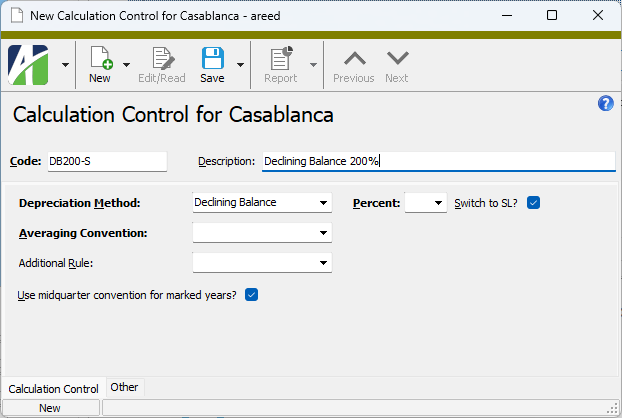
- From the Percent drop-down list, select the accelerator to use in the declining balance calculation. Your options are:
- 125
- 150
- 175
- 200
- If you want to switch to a straight line calculation when the depreciation calculated by the straight line method is greater than the amount calculated by the declining balance method, mark the Switch to SL? checkbox; otherwise, ensure the checkbox is cleared.
- From the Averaging Convention drop-down list, select the averaging convention to use. Your options are:
- Half Year. No matter when an asset is placed in service during the year, it receives a half-year of depreciation.
- Modified Half Year. An asset must be in service for at least half the first year in order to get any depreciation for that year.
- Full Year. No matter when an asset is placed in service during the year, it receives a full year of depreciation.
- Mid Month. No matter when an asset is placed in service during the month, it receives a half-month of depreciation.
- Full Month. No matter when an asset is placed in service during the month, it receives a full month of depreciation.
- Mid Quarter. No matter when an asset is placed in service during the quarter, it receives a half-quarter of depreciation.
- Nearest Period. Assets placed in service through the 15th of the month (14th for February) receive a full month's depreciation. Assets placed in service after the 15th do not start depreciating until the next month. Assets retired through the 15th of the month are depreciated through the end of the preceding month. Assets retired after the 15th of the month are depreciated through the end of the retirement month. (The "Nearest Period" convention applies only to original cost and added cost, not to bonus depreciation or partial/full retirement.)
Days. Use this option when you need to prorate the depreciation of the in-service month or end-of-life month by day. This convention can be applied to the retirement month if the asset is retired before end-of-life.
Example
If an asset is placed in service on April 11, the depreciation for April is prorated by multiplying the month's depreciation times the ratio of the days in-service divided by the number of days in the month (20/30 = 2/3).
- If this calculation control represents vehicle depreciation, from the Additional Rule drop-down list, select the type of vehicle the calculation control applies to. Your options are:
- Passenger Automobile
- Electric Vehicle
- Truck or Van
- If you need to override any "Use Midquarter" flags on the calendar when you use this calculation control, clear the Use midquarter convention for marked years? checkbox.
- Save the new declining balance calculation control.
Create a sum-of-years'-digits calculation control
Create a sum-of-years'-digits calculation control
- In the Navigation pane, highlight the Fixed Assets > Setup > Calculation Controls folder.
- Click . The New Calculation Control window opens.
- Enter a unique Code for the calculation control.
- Enter a Description of the calculation control.
- From the Depreciation Method drop-down list, select "Sum of Years Digits".
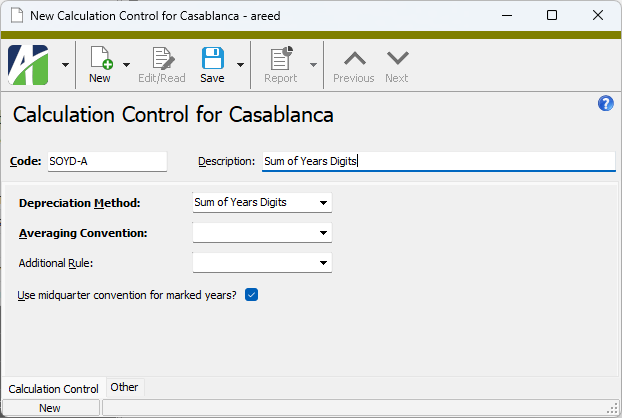
- From the Averaging Convention drop-down list, select the averaging convention to use. Your options are:
- Half Year. No matter when an asset is placed in service during the year, it receives a half-year of depreciation.
- Modified Half Year. An asset must be in service for at least half the first year in order to get any depreciation for that year.
- Full Year. No matter when an asset is placed in service during the year, it receives a full year of depreciation.
- Mid Month. No matter when an asset is placed in service during the month, it receives a half-month of depreciation.
- Full Month. No matter when an asset is placed in service during the month, it receives a full month of depreciation.
- Mid Quarter. No matter when an asset is placed in service during the quarter, it receives a half-quarter of depreciation.
- Nearest Period. Assets placed in service through the 15th of the month (14th for February) receive a full month's depreciation. Assets placed in service after the 15th do not start depreciating until the next month. Assets retired through the 15th of the month are depreciated through the end of the preceding month. Assets retired after the 15th of the month are depreciated through the end of the retirement month. (The "Nearest Period" convention applies only to original cost and added cost, not to bonus depreciation or partial/full retirement.)
Days. Use this option when you need to prorate the depreciation of the in-service month or end-of-life month by day. This convention can be applied to the retirement month if the asset is retired before end-of-life.
Example
If an asset is placed in service on April 11, the depreciation for April is prorated by multiplying the month's depreciation times the ratio of the days in-service divided by the number of days in the month (20/30 = 2/3).
- If this calculation control represents vehicle depreciation, from the Additional Rule drop-down list, select the type of vehicle the calculation control applies to. Your options are:
- Passenger Automobile
- Electric Vehicle
- Truck or Van
- If you need to override any "Use Midquarter" flags on the calendar when you use this calculation control, clear the Use midquarter convention for marked years? checkbox.
- Save the new sum-of-years'-digits calculation control.
Create a percent of net value calculation control
The percent of net value method is based on a flat percent of the asset's cost-to-date minus depreciation-to-date (i.e., net value) per year. This method is typically used in Canada.
Create a percent of net value calculation control
- In the Navigation pane, highlight the Fixed Assets > Setup > Calculation Controls folder.
- Click . The New Calculation Control window opens.
- Enter a unique Code for the calculation control.
- Enter a Description of the calculation control.
- From the Depreciation Method drop-down list, select "Percent of Net Value". The Percent field become visible to the right of the dropdown.
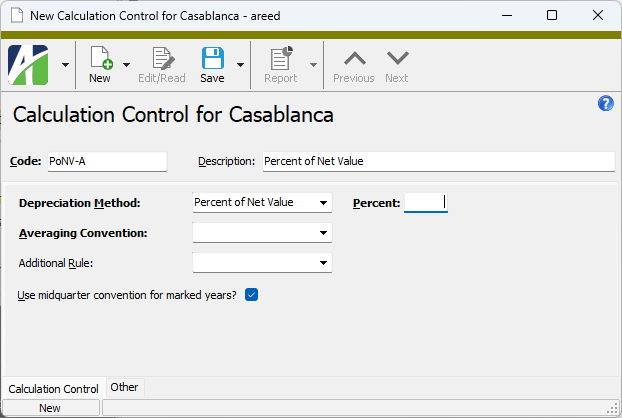
- In the Percent field, enter the percent by which to depreciate an asset's net value under this calculation. This field allows up to four decimal places.
Note
The Canadian Capital Cost Allowance (CCA) is based on a flat percent of net value per year. While this percent is a whole number (per the Canada Revenue Agency), for internal bookkeeping purposes the percent of net value method sometimes needs to be a fractional percent of net value.
- From the Averaging Convention drop-down list, select the averaging convention to use. Your options are:
- Half Year. No matter when an asset is placed in service during the year, it receives a half-year of depreciation.
- Modified Half Year. An asset must be in service for at least half the first year in order to get any depreciation for that year.
- Full Year. No matter when an asset is placed in service during the year, it receives a full year of depreciation.
- Mid Month. No matter when an asset is placed in service during the month, it receives a half-month of depreciation.
- Full Month. No matter when an asset is placed in service during the month, it receives a full month of depreciation.
- Mid Quarter. No matter when an asset is placed in service during the quarter, it receives a half-quarter of depreciation.
- Nearest Period. Assets placed in service through the 15th of the month (14th for February) receive a full month's depreciation. Assets placed in service after the 15th do not start depreciating until the next month. Assets retired through the 15th of the month are depreciated through the end of the preceding month. Assets retired after the 15th of the month are depreciated through the end of the retirement month. (The "Nearest Period" convention applies only to original cost and added cost, not to bonus depreciation or partial/full retirement.)
Days. Use this option when you need to prorate the depreciation of the in-service month or end-of-life month by day. This convention can be applied to the retirement month if the asset is retired before end-of-life.
Example
If an asset is placed in service on April 11, the depreciation for April is prorated by multiplying the month's depreciation times the ratio of the days in-service divided by the number of days in the month (20/30 = 2/3).
- If this calculation control represents vehicle depreciation, from the Additional Rule drop-down list, select the type of vehicle the calculation control applies to. Your options are:
- Passenger Automobile
- Electric Vehicle
- Truck or Van
- If you need to override any "Use Midquarter" flags on the calendar when you use this calculation control, clear the Use midquarter convention for marked years? checkbox.
- Save the new percent of net value control.
Create a manual depreciation calculation control
Create a manual depreciation calculation control
- In the Navigation pane, highlight the Fixed Assets > Setup > Calculation Controls folder.
- Click . The New Calculation Control window opens.
- Enter a unique Code for the calculation control.
- Enter a Description of the calculation control.
- From the Depreciation Method drop-down list, select "Manual".
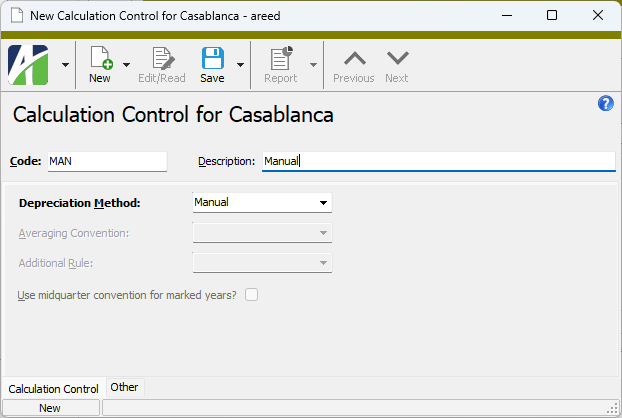
- Save the new manual calculation control.
Create a "no depreciation" calculation control
Create a "no depreciation" calculation control
Fixed Assets can track non-depreciable assets as well as depreciable ones. For example, you can track the acquisition, improvement, and disposal of non-depreciable assets such as land and even appreciating assets such as structures. To manage such assets, at least one calculation control with a depreciation method of "No Depreciation" must be set up for non-depreciable assets and applied on an asset class.
To create a "no depreciation" calculation control:
- In the Navigation pane, highlight the Fixed Assets > Setup > Calculation Controls folder.
- Click . The New Calculation Control window opens.
- Enter a unique Code for the calculation control.
- Enter a Description of the calculation control.
- From the Depreciation Method drop-down list, select "No Depreciation". The remaining fields in the window are disabled.
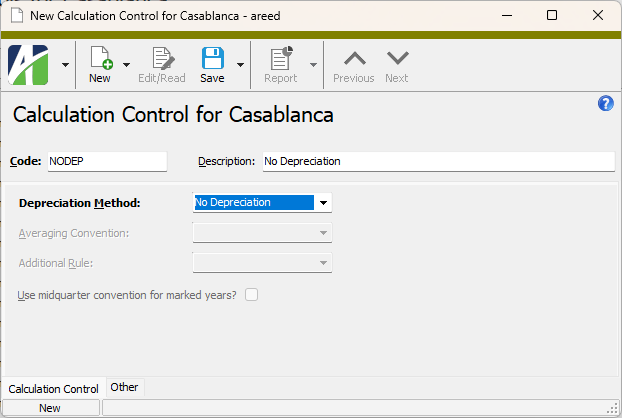
- Save the new "no depreciation" calculation control.
Override the mid-quarter convention flag on a calculation control
Note
This procedure does not apply to manual calculation controls.
- In the Navigation pane, highlight the Fixed Assets > Setup > Calculation Controls folder.
- In the HD view, locate and double-click the calculation control you need to override the flag for to open it in the Calculation Control window.
- To override any "Use Midquarter" flags on the calendar when you use this calculation control, clear the Use midquarter convention for marked years? checkbox.
- Save your changes.
Calculation Control Record ID
Calculation Control tab
- Declining Balance
- Straight Line
- Sum of Years Digits
- Percent of Net Value. Based on a flat percent of the asset's cost-to-date minus depreciation-to-date (i.e., net value) per year. This method is typically used in Canada.
- Manual
- No Depreciation. When this option is selected, the remainder of the fields in the window are disabled.
This field is enabled if you select "Declining Balance" in the Depreciation Method field.
The accelerator to use in the declining balance calculation. Valid options are:
- 125
- 150
- 175
- 200
This checkbox is enabled and marked if you select "Declining Balance" in the Depreciation Method field.
If marked, indicates that ActivityHD should switch to a straight line calculation when the depreciation calculated by the straight line method is greater than the amount calculated by the declining balance method. If the checkbox is cleared, ActivityHD does not switch methods even when the straight line depreciation is greater.
Note
The Canadian Capital Cost Allowance (CCA) is based on a flat percent of net value per year. While this percent is a whole number (per the Canada Revenue Agency), for internal bookkeeping purposes the percent of net value method sometimes needs to be a fractional percent of net value.
This field is enabled unless you select "Manual" in the Depreciation Method field.
The averaging convention to use. Valid options are:
- Half Year. No matter when an asset is placed in service during the year, it receives a half-year of depreciation.
- Modified Half Year. An asset must be in service for at least half the first year in order to get any depreciation for that year.
- Full Year. No matter when an asset is placed in service during the year, it receives a full year of depreciation.
- Mid Month. No matter when an asset is placed in service during the month, it receives a half-month of depreciation.
- Full Month. No matter when an asset is placed in service during the month, it receives a full month of depreciation.
- Mid Quarter. No matter when an asset is placed in service during the quarter, it receives a half-quarter of depreciation.
- Nearest Period. Assets placed in service through the 15th of the month (14th for February) receive a full month's depreciation. Assets placed in service after the 15th do not start depreciating until the next month. Assets retired through the 15th of the month are depreciated through the end of the preceding month. Assets retired after the 15th of the month are depreciated through the end of the retirement month. (The "Nearest Period" convention applies only to original cost and added cost, not to bonus depreciation or partial/full retirement.)
-
Days. Prorates the depreciation of the in-service month or end-of-life month by day. This convention can be applied to the retirement month if the asset is retired before end-of-life.
Example
If an asset is placed in service on April 11, the depreciation for April is prorated by multiplying the month's depreciation times the ratio of the days in-service divided by the number of days in the month (20/30 = 2/3).
This field only applies to vehicle depreciation. The type of vehicle the calculation control applies to. Your options are:
- Passenger Automobile
- Electric Vehicle
- Truck or Van
This checkbox is enabled unless you select "Manual" in the Depreciation Method field.
On a ledger calendar, you can flag some depreciation years to "Use Midquarter". If you need to override the flag on the ledger calendar when this calculation control is used, clear the checkbox. Otherwise, to use the midquarter convention for the years that are flagged to do so, leave this checkbox marked.
Custom tab
This tab is visible if custom fields exist for the entity. At a minimum, if there are custom fields, a Fields subtab will be present. One or more additional categories of subtabs may also be visible.
Fields subtab
This tab prompts for values for any custom fields set up for entity records of this entity type. Respond to the prompts as appropriate.
References subtab
This tab is visible if other records reference the current record.
Example
Suppose a custom field exists on PRCodes that references an ARCode. On the ARCode record, on the Custom > References subtab, you can view all the PRCodes which reference that ARCode.
Exchange Folder subtab
This tab is visible only if you set up a custom field with a data type of "Exchange Folder". The label on this tab is the name assigned to the custom field.
This tab shows the contents of the specified Exchange folder.
File subtab
This tab is visible only if you set up a custom field with a data type of "File". The label on the tab is the name assigned to the custom field.
This tab renders the contents of the specified file according to its file type.
Internet Address subtab
This tab is visible only if you set up a custom field with a data type of "Internet Address". The label on this tab is the name assigned to the custom field.
This tab shows the contents of the specified web page.
Network Folder subtab
This tab is visible only if you set up a custom field with a data type of "Network Folder". The label on this tab is the name assigned to the custom field.
This tab shows the contents of the specified network folder.
Notes tab
The Notes pane shows the Notes HD view filtered to show all notes that reference the selected calculation control.
Double-click a row in the pane to drill down to its record in the Note window.
Attachments tab
The Attachments tab is visible if any record for a given entity has an attachment. If the Attachments tab is not visible, this implies that no record of the entity type has an attachment on it; however, once an attachment is added to any record of the entity type, the Attachments tab will become available.
Change Logs tab
This tab is visible if the user has "Change Logs" access to the associated data folder resource.
The Change Logs pane shows the Change Logs HD view filtered to show all change logs for the selected entity record.
Double-click a row in the pane to drill down to its record in the Change Log window.
Other tab
Developer tab
This tab is visible only when developer features are enabled.
Automation subtab
This subtab shows field names and values for the current data record. Use the information in the subtab to assist when creating automation objects such as bots and import files. The field names and field values can be copied from the text box and pasted directly into your code or application. To copy content from the text box, highlight the content to copy and press Ctrl+C or right-click your selection and select Copy from the context menu.
Export (XML | JSON) subtab
This subtab shows the XML syntax for exporting the selected data record. The syntax can be copied from the text box as an exemplar for creating your own automation objects for bots, import files, ActivWebAPI, etc. To copy content from the text box, highlight the content to copy and press Ctrl+C or right-click your selection and select Copy from the context menu.
Import (XML | JSON) subtab
This subtab allows you to select a file for import and shows the XML syntax for importing data records. Use the subtab to explore the XML syntax for importing data records. In particular, you can investigate the syntax which results when using Data.Import and ActivWebAPI data POST and DELETE routes.
Change Log (XML | JSON) subtab
This subtab is visible only when the Enable Change Logs option is marked in System Options or Company Options (depending on whether the feature applies at the system or the company level). This is the default setting when developer features are enabled.
This subtab allows you to investigate changes to the current data record. The syntax can be copied for use in bots, dashboards, ActivWebAPI, and other automation. To copy content from the text box, highlight the content to copy and press Ctrl+C or right-click your selection and select Copy from the context menu.
Select Statement (SQL) subtab
This subtab allows you to investigate the SQL select statement used to retrieve the current data record. The syntax can be copied as an exemplar for data sources and other automation. To copy content from the text box, highlight the content to copy and press Ctrl+C or right-click your selection and select Copy from the context menu.
| Calculation Control Code | Description | Averaging | Depreciation Method |
|---|---|---|---|
| DB125-NoSw-FM | Declining Balance 125%, No Switch, Full-Month Conv | Full Month | Declining Balance |
| DB125-NoSw-NP | Declining Balance 125%, No Switch, Nearest Pd Conv | Nearest Period | Declining Balance |
| DB125-Sw-DA | Declining Balance 125%, Switch, Days Convention | Days | Declining Balance |
| DB125-Sw-FM | Declining Balance 125%, Switch, Full-Month Conv | Full Month | Declining Balance |
| DB125-Sw-HY | Declining Balance 125%, Switch, Half-Year Conv | Half Year | Declining Balance |
| DB125-Sw-MM | Declining Balance 125%, Switch, Mid-Month Conv | Mid Month | Declining Balance |
| DB125-Sw-MQ | Declining Balance 125%, Switch, Mid-Qtr Conv | Mid Quarter | Declining Balance |
| DB125-Sw-NP | Declining Balance 125%, Switch, Nearest Pd Conv | Nearest Period | Declining Balance |
| DB150-NoSw-FM | Declining Balance 150%, No Switch, Full-Month Conv | Full Month | Declining Balance |
| DB150-NoSw-NP | Declining Balance 150%, No Switch, Nearest Pd Conv | Nearest Period | Declining Balance |
| DB150-Sw-DA | Declining Balance 150%, Switch, Days Convention | Days | Declining Balance |
| DB150-Sw-FM | Declining Balance 150%, Switch, Full-Month Conv | Full Month | Declining Balance |
| DB150-Sw-HY | Declining Balance 150%, Switch, Half-Year Conv | Half Year | Declining Balance |
| DB150-Sw-MM | Declining Balance 150%, Switch, Mid-Month Conv | Mid Month | Declining Balance |
| DB150-Sw-MQ | Declining Balance 150%, Switch, Mid-Qtr Conv | Mid Quarter | Declining Balance |
| DB150-Sw-NP | Declining Balance 150%, Switch, Nearest Pd Conv | Nearest Period | Declining Balance |
| DB175-NoSw-FM | Declining Balance 175%, No Switch, Full-Month Conv | Full Month | Declining Balance |
| DB175-NoSw-NP | Declining Balance 175%, No Switch, Nearest Pd Conv | Nearest Period | Declining Balance |
| DB175-Sw-DA | Declining Balance 175%, Switch, Days Convention | Days | Declining Balance |
| DB175-Sw-FM | Declining Balance 175%, Switch, Full-Month Conv | Full Month | Declining Balance |
| DB175-Sw-HY | Declining Balance 175%, Switch, Half-Year Conv | Half Year | Declining Balance |
| DB175-Sw-MM | Declining Balance 175%, Switch, Mid-Month Conv | Mid Month | Declining Balance |
| DB175-Sw-MQ | Declining Balance 175%, Switch, Mid-Qtr Conv | Mid Quarter | Declining Balance |
| DB175-Sw-NP | Declining Balance 175%, Switch, Nearest Pd Conv | Nearest Period | Declining Balance |
| DB200-NoSw-FM | Declining Balance 200%, No Switch, Full-Month Conv | Full Month | Declining Balance |
| DB200-NoSw-NP | Declining Balance 200%, No Switch, Nearest Pd Conv | Nearest Period | Declining Balance |
| DB200-Sw-DA | Declining Balance 200%, Switch, Days Convention | Days | Declining Balance |
| DB200-Sw-FM | Declining Balance 200%, Switch, Full-Month Conv | Full Month | Declining Balance |
| DB200-Sw-HY | Declining Balance 200%, Switch, Half-Year Conv | Half Year | Declining Balance |
| DB200-Sw-MM | Declining Balance 200%, Switch, Mid-Month Conv | Mid Month | Declining Balance |
| DB200-Sw-MQ | Declining Balance 200%, Switch, Mid-Qtr Conv | Mid Quarter | Declining Balance |
| DB200-Sw-NP | Declining Balance 200%, Switch, Nearest Pd Conv | Nearest Period | Declining Balance |
| No Depreciation | No Depreciation | N/A | N/A |
| PNV0 | 0% of Net Value (CCA) | Half Year | Percent of Net Value |
| PNV10 | 10% of Net Value (CCA) | Half Year | Percent of Net Value |
| PNV100 | 100% of Net Value (CCA) | Half Year | Percent of Net Value |
| PNV20 | 20% of Net Value (CCA) | Half Year | Percent of Net Value |
| PNV30 | 30% of Net Value (CCA) | Half Year | Percent of Net Value |
| PNV4 | 4% of Net Value (CCA) | Half Year | Percent of Net Value |
| PNV40 | 40% of Net Value (CCA) | Half Year | Percent of Net Value |
| PNV45 | 45% of Net Value (CCA) | Half Year | Percent of Net Value |
| PNV5 | 5% of Net Value (CCA) | Half Year | Percent of Net Value |
| PNV50 | 50% of Net Value (CCA) | Half Year | Percent of Net Value |
| PNV55 | 55% of Net Value (CCA) | Half Year | Percent of Net Value |
| SL-DAY | Straight Line, Days Convention | Days | Straight Line |
| SL-FM | Straight Line, Full-Month Convention | Full Month | Straight Line |
| SL-FY | Straight Line, Full-Year Convention | Full Year | Straight Line |
| SL-HY | Straight Line, Half-Year Convention | Half Year | Straight Line |
| SL-MM | Straight Line, Mid-Month Convention | Mid Month | Straight Line |
| SL-MQ | Straight Line, Mid-Quarter Convention | Mid Quarter | Straight Line |
| SL-NP | Straight Line, Nearest Period Convention | Nearest Period | Straight Line |
| SYD-FM | Sum-of-years-digits, Full-Month Convention | Full Month | Sum of Years Digits |
| SYD-NP | Sum-of-years-digits, Nearest Period Convention | Nearest Period | Sum of Years Digits |

|
|
Calculation controls security
Common accesses available on calculation controls
| Access | A user with this access can... |
|---|---|
| Change | Use the mass change action on calculation controls. |
| Change Logs | |
| Custom Fields | Create and edit custom fields for calculation controls. |
| Data | Have read-only access to calculation controls from anywhere in the software (e.g., field validations, filters, date expressions). |
| Delete | Delete calculation controls. |
| Edit | Edit calculation control records. |
| Export | Export calculation control records from ActivityHD. |
| Import | Import calculation control records into ActivityHD. |
| New | Create new calculation control records. |
| Read | Have read-only access to calculation control records. |
| Report | Run reports with calculation control information. |
| Report Designs | Create and edit report designs with calculation control information. This access enables the Report Designs button on the Output tab of report dialogs. |
| Shared Answers | Create and edit saved answers related to calculation controls. |
| Shared Filters | Create and edit shared filters on calculation controls. |
| Visible | View the Calculation Controls folder in the Navigation pane. |
|
6224 34th Street Lubbock, TX 79407 806.687.8500 | 800.354.7152 |
© 2026 AccountingWare, LLC All rights reserved. |