Disbursements determine how an employee receives his/her pay.
Disbursement rules can be set up for each disbursement set assigned to an employee. Disbursement rules are defined on the Disbursement tab of the employee record. These rules are applied whenever a check is created by the Process Payroll Run wizard. These disbursements cannot be changed unless the check is merged and the disbursement line does not have a reference.
Some more fun facts about disbursements:
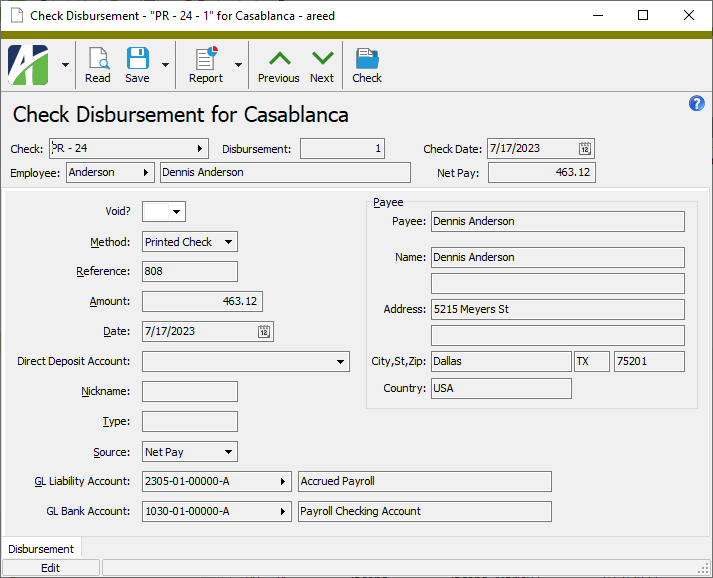
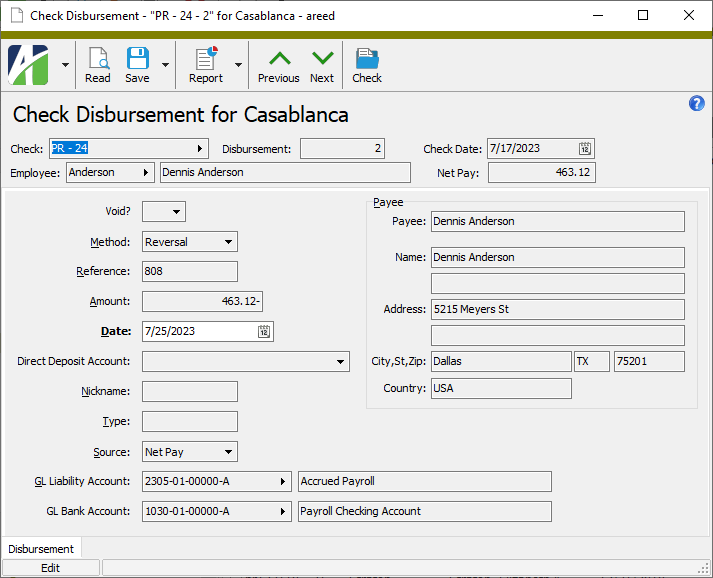
Printed check disbursements and direct deposit disbursements cannot be changed once they have a reference. Although these disbursements cannot be changed, they can be voided. When a disbursement is voided, a reversal line is created. After that, new disbursement lines can be entered.
Disbursements on a manual check can be changed up until the corresponding GL entry is merged.
Disbursements cannot be changed if the underlying check is a voided check or a reversal check.
Disbursements cannot be deleted from a voided check.
Disbursements for printed checks and direct deposits can be edited until a reference is entered. Manual checks can be edited until the GL entry is merged.
To maintain a disbursement:
Maintain a payroll check disbursement
In the Navigation pane, highlight the Payroll/Human Resources > Checks > Disbursements folder.
In the HD view, locate and double-click the disbursement you want to change to load it in the Disbursement window.
Perform only the steps you need to update the disbursement record.
From the Method drop-down list, select how to disburse the check. Your options are:
Direct Deposit
Manual
Printed Check
Reversal
If "Manual" is selected in the Method field, the Reference field is enabled. Enter a reference note about the disbursement such as the check number or direct deposit batch.
Enter the Amount of the disbursement.
Enter the Date of the disbursement. This date is typically the check date or direct deposit date.
If "Direct Deposit" is selected in the Method field, the Direct Deposit Account field is enabled. From the drop-down list, select the routing number and account number of the direct deposit account for this disbursement. The options listed come from the disbursement accounts defined on the employee record.
The Source field shows the source amount of the disbursement. Valid sources are:
Net Pay. The disbursement amount is calculated from net pay.
Deduction. The disbursement represents an employee-specific payment of a deduction or tax. A deduction disbursement can be used to make deposits to accounts such as an employee's Health Savings Account (HSA).
If necessary, select the correct source from the drop-down list.
In the GL Bank Account field, enter the GL bank account for the disbursement. This field defaults to the bank account designated on the check's Payroll Run tab.
Typically, the date on check disbursements not only determines the date of printed checks and direct deposits, but also the date of the cash journal entry. In some rare cases, however, the disbursement date and cash journal entry date need to be different. One such case is when the accounting department reserves certain dates for corrections and closing entries. The procedure that follows describes how to accomplish this.
Note
To prevent unintentional changes, the GL date does not appear on the Check record or the Check Disbursement record. Instead, the GL date is only available to be shown in the Check Disbursements HD view. The only way the date can be changed is by using the mass changer or through automation.
Process a payroll run or time sheets as usual.
New checks are assigned the check date from the payroll run. New disbursements are assigned the check date as the disbursement date and GL date. (Any changes to the check date at this point would automatically update both dates on the disbursement.)
Merge the checks.
Reminder: Disbursements cannot be changed on processed checks until the checks have been merged. Before merging, disbursements are calculated from each employee's disbursement rules. (Any changes to the disbursement date at this point would automatically update the disbursement GL date.)
Use the mass changer to change the disbursement GL date. Changing the GL date at this point changes the posting date on the cash journal entries created during check merge.
Disburse the checks using Print Checks and/or Direct Deposit.
Reconcile the checks in Bank Reconciliation.
Warning
The date on bank transactions will match the GL date, not the disbursement date.
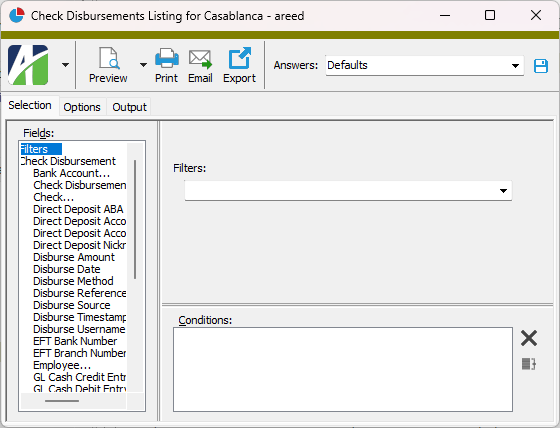
Check Disbursements Listing
Check Disbursements Listing
Purpose
The Check Disbursements Listing provides a list of checks disbursed from Payroll.
Content
For each check disbursement included on the report, the listing shows:
batch - entry - disbursement number
disbursement method
disbursement date
amount disbursed.
The following totals appear on the report:
bank account totals
employee totals
grand totals.
Print the report
In the Navigation pane, highlight the Payroll/Human Resources > Checks > Disbursements folder.
Start the report set-up wizard.
To report on all or a filtered subset of disbursements:
Right-click the Disbursements folder and select Select and Report > Check Disbursements Listing from the shortcut menu.
On the Selection tab, define any filters to apply to the data.
To report on specifically selected disbursements:
In the HD view, select the disbursements to include on the report. You can use Ctrl and/or Shift selection to select multiple records.
Click .
To report on a particular disbursement from the Disbursement window:
In the HD view, locate and double-click the disbursement to report on. The Disbursement window opens with the disbursement loaded.
Click .
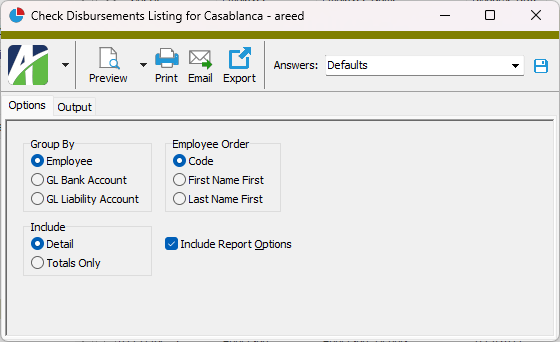
Select the Options tab.
In the Group By field, select how to group disbursement records on the report. Your options are:
Employee
GL Bank Account
GL Liability Account
In the Include field, select the information to include on the report. Your options are:
Detail
Totals Only
In the Employee Order field, select the sort order for employee records on the report. Your options are:
Code - Base the sort order on the employee code.
First Name First
Last Name First
To include a section at the end of the report with the report settings used to produce the report, leave the Include Report Options checkbox marked. To produce the report without this information, clear the checkbox.
Select the Output tab.
In the Design field, look up and select the report design to use.
There are three built-in report designs for the Check Disbursements Listing:
Certified Payroll Example - This design lists the information needed to complete Department of Labor Form WH-347.
Check Disbursements - This design lists disbursements by employee then by account or by account then by employee (depending on the grouping you select) and shows the batch - entry - disbursement number, disbursement method, disbursement date, and amount disbursed.
Check Register - This design lists disbursements in check number order followed by direct deposits and shows check number, void flag, check date, employee code and name, and check amount.
In the toolbar, click the icon for the type of output you want:
- Provides access to two preview options.
Preview - Click the icon or click the drop-down arrow and select Preview from the drop-down menu to view the report in the Crystal Reports viewer.
Preview to PDF - Click the drop-down arrow next to the icon and select Preview to PDF to view the report in the PDF reader.
- Opens the Print dialog so that you can select and configure a printer and then print a paper copy of the report.
- Opens the Report Email dialog so that you can address and compose an email that the report will be attached to. For best results, ensure your email client is running before you attempt to send a report via email.
- Opens a drop-down menu with two export options:
Export Report - Opens a dialog so that you can save the report to a file. File types include Crystal Reports (.rpt), PDF (.pdf), Microsoft Excel (.xls), Microsoft Word (.doc), rich text (.rtf), and XML (.xml).
Export Data - Opens a dialog so that you can export report data to XML or JSON file format.
From
The email account from which to send the email. Valid options are:
Windows user default account. Sends email using the user's Windows default email account. For most users, this is the account configured in Outlook or another email client application.
Server personal. Sends email using the email configuration for the system or company server and the email address on the current user's authorized user record. The authorized user record must have a confirmed email address.
Server generic. Sends email using the email configuration and "from" address for the system or company server. This option requires "Send generic" access to the Server Email resource.
To
The email address(es) to which to send the email. Separate email addresses with semi-colons.
CC
The email addresses to copy on the email. Separate email addresses with semi-colons.
BCC
The email addresses to blind copy on the email. Separate email addresses with semi-colons.
Subject
The subject line.
Text box
The body of the email.
Data extensions
The following data extensions are available for the report:
Employees
Checks
Check disbursements
Disbursement Record ID
Check
Displays the batch name and entry number of the check associated with this disbursement.
Press F3 to look up the value.
If a value is already selected, you can press F4 to open the record in its native editor.
Disbursement
Displays the number of the disbursement line.
Check Date
Displays the check date for the check associated with the disbursement.
Employee
Displays the employee code for the employee on the check associated with the disbursement.
Press F3 to look up the value.
If a value is already selected, you can press F4 to open the record in its native editor.
Net Pay
Displays the net pay amount on the check associated with the disbursement.
Disbursement tab
Void?
Displays "Void" if this disbursement has been voided.
Method
The disbursement method for this disbursement. Valid options are:
Direct Deposit
Manual
Printed Check
Reversal
Reference
A reference note for the disbursement; e.g., check number, direct deposit batch, or a manual entry.
Amount
The amount of the disbursement.
Date
The date of the disbursement. Typically, this is the check date or the direct deposit date.
Direct Deposit Account
If the disbursement is by direct deposit, this field shows the routing number and account number of the account receiving the direct deposit. The options available in the drop-down list are the disbursement accounts defined on the employee record.
Nickname
If the disbursement is by direct deposit, the nickname of the direct deposit account.
Type
If the disbursement is by direct deposit, the type of direct deposit account. Valid types are:
Checking
EFT Canadian
Savings
Source
The source amount of the disbursement. Valid sources are:
Net Pay. The disbursement amount is calculated from net pay.
Deduction. The disbursement represents an employee-specific payment of a deduction or tax. For example, a deduction disbursement can be used to make deposits to an employee's Health Savings Account (HSA).
GL Liability Account
The liability account for the disbursement. This is the same account as the liability account on the check's Payroll Run tab.
Press F2 to open the Account Expand dialog box where you can look up an account number, find an account number by its alias, build the account number by segment, or view setup and setup sources.
Press F3 to look up the account.
If an account is already selected, you can press F4 to open the record in the Account window.
GL Bank Account
The GL bank account for the disbursement. Unless changed, this is the same account as the GL bank account on the check's Payroll Run tab.
Press F2 to open the Account Expand dialog box where you can look up an account number, find an account number by its alias, build the account number by segment, or view setup and setup sources.
Press F3 to look up the account.
If an account is already selected, you can press F4 to open the record in the Account window.
Payee
The name and address information for the payee for this disbursement. This information corresponds to the employee's disbursement location.
Check disbursements security
Common accesses available on check disbursements
Access
A user with this access can...
Change
Use the mass change action on check disbursements.
Data
Have read-only access to check disbursements from anywhere in the software (e.g., field validations, filters, date expressions).
Delete
Delete check disbursements.
Edit
Edit check disbursement records.
Read
Have read-only access to check disbursement records.
Report
Run reports with check disbursement information.
Report Designs
Create and edit report designs with check disbursement information. This access enables the Report Designs button on the Output tab of report dialogs.
Shared Answers
Create and edit saved answers related to check disbursements.
Shared Filters
Create and edit shared filters on check disbursements.
Visible
View the Disbursements folder in the Navigation pane.
Check disbursements filters
The following built-in filters are available for disbursements:
Filter Name
Effect
? Batch
Prompts for a batch name and lists disbursements in a batch with a name that contains the specified search string.
? Check Date Range
Prompts for a range of dates and lists the disbursements for check dates in that range.
? Disbursed By
Prompts for the user name of the user who made a disbursement and lists the disbursements by users with a user name that contains the specified search string.
? Employee Code
Prompts for an employee code and lists disbursements to employees with an employee code that contains the specified search string.
? Employee Name
Prompts for an employee name and lists disbursements to employees with a name that contains the specified search string.
 Maintain a payroll check disbursement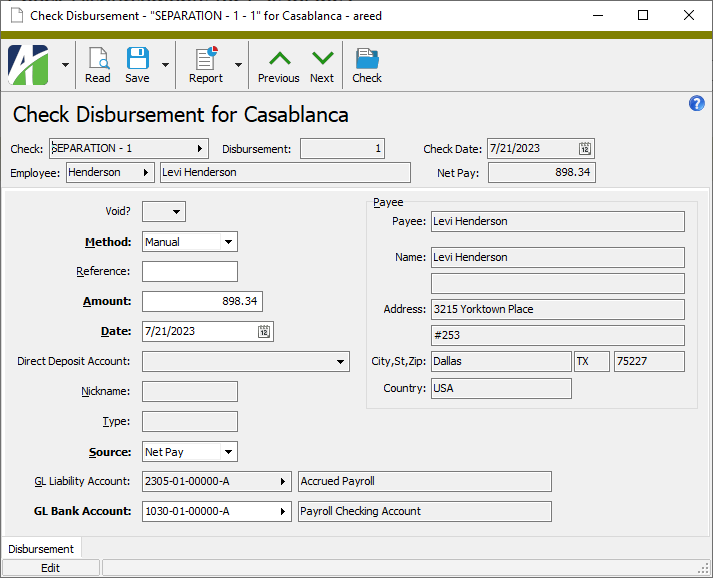
 .
.
 - Provides access to two preview options.
 - Opens the Print dialog so that you can select and configure a printer and then print a paper copy of the report.
 - Opens the
  - Opens a drop-down menu with two export options: