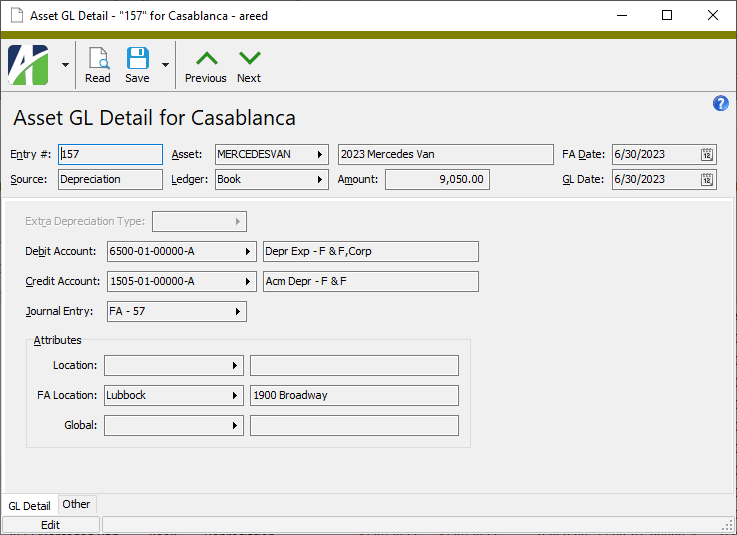
The GL Detail window shows posting detail for fixed assets postings.
GL Detail Record ID
Entry #
The GL detail entry number.
Source
The process which produced the GL detail entry.
Asset
The asset code of the asset associated with the GL detail entry.
Press F3 to look up the value.
If a value is already selected, you can press F4 to open the record in its native editor.
Ledger
The ledger associated with the GL detail entry.
Press F3 to look up the value.
If a value is already selected, you can press F4 to open the record in its native editor.
Amount
The amount posted for the GL detail entry.
FA Date
The asset event (depreciation, added cost, retirement) date.
GL Date
The GL posting date.
GL Detail tab
Extra Depreciation Type
If the GL detail entry represents extra depreciation, this is the extra depreciation type.
Press F3 to look up the value.
If a value is already selected, you can press F4 to open the record in its native editor.
Debit Account
The expense account the transaction posted to.
Press F2 to open the Account Expand dialog box where you can look up an account number, find an account number by its alias, build the account number by segment, or view setup and setup sources.
Press F3 to look up the account.
If an account is already selected, you can press F4 to open the record in the Account window.
Credit Account
The credit account the transaction posted to.
Press F2 to open the Account Expand dialog box where you can look up an account number, find an account number by its alias, build the account number by segment, or view setup and setup sources.
Press F3 to look up the account.
If an account is already selected, you can press F4 to open the record in the Account window.
Journal Entry
The journal entry that contains the GL detail entry.
Press F3 to look up the value.
If a value is already selected, you can press F4 to open the record in its native editor.
Voided By
The GL detail record which voids this GL detail record. This field is visible only if the GL detail record is voided.
Press F3 to look up the value.
If a value is already selected, you can press F4 to open the record in its native editor.
Reverses
The GL detail record which this GL detail record reverses. This field is visible only if the GL detail record reverses an earlier GL detail record.
Press F3 to look up the value.
If a value is already selected, you can press F4 to open the record in its native editor.
Attributes
The fields in this section show the active Fixed Assets attributes and the values assigned to them for the selected GL detail record.
<Attribute>
The attribute item assigned to the indicated attribute along with the description of the attribute item.
Other tab
Memo tab
To include additional information about this record not collected elsewhere, enter it in this text box. This area supports common keyboard shortcuts such as Ctrl+C to copy and Ctrl+V to paste.
Timestamps tab
This tab shows the user who created this record and the date and time of creation as well as the user, date, and time of the latest modification to the record.
GL detail security
Common accesses available on GL detail
Access
A user with this access can...
Change
Use the mass change action on GL detail.
Change Logs
Custom Fields
Create and edit custom fields for GL detail.
Data
Have read-only access to GL detail from anywhere in the software (e.g., field validations, filters, date expressions).
Delete
Delete GL detail.
Edit
Edit GL detail records.
Export
Export GL detail records from ActivityHD.
Read
Have read-only access to GL detail records.
Report
Run reports with GL detail information.
Report Designs
Create and edit report designs with GL detail information. This access enables the Report Designs button on the Output tab of report dialogs.
Shared Answers
Create and edit saved answers related to GL detail.
Shared Filters
Create and edit shared filters on GL detail.
Visible
View the GL Detail folder in the Navigation pane.
GL detail filters
The following built-in filters are available for GL detail records for fixed assets:
Filter Name
Effect
? Asset Code
Prompts for an asset code and lists the GL detail records for assets with an asset code that contains the specified search string.
? Asset Description
Prompts for an asset description and lists the GL detail records for assets with a description that contains the specified search string.
? Class Code
Prompts for an asset class code and lists the GL detail records for assets with a class code that contains the specified search string.
? Class Description
Prompts for an asset class description and lists the GL detail records for assets that have a class code with a description that contains the specified search string.
? FA Date
Prompts for a range of dates and lists the GL detail records with an FA date in that range.
? GL Account (Credit Account)
Prompts for an account number and lists the GL detail records with a credit account that contains the specified search string.
? GL Account (Debit Account)
Prompts for an account number and lists the GL detail records with a debit account that contains the specified search string.
? GL Date
Prompts for a range of dates and lists the GL detail records with a GL date in that date range.
? Ledger
Prompts for a ledger code and lists the GL detail records posted to that ledger.