Position pay rates
Position pay rates are one means of providing values for salary or hourly rates to payroll check calculations. They are a feature of the Human Resources package of ActivityHD and, as such, they are optional. Pay rates are defined on positions and can be applied to employees in the Pay Rate table on the Positions tab of the employee record. Pay rates correspond to the position selected in the Positions table. A pay rate consists of an effective date, unit of pay, and amount per unit of pay. Pay rates are date-driven, so you can enter pay rates in advance and they will not be used in pay check calculations until their effective dates.
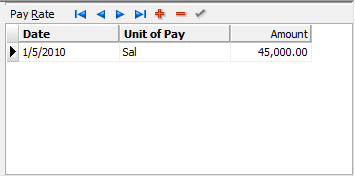
To view all position pay rates for employees, highlight the Payroll/Human Resources > Employees > Position Pay Rates folder. Drilling down on a position pay rate in the HD view opens the employee record to the Positions tab with focus on the pay rate you clicked on.
You can delete a position pay rate from an employee record by highlighting its row in the Pay Rate table on the Positions tab and clicking  . You can also delete a position pay rate from the Employee Position Pay Rates HD view. If you delete the last employee pay rate assigned to a particular position from the HD view, ActivityHD will also prompt you whether to delete the position from the employee record.
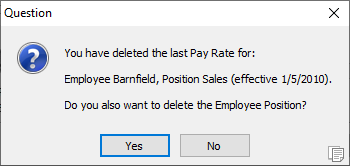
Click Yes to remove the position from the employee. Note that the position record itself is not deleted, only its association with the employee.
Employee position pay rates security
Common accesses available on employee position pay rates
| Change
|
Use the mass change action on employee position pay rates. |
| Data
|
Have read-only access to employee position pay rates from anywhere in the software (e.g., field validations, filters, date expressions). |
| Delete
|
Delete employee position pay rates. |
| Edit
|
Edit employee position pay rate records. |
| Read
|
Have read-only access to employee position pay rate records. |
| Report
|
Run reports with employee position pay rate information. |
| Report Designs
|
Create and edit report designs with employee position pay rate information. This access enables the Report Designs button on the Output tab of report dialogs. |
| Shared Answers
|
Create and edit saved answers related to employee position pay rates. |
| Shared Filters
|
Create and edit shared filters on employee position pay rates. |
| Visible
|
View the Position Pay Rates folder in the Navigation pane. |
Position pay rates filters
The following built-in filters are available for position pay rates:
| ? Current Values
|
Prompts for a date and lists position pay rates for employees as of that date. |
| ? Employee Code
|
Prompts for an employee code and lists position pay rates for employees with an employee code that contains the specified search string. |
| ? Employee Name
|
Prompts for an employee name and lists position pay rates for employees with a name that contains the specified search string. |
| ? Position Code
|
Prompts for a position code and lists position pay rates for employees with a position code that contains the specified search string. |
| ? Unit of Pay
|
Prompts for a unit of pay code and lists position pay rates for employees assigned a unit of pay code that contains the specified search string. |
| Current Employees
|
Lists position pay rates for current employees. |
| Terminated Employees
|
Lists position pay rates for terminated employees. |
