A segment item parameter value is the value assigned to a segment item parameter as of a specified date. Segment item parameter values are values ActivityHD needs to perform payroll calculations. You specify a parameter value on the Calculations tab of the Segment Item window by selecting the parameter in the Available Parameters table and entering an effective date and value in the Values table. Parameter values for individual employees can be maintained on the Calculations tab of the employee record. If the parameter value on the segment item does not match the parameter value on an employee's record, the value from the employee record is used in payroll calculations.
Note
If the segment item where the parameter is declared or the segment item where the parameter value is entered is flagged as obsolete, the segment item parameter value is also flagged as obsolete.
Segment item parameters are declared on the Calculations tab of segment items and parameter values can be entered and maintained there or in the Parameter window. ActivityHD also provides a Segment Item Parameter Value window where you can maintain parameter values.
Note
The following procedure describes how to change an existing segment item parameter value. Changing this value overrides the current record. To add a new segment item parameter value, enter a new value in the Values table of the segment item parameter or on the Calculations tab of the segment item.
In the Navigation pane, highlight the Payroll/Human Resources > Setup > Segment Items > Parameter Values folder.
In the HD view, locate and double-click the parameter value you need to maintain. The Segment Item Parameter Value window opens with the parameter value record loaded.
Perform only the steps necessary to update the parameter value.
In the Effective Date field, enter the effective date of the parameter value.
In the Value field, enter the parameter value as of the specified effective date.
To delete a segment item parameter value, highlight the parameter value in the HD view and click , or open the segment item parameter value and select > Edit > Delete. In either case, ActivityHD prompts you to confirm your action. Click Delete to delete the parameter value.
Parameter Value Record ID
Segment Item
Displays the segment item that contains the parameter value. In general, this is the segment item where the parameter is defined; however, a parameter can be defined earlier in the hierarchy while the parameter value is input on a segment item that comes after it. To see the segment item where the parameter is defined, click the Segment Item button in the toolbar.
Press F3 to look up the value.
If a value is already selected, you can press F4 to open the record in its native editor.
Parameter
Displays the full name of the parameter associated with the parameter value.
Press F3 to look up the value.
If a value is already selected, you can press F4 to open the record in its native editor.
Effective Date
The date the parameter value takes effect. Depending on how the parameter is defined, ActivityHD compares this date to the check date or work date to determine which parameter value to use.
Common accesses available on segment item parameter values
Access
A user with this access can...
Change
Use the mass change action on segment item parameter values.
Data
Have read-only access to segment item parameter values from anywhere in the software (e.g., field validations, filters, date expressions).
Delete
Delete segment item parameter values.
Edit
Edit segment item parameter value records.
Read
Have read-only access to segment item parameter value records.
Report
Run reports with segment item parameter value information.
Report Designs
Create and edit report designs with segment item parameter value information. This access enables the Report Designs button on the Output tab of report dialogs.
Shared Answers
Create and edit saved answers related to segment item parameter values.
Shared Filters
Create and edit shared filters on segment item parameter values.
Visible
View the Parameter Values folder in the Navigation pane.
Segment item parameter values filters
The following built-in filters are available for segment item parameter values:
Filter Name
Effect
? Parameter
Prompts for a segment item parameter and lists the parameter values for segment item parameters that contain the specified search string.
? Values as of
Prompts for a date and lists segment item parameter values as of that date.
Current Values
Lists current segment item parameter values.
Deduction
Lists segment item parameter values for deduction-type segment items.
Pay
Lists segment item parameter values for pay-type segment items.
Statistic
Lists segment item parameter values for statistic-type segment items.
Tax
Lists segment item parameter values for tax-type segment items.
 Maintain a segment item parameter value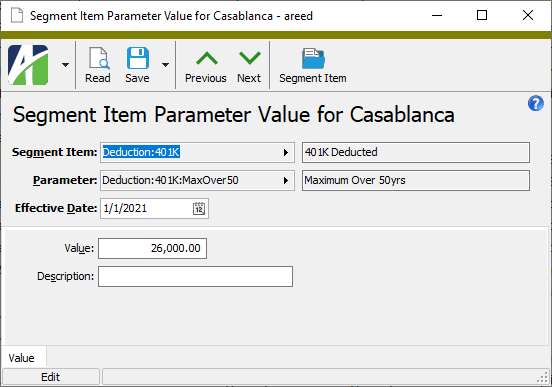
 , or open the segment item parameter value and select
  > Edit > Delete. In either case,