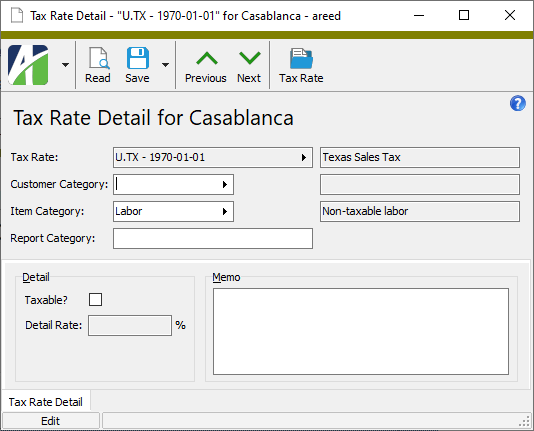
Tax rate detail records let you view and maintain tax rate exceptions. Tax rate detail is created on tax rate records. Each tax rate detail record represents one row from the Detail table of one of your tax rates.
Tax rate detail can be used to handle any of the following:
Overriding the default taxability of customer tax categories and/or item tax categories.
Overriding the standard rate by customer tax category and/or item tax category.
Providing reporting categories for the Tax Liability Report by customer tax category and/or item tax category.
In the Navigation pane, highlight the Accounts Receivable > Setup > Tax Rates > Tax Rate Detail folder.
In the HD view, locate and double-click the tax rate detail record you need to maintain to open it in the Tax Rate Detail window.
In the steps that follow, perform only the steps needed to correct the tax rate detail record.
In the Customer Category and/or Item Category fields, select the tax category(ies) the rate exception affects.
In the Report Category field, enter the reporting category to use to report sales that are subject to the sales tax on this detail line. Report categories are not maintained in a separate table; simply enter a category name here to define it. If you want the Tax Liability Report to show these sales as **Uncategorized Taxable** or **Uncategorized Nontaxable**, leave this field blank. Report categories are typically only needed in multi-state or multi-province reporting where sales need to be reported differently between state jurisdictions based on groups of customers and/or items.
Note
If the detail line specifies both a customer tax category and an item tax category, you should define a report category so that sales can be distinguished on the Tax Liability Report. Otherwise, the sales are reported under a default category of **Uncategorized Taxable** or **Uncategorized Nontaxable**.
If the detail line was previously flagged as taxable but is nontaxable, clear the Taxable? checkbox. If the detail line was previously set as nontaxable but is taxable, mark the Taxable? checkbox. This setting affects the customer tax category/item tax category combination for this level and all lower levels unless the setting is overridden at a lower level.
If you marked the Taxable? checkbox or if the checkbox was already marked but the rate was incorrect, enter the Detail Rate as a percent. You only need to enter the detail rate if it differs from the standard rate.
Enter any notes about the rate exception in the Memo field.
Taxability and report categories defined in tax rate detail for a particular tax entity ARE inherited by lower level tax entities; overrides of the standard rate ARE NOT inherited—they affect only the tax entity with the rate override.
Precedence
At each level of the tax entity hierarchy, ActivityHD applies a defined order of precedence to determine rate override, taxability, and reporting category. The following table delineates the precedence logic. The applicable level with the lowest precedence "wins".
Precedence
Invoice Customer
Invoice Detail Line
Tax Rate Detail
Result
Customer Tax Category?
Item Tax Category?
Report Category?
Taxable?
Rate?
Report Category
Taxable?
Tax Rate
1
Taxable or Nontaxable
Taxable or Nontaxable
Y
Y
Y
N
N/A
From Report Category
N
N/A
N
N
N/A
"Uncategorized Nontaxable"
N
N/A
2
Taxable or Nontaxable
Taxable or Nontaxable
Y
Y
Y
Y
Y
From Report Category
Y
Detail Rate
N
Y
Y
"Uncategorized Taxable"
Y
Detail Rate
Y
Y
N
From Report Category
Y
Standard Rate
N
Y
N
"Uncategorized Taxable"
Y
Standard Rate
3
Taxable or Nontaxable
Taxable or Nontaxable
Y
N
Y
N
N/A
From Report Category
N
N/A
N
N
N/A
"Uncategorized Nontaxable"
N
N/A
4
Taxable
Taxable or Nontaxable
N
Y
Y
N
N/A
From Report Category
N
N/A
N
N
N/A
"Uncategorized Nontaxable"
N
N/A
5
Taxable or Nontaxable
Taxable
Y
N
Y
Y
Y
From Report Category
Y
Detail Rate
N
Y
Y
"Uncategorized Taxable"
Y
Detail Rate
6
Taxable
Taxable or Nontaxable
N
Y
Y
Y
Y
From Report Category
Y
Detail Rate
N
Y
Y
"Uncategorized Taxable"
Y
Detail Rate
7
Taxable or Nontaxable
Taxable
Y
N
Y
Y
N
From Report Category
Y
Standard Rate
8
Taxable
Taxable or Nontaxable
N
Y
Y
Y
N
From Report Category
Y
Standard Rate
9
Nontaxable
Taxable or Nontaxable
N
N
N
N
N
"Uncategorized Nontaxable"
N
N/A
Taxable
Nontaxable
N
N
N
N
N
"Uncategorized Nontaxable"
N
N/A
Taxable
Taxable
N
N
N
N
N
"Uncategorized Taxable"
Y
Standard Rate
Tax Rate Detail Record ID
Tax Rate
This field displays the unique identifier of the tax rate associated with the exception detail record. The tax rate identifier is a combination of the tax entity code and the tax rate effective date.
Press F3 to look up the value.
If a value is already selected, you can press F4 to open the record in its native editor.
Customer Category
The customer tax category associated with the tax rate exception.
Press F3 to look up the value.
If a value is already selected, you can press F4 to open the record in its native editor.
Item Category
The item tax category associated with the tax rate exception.
Press F3 to look up the value.
If a value is already selected, you can press F4 to open the record in its native editor.
Report Category
The report category for reporting sales that are subject to this tax rate exception. Report categories are not maintained in a separate table; you can simply enter a category name here to define it. If you leave this field blank, the Tax Liability Report shows these sales as **Uncategorized Taxable** or **Uncategorized Nontaxable**. Report categories are typically only needed in multi-state or multi-province reporting where sales need to be reported differently between state jurisdictions based on groups of customers and/or items.
Note
If the detail line specifies both a customer tax category and an item tax category, you should define a report category so that sales can be distinguished on the Tax Liability Report. Otherwise, the sales are reported under a default category of **Uncategorized Taxable** or **Uncategorized Nontaxable**.
Tax Rate Detail tab
Detail
Taxable?
If the checkbox is marked, the customer/item tax category combination is taxable for the current tax entity and its lower level tax entities (unless overridden at a lower level).
Ensure the checkbox is cleared to make the customer/item tax category combination nontaxable for the current tax entity and its lower level tax entities (unless overridden at a lower level).
Detail Rate
This field is enabled if the Taxable? checkbox is marked. If the tax rate for the customer/item tax category is different than the standard rate defined for the tax entity, enter the tax rate to apply.
Memo
Additional information about the tax exception if needed.
Extras\Accounts Receivable\Import AR Tax Rates.xls
Tax rate detail security
Common accesses available on tax rate detail
Access
A user with this access can...
Change
Use the mass change action on tax rate detail.
Data
Have read-only access to tax rate detail from anywhere in the software (e.g., field validations, filters, date expressions).
Delete
Delete tax rate detail.
Edit
Edit tax rate detail records.
Read
Have read-only access to tax rate detail records.
Report
Run reports with tax rate detail information.
Report Designs
Create and edit report designs with tax rate detail information. This access enables the Report Designs button on the Output tab of report dialogs.
Shared Answers
Create and edit saved answers related to tax rate detail.
Shared Filters
Create and edit shared filters on tax rate detail.
Visible
View the Tax Rate Detail folder in the Navigation pane.
Tax rate detail filters
The following built-in filter is available for tax detail records:
Filter Name
Effect
? As of Date
Prompts for an "as of" date and lists the tax rate detail records in effect as of that date.
 Maintain a tax rate detail record